《Hands-On Large Language Models》阅读笔记(四)
第五章:文本聚类与主题建模(Text Clustering and Topic Modeling)
继续巩固 LLM 的基础知识,文本聚类与主题建模是 NLP 中的两个概念,文本聚类就是文本按语义分类,如猫狗一块,苹果西瓜在一起,足球篮球放一堆, 而它们的分类名就是主题了,如动物,水果,体育。主题范围有大有小,水果可以延展到食物,体育可以缩小到球类,语义越相近,就离得越近,这其实就是物以类聚。
可用嵌入模型进行聚类,与文本聚类相关的主题建模方法是 BERTopic. 下面是用 Hugging Face 上的 arxiv_nlp 数据集来进行本章的学习,Hugging Face
还真是一个宝藏啊,估计一些禁书都能在里面找到。arxiv_nlp 包含了 1991 年到 2024 年来自 ArXiv cs.CL(计算与语言)板块 44949 篇摘要。
1from datasets import load_dataset
2dataset = load_dataset("maartengr/arxiv_nlp")
得到的 dataset 是
1DatasetDict({
2    train: Dataset({
3        features: ['Titles', 'Abstracts', 'Years', 'Categories'],
4        num_rows: 44949
5    })
6})
只取训练集的数据,包括标题,摘要,年份,分类四个字段。
文本聚类不仅可以发现已知的数据模式,更可挖掘出未知的数据模式,文本聚类当前流行的做法主要包含以下三个步骤
- 使用嵌入模型(embedding model)将输入文档转换为嵌入向量. 将使用
thenlper/gte-small模型 - 使用降维模型(dimensionality reduction model) 将嵌入向量降至更低的维度. PCA(Principal Component Analysis) 和 UMAP(Uniform Manifold Approximation and Projection) 是著名的两种降维方法,将使用 UMAP
- 使用聚类模型(cluster model) 将降维后的向量进行聚类. k 均值聚类(k-means) 和基于密度的算法,如 HDBSCAN(Hierarchical Density-Based Spatial Clustering of Applications with Noise),将使用 HDBSCAN, 它是 DBSCAN 的变体。
单说一下降维,就是降维打击的降维,降维可以理解为一种压缩算法,例如三维空间中多点之间的远近关系,把它们降维到二维平面的疏密分布就一目了然了。 降维并不是简单删除维度,而是要把多维信息压缩到低维向量中。
下面来看完整的代码
 1from datasets import load_dataset
 2from sentence_transformers import SentenceTransformer
 3from umap import UMAP  # 依赖 uv add umap-learn
 4from hdbscan import HDBSCAN # 依赖 uv add hdbscan
 5
 6dataset = load_dataset("maartengr/arxiv_nlp")["train"] # [Titles, Abstracts, Years, Categories]
 7
 8abstracts = dataset["Abstracts"]
 9titles = dataset["Titles"]
10
11# text embeddings
12embedding_model = SentenceTransformer("thenlper/gte-small", device="cuda")
13embeddings = embedding_model.encode(abstracts, batch_size=10, device="cuda", show_progress_bar=True)
14print(embeddings.shape)  # (44949, 384)
15
16# dimensionality reduction, 从 384 降到 5
17umap_model = UMAP(n_components=5, min_dist=0.0, metric="cosine", random_state=42)
18reduced_embeddings = umap_model.fit_transform(embeddings)
19print(reduced_embeddings.shape)  # (44949, 5)
20
21# clustering
22hdbscan_model = HDBSCAN(
23    min_cluster_size=50, metric="euclidean", cluster_selection_method="eom"
24).fit(reduced_embeddings)
25clusters = hdbscan_model.labels_  # clusters 中每条数据对应的聚类标签,[1,3,-1,143]
26print(len(set(clusters)))  # 156 个 cluster, cluster {0,1,2,3,...,153,154,-1}
embedding_model.encode(, device="mps") 在 Apple M3 Pro(内存 36G) 下非常的慢,所以转到我的 4090 上运行,有近 100 倍的提升。
得到的结果 clusters 是与数据集同等大小(44949)的数组, 值就是对应的聚类标签(在 -1 ~ 154 之间)。也就是上面代码把这 44949 篇文章的摘要分到了
156 个类别当中,至于每个类型是关于什么就要人工来标注了。根据 clusters 中的索引与标签值可查看同类型的几篇文章概要。
把嵌入向量降维到 2 维,分类后用 matplotlib 可生成一张图片
 1import pandas as pd
 2import matplotlib.pyplot as plt
 3
 4# dimensionality reduction, 从 384 降到 2
 5umap_model = UMAP(n_components=2, min_dist=0.0, metric="cosine", random_state=42)
 6reduced_embeddings = umap_model.fit_transform(embeddings)
 7print(reduced_embeddings.shape)  # (44949, 2)
 8
 9hdbscan_model = HDBSCAN(
10    min_cluster_size=50, metric="euclidean", cluster_selection_method="eom"
11).fit(reduced_embeddings)
12clusters = hdbscan_model.labels_
13
14df = pd.DataFrame(reduced_embeddings, columns=["x", "y"])
15df["title"] = titles
16df['cluster'] = [str(c) for c in clusters]
17
18# 选择离群点和非离群点(聚类)
19clusters_df = df.loc[df.cluster != "-1", :]
20outliers_df = df.loc[df.cluster == "-1", :]
21
22# 生成图片
23plt.scatter(outliers_df.x, outliers_df.y, alpha=0.05, s=2, c="grey")
24plt.scatter(
25    clusters_df.x, clusters_df.y, c=clusters_df.cluster.astype(int),
26    alpha=0.6, s=2, cmap="tab20b"
27)
28plt.axis("off")
29
30plt.savefig("cluster_chart.png", dpi=300, bbox_inches="tight", format="png", transparent=True)
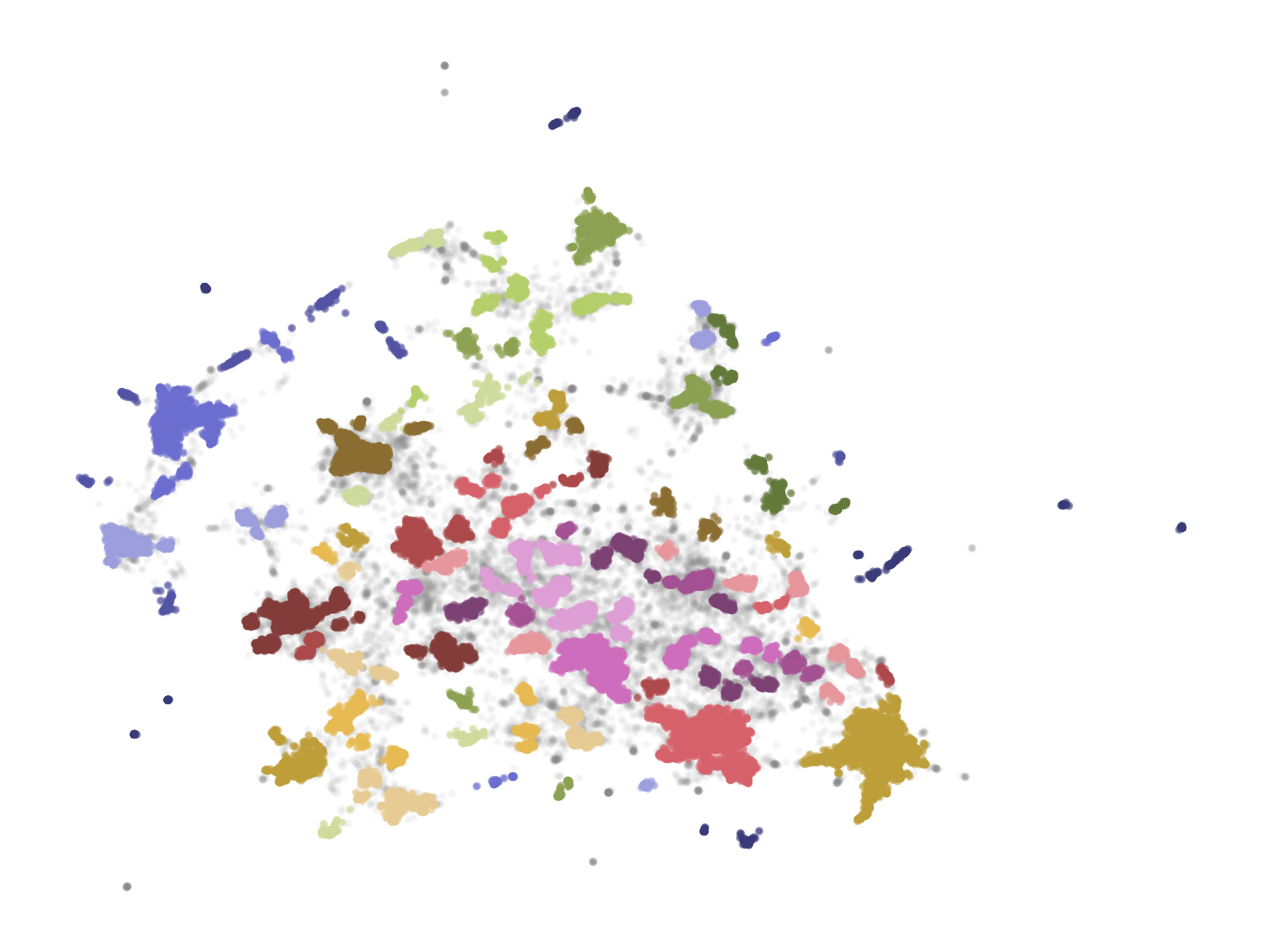
标签为 -1 的离群点用灰色表示。
从文本聚类和主题建模
前面实践了把 44949 篇文章摘要转成嵌入向量,降维后再分成 156 个类别,至于哪个类别具体是什么主题就不知道了,或者要查看类别人为标注。 现在要扩展到主题建模,这一过程可以为每个聚类确定最具代表性的关键词(主题表示),从而协助人工更准确定义类别名称。
BERTopic 是一个高度模块化的文本聚类和主题建模框架, BERTopic 先要求像前面那样完成聚类, 然后从同一个簇中确认它们相似语义的关键字( 比如根据实词的频度来计算), 把聚类和主题表示放在一起就是

BERTopic 可以使用与聚类不同的嵌入模型, 当然也能用一样的, 下面我们在前面创建好了嵌入模型(embedding_model), 文本嵌入(text embeddings),
降维模型(umap_model), 和聚类模型(hdbscan_model) 后由 BERTopic 来真正执行前面实际的降维, 聚类, 和创建主题的操作
1from bertopic import BERTopic
2
3topic_model = BERTopic(
4    embedding_model=embedding_model,
5    umap_model=umap_model,
6    hdbscan_model=hdbscan_model,
7    verbose=True,
8).fit(abstracts, embeddings)
这一步执行很快, 真正慢的是前一步对 44949 篇文章摘要逐一转换成嵌入向量才慢, 刚刚从 Mac 的 M3 Pro(内存36G) 转到用 M4 Pro(内存48G)后, 对摘要的嵌入向量的编码还是快多了(device="mps"), 原来 2it/s, 现在是 35it/s.
主题建模后 topic_model.get_topic_info() 的内容为
| Topic | Count | Name | Representation |
|---|---|---|---|
| -1 | 14252 | -1_the_and_of_to | [the, and, of, to, in, we, for, that, language, on] |
| 0 | 2207 | 0_speech_asr_recognition_end | [speech, asr, recognition, end, acoustic, audio, speaker, the, wer, error] |
| 1 | 1268 | 1_medical_clinical_biomedical_patient | [medical, clinical, biomedical, patient, notes, healthcare, health, patients, and, extraction] |
| ... | ... | ... | ... |
| 152 | 51 | 152_long_context_window_length | [long, context, window, length, llms, memory, contexts, extension, extensible, llm] |
每个分类都提取出了最具代表性的关键字, 第一个主题标记为 -1, 就是无法归类, 被视为离群点(outliers), 可用 BERTopic 的 reduce_outliers()
将离群点重新分配到主题中. 比如看到 Topic 为 0 主题是关于 语音识别 的文章.
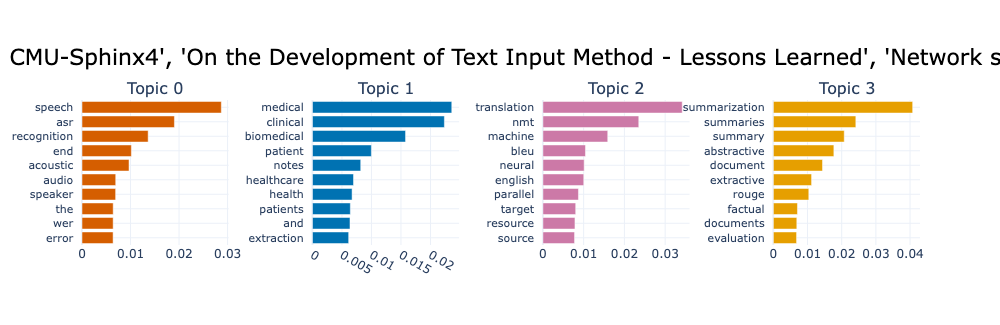
用 topic_model.get_topic(topic_id) 还能看到特定主题各关键字的评分, 由高到低排列. 有了这些关键字, 大致看下摘要内容就能为主题准确命名了.
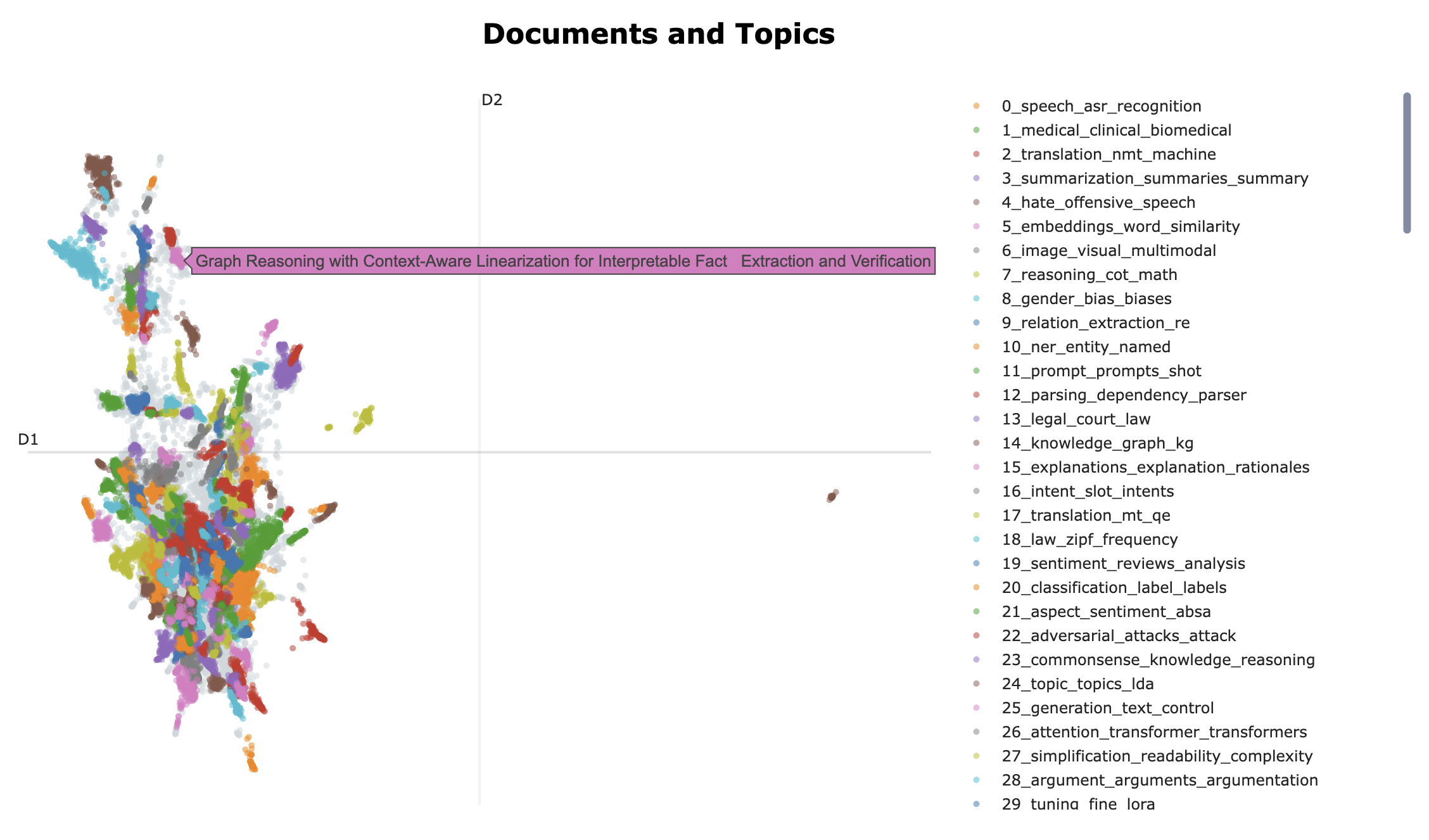
有多种可视化图可显示, 下图用代码展示成两种类型的图
 1# 平面聚焦分布图
 2reduced_embeddings = umap_model.fit_transform(embeddings)
 3
 4fig = topic_model.visualize_documents(
 5    titles,
 6    reduced_embeddings=reduced_embeddings,
 7    width=1800,
 8    hide_annotations=True
 9)
10
11fig.update_layout(font=dict(size=12))
12
13# 条形图
14topic_model.visualize_barchart(title=titles, n_words=10, autoscale=True, top_n_topics=4)
以上主题中的关键字没有考虑语义结构, BERTopic 还有微调的表示模型对主题进一步优化, 如 KeyBERTInspired, 这种表示模型可以叠加应用, 如下面的
MMR 表示模型.
1from bertopic.representation import KeyBERTInspired
2
3representation_model = KeyBERTInspired()
4topic_model.update_topics(abstracts, representation_model=representation_model)
5
6topic_model.visualize_barchart(title=titles, n_words=10, autoscale=True, top_n_topics=4)
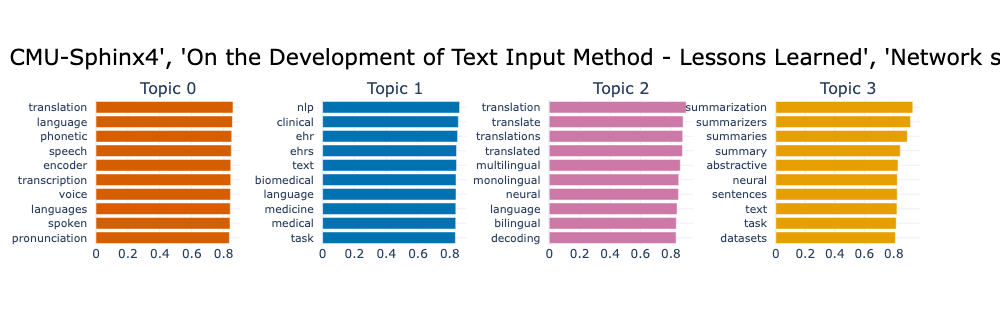
与前面主题对比一下, 是不是更容易阅读, 自己斟酌.
再用最大边际相关性(MMR - maximal marginal relevance) 处理, 过滤掉冗余词, 只保留对主题表示有新贡献的词
1from bertopic.representation import MaximalMarginalRelevance
2
3representation_model = MaximalMarginalRelevance(diversity=0.2)
4topic_model.update_topics(abstracts, representation_model=representation_model)
5
6topic_model.visualize_barchart(title=titles, n_words=10, autoscale=True, top_n_topics=4)
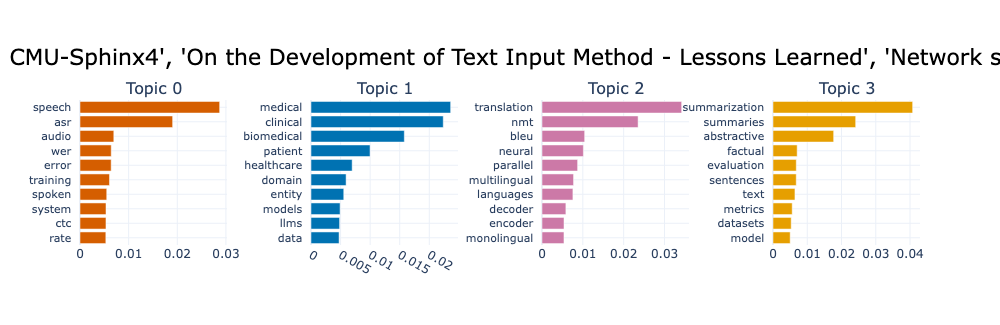
经过 KeyBERTInspired 和 MMR 处理后, 主题仍然不是很理解. 下面用生成模型生成更符合语义的主题, 书中使用的是 google/flan-t5-small 和
GPT 作了测试, 这里打算用本地 Ollama 的 gemma4:e4b 模型.
实现方式是喂给生成模型几个相关文档, 列出主题建模时确定的关键字列表, 让生成模型给出一个更有表现力的主题
 1import openai
 2from bertopic.representation import OpenAI
 3
 4prompt = """
 5I have a topic that contains the following documents:
 6[DOCUMENTS]
 7
 8The topic is described by the following keywords: [KEYWORDS]
 9
10Based on the information above, extract a short topic label in the following
11format:
12topic: <short topic label>
13"""
14
15client = openai.OpenAI(base_url="http://localhost:11434/v1", api_key="any")
16representation_model = OpenAI(
17    client, model="gemma4:e4b", exponential_backoff=True, chat=True, prompt=prompt,
18    generator_kwargs={"stop": "xxxxx"}
19)
20topic_model.update_topics(abstracts, representation_model=representation_model)
使用 Ollama 兼容的 OpenAI 的 API, 这里定义了一个提示词模板 prompt, OpenAI(...) 在应用 prompt 模版时会在 [DOCUMENTS]
位置安放几篇(通常 4 篇) 最能代表这个主题的摘要,[KEYWORDS] 处替换为前面主题建模生成的关键字列表, 所以模板中的 [DOCUMENTS] 和
[KEYWORDS] 的固定写法. 如果不给 OpenAI() 函数指定 prompt, 它会使用自己默认的提示词模板(bertopic.representation._openai.DEFAULT_CHAT_PROMPT),
所以 prompt 是可选的. 另外 BERTopic 可选择的模型还有 llamacpp, langchain(还是 0.x 版), cohere.
提示词发送给生成模型, 生成模型回一个简短的标签名.
在通过 OpenAI 的 SDK 使用 Ollama 模型时有一点要注意, 必须设置 generator_kwargs={"stop": "xxxxx-or-any"}, 否则会向 Ollama
模型发送请求如下
 1{
 2  "messages": [
 3    {
 4      "role": "system",
 5      "content": "You are an assistant that extracts high-level topics from texts."
 6    },
 7    {
 8      "role": "user",
 9      "content": "<包括几篇相关摘要的和关键字的提示词>"
10    }
11  ],
12  "model": "gemma4:e4b",
13  "stop": "\n"
14}
有 "stop": "\n" 的话, Ollama 的回复是空, 不能简单去掉 stop 字段(除非定制一个 Ollama representation 类),
但可用 generator_kwargs 参数覆盖, 设置 "stop": "xxxxx-or-any" 后就能得到如下的完全自然语言的标签
| Topic | Count | Name | Representation |
|---|---|---|---|
| -1 | 14252 | -1,14252,-1_Advanced Natural Language Processing (NLP) Techniques and Model Development | -1,14252,-1_Advanced Natural Language Processing (NLP) Techniques and Model Development,[Advanced Natural Language Processing (NLP) Techniques and Model Development] |
| 0 | 2207 | 0_End-to-End Automatic Speech Recognition and Machine Translation | [End-to-End Automatic Speech Recognition and Machine Translation] |
| 1 | 1268 | 1_Biomedical Information Extraction from Clinical Notes and Records | [Biomedical Information Extraction from Clinical Notes and Records] |
| ... | ... | ... | ... |
| 152 | 51 | 152_Long-Context LLM Extension, Retrieval Augmentation, and Evaluation | [Long-Context LLM Extension, Retrieval Augmentation, and Evaluation] |
使用上了生成模型, 一般不用担心它不能给你生成一个适合人类阅读的标签, 即使难以归纳它也会发挥它的幻觉优势给你创造出来.
有这个列表就没必要再用图展示那些分类标签了.
小结
学习了生成模型和表示模型如何无监督(没有标注数据的情况下)地对文本进行分类, 对主题建模. 再次简单回顾一下文本聚类和主题建模的全过程
文本嵌入(用嵌入模型) -> 向量降维(用降维模型, 如 PCA 或 UMAP 方法) -> 进行聚类(用聚类模型, 如 K-Means 或 HDBSCAN) -> 主题建模(如 BERTopic) -> 表示模型或生成模型对主题名称求精.
永久链接 https://yanbin.blog/hands-on-large-language-models-reading-notes-4/, 来自 隔叶黄莺 Yanbin's Blog[版权声明]
 本文采用 署名-非商业性使用-相同方式共享 4.0 国际 (CC BY-NC-SA 4.0) 进行许可。