《Hands-On Large Language Models》阅读笔记(五)
第六章:提示词工程(Prompt Engineering)
还是继续学习怎么使用生成模型, 这本书也只能涉及到 Prompt Engineering 了, 另外两个高层次的 Content Engineering 和 Harness Engineering 必须找别的资料.
主要为文本生成而训练的模型通常被称为生成式预训练模型(Generative Pre-trained Transformers-GPT), 将要学习如何设计高效的提示词, 了解生成模型, 研究它们的推理, 输出的验证和评估.
由于使用了新的 transformers 版本(5.8.0), 以下的代码与书中有所不同
1from transformers import pipeline
2
3pipe = pipeline("text-generation", model="microsoft/Phi-3-mini-4k-instruct", trust_remote_code=False)
4messages = [
5    {"role": "user", "content": "Create a funny joke about chickens."},
6]
7output = pipe(messages)
8print(output)
输出的信息包含 user 和 assistant 两部分, 因为 pipeline() 有一个默认的参数 return_full_text=True(同时返回用户和 LLM 的消息)
1[{'generated_text': [{'role': 'user', 'content': 'Create a funny joke about chickens.'}, {'role': 'assistant', 'content': ' Why don’t chickens use computers? Because they\'re scared of the "cluck" and click!'}]}]{'role': 'user', 'content': 'Create a funny joke about chickens.'} 像是模型推理服务端 API 接收到的数据格式,而底层模型收到的数据还有些不同
1prompt = pipe.tokenizer.apply_chat_template(messages, tokenize=False)
2print(prompt)
下面的从 Token 解码后的字符串才是模型实际收到的内容
1<|user|>
2Create a funny joke about chickens.<|end|>
3<|endoftext|>
其中 <|user|>, <|end|>, 和 <|endoftext|> 是模型的特殊标记, 用于区分不同的角色和对话的结束. 虽然 pipe.tokenizer.bos_token
是 <s>, 但在 pipe.tokenizer.chat_template 这个 Jinja2 模板中已经不用 <s> 这个特殊 Token 了。
这里的 pipe.tokenizer.chat_template 内容是
1{% for message in messages %}{% if message['role'] == 'system' %}{{'<|system|>
2' + message['content'] + '<|end|>
3'}}{% elif message['role'] == 'user' %}{{'<|user|>
4' + message['content'] + '<|end|>
5'}}{% elif message['role'] == 'assistant' %}{{'<|assistant|>
6' + message['content'] + '<|end|>
7'}}{% endif %}{% endfor %}{% if add_generation_prompt %}{{ '<|assistant|>
8' }}{% else %}{{ eos_token }}{% endif %}
对于那个 user 与 assistant 的双向交互的 Token 对应的文本就是
1messages = [
2    {'role': 'user', 'content': 'Create a funny joke about chickens.'},
3    {'role': 'assistant', 'content': ' Why don’t chickens use computers? Because they\'re scared of the "cluck" and click!'}
4]
5
6prompt = pipe.tokenizer.apply_chat_template(messages, tokenize=False)
7print(prompt)
1<|user|>
2Create a funny joke about chickens.<|end|>
3<|assistant|>
4 Why don’t chickens use computers? Because they're scared of the "cluck" and click!<|end|>
5<|endoftext|>
控制模型输出
我们在创建 pipeline 时
 1pipe = pipeline(
 2    "text-generation",
 3    model=model,
 4    device_map="mps",
 5    tokenizer=tokenizer,
 6    return_full_text=False,
 7    max_new_tokens=500,
 8    max_length=None,
 9    do_sample=False,
10)
11
12messages = [
13    {"role": "user", "content": "Create a funny joke about chickens."}
14]
15
16output = pipe(messages)
17print(output[0]["generated_text"])
do_sample=False 时不进行取样,我们前面知道 LLM 在每次预测下一个 Token 时会对整个语汇表中的每一个 Token 打分,do_sample=False
时只取最高分的 Token, 这时候就不大会发挥模型的想象力。 在 do_sample=False 时上面代码每次都返回一样的
Why did the chicken join the band? Because it had the drumsticks!
如果设置 do_sample=True 时就不一定只取最高分的,所以多执行几次的结果会是
1# 第一次
2Why did the chicken go to the doctor? Because it had a "cram-pain"!
3
4# 第二次
5Why don't chickens use computers? Because they already have their own "fowl" technology!
6
7# 第三次
8Why don't chickens use computers? Because they're afraid of the Wi-Fi!
但是 pipeline(..., do_sample=True) 时调用 pipe() 函数设定 temperature=0.1 时又会产生 do_sample=False 的效果。
1from transformers import GenerationConfig
2
3output = pipe(messages, generation_config=GenerationConfig(do_sample=True, temperature=0.1))
这里的 temperature 取值范围是 (0.0, 2.0], temperature 取值为 0 的话用 do_sample=False 替代,大于 2.0 太过随机,没有意义。
| temperature | 效果 |
|---|---|
| 0.1 ~ 0.4 | 保守,稳定,适合问答,代码 |
| 0.7 ~ 1.0 | 平衡创意与连贯性,常用区间 |
| 1.0 | 按模型原始概率分布采样,不做缩放 |
| 1.2 ~ 2.0 | 输出更随机,多样,可能出现不连贯 |
GenerationConfig 中的另两个参数
top_p(nucleus sampling),top_p=0.1表示从高概率往下采样,直到概率累积为0.1, 然后从那些Token当中采用,top_p=1的话会考虑所有的 Token。top_k: 只考虑概率最多的k个Token,top_k=100的话只考虑头部的 100 个Token.top_k=0也没有报错,好像是最大值的效果
提示词工程(Prompt Engineering)
LLM 是一个预测引擎,提示词主要是引导模型生成有用的回复,以后可能是根据不同的模型要对提示词进行调试。感觉这比代码调试还麻烦,因为换个模型就不一样了。
基本提示词 The sky is 然后让 LLM 去预测 blue.
带指令的提示词
1Classify the text into negative or positive.
2"This is a grate movie!"
LLM 输出 The text is positive.
基于指令的提示词
让 LLM 回答特定问题或解决特定任务的提示词称为基于指令的提示词,比如任务: 监督分类,搜索,摘要,代码生成等。对于长提示词,中间的信息往往会被遗忘,
LLM 会更关注提示词的开头(primacy effect) 和结尾(recency effect),所以在提示词设计时要把重要的信息放在开头和结尾。
高级提示工程
提示词主要包含了指令,数据和输出指示器, 也不限于这三个组件,下面的提示词包含了多个组件
- 角色定位: 你是干什么的
- 指令: 当前的任务
- 上下文: 描述问题或任务背景的附加信息,为什么提出这个指令
- 格式: 如输出为 JSON, XML 等
- 受众: 生成文本的目标对象,如向 5 岁的孩子解释,或是专业人士
- 语气: 比如是向老板写一封邮件,还是向朋友写一封邮件
- 数据: 与任务相关的主要数据
给上下文提供示例, 这类似于监督学习
- Zero-shot prompt
- One-shot prompt
- Few-shot prompt
这个 X shot prompt 是用 user, assistant 来模拟一个对话历史让 LLM 照着样子做
 1from transformers import pipeline, GenerationConfig
 2
 3pipe = pipeline(
 4    "text-generation",
 5    model="google/gemma-4-E4B-it",
 6    device_map="mps",
 7    return_full_text=False,
 8)
 9
10messages = [
11    {"role": "user", "content": "树上有 9 只鸟,猎人开枪打死了一只,树上还剩几只鸟?"},
12    {"role": "assistant", "content": "树上还剩 0 只鸟,因为枪声吓跑了其他的鸟。"},
13    {"role": "user", "content": "树上有 18 只鸟,开枪打死了两只,树上还剩几只鸟?回答一个数字,并解释原因"}
14]
15
16output = pipe(messages, generation_config=GenerationConfig(do_sample=False, max_new_tokens=500, max_length=None))
17print(output[0]["generated_text"])
用这种方式引导模型参照该 Shot 回答,其实现在很多模型都会自己回答这个问题了。
使用生成模型进行推理(Reasoning)
现在的多数生成模型不光能使用工具,还能进行推理,即思维链(Chain-of-Thought), 就是看到的 Thinking, Reasoning, 这个步骤。
比如前面那个枪打鸟的问题,可以引导模型进行思考,或者问一下突兀的问题,有些模型也会去思考
 1pipe = pipeline(
 2    "text-generation",
 3    model="Qwen/Qwen3.5-4B",
 4    device_map="mps",
 5    return_full_text=True,
 6)
 7
 8messages = [
 9    {"role": "user", "content": "tell me another one"}
10]
11
12output = pipe(messages, generation_config=GenerationConfig(do_sample=False, max_new_tokens=500, max_length=None))
13print(output[0]["generated_text"])
输出中有
1[{'role': 'user', 'content': 'tell me another one'}, {'role': 'assistant', 'content': 'Okay, the user just said "tell me another one". Hmm, I need to figure out what they\'re referring to. Since there\'s no context from previous messages, maybe they want another example or suggestion. Wait, in the conversation history, there\'s nothing before this. Oh, right, this is the first message. So they might be expecting me to provide something, but I don\'t have prior context.\n\nWait, maybe they\'re continuing from a previous interaction that I don\'t have access to. Since I\'m an AI, I need to check if there\'s any history. But according to the setup, this is a new session. So the user might be expecting me to generate something new, like another joke, fact, or example. But without knowing what "another one" refers to, it\'s tricky.\n\nI should ask for clarification. But the user might expect me to guess. Common scenarios: maybe they want another joke, another fact, another idea. Since I don\'t know, the best approach is to politely ask what they\'re referring to. But the instruction says to be helpful. Maybe provide a few options. Let me think. If I say, "Sure! What would you like another one of? A joke, a fact, a story, or something else?" That way, I cover possibilities and invite them to specify. That should work.\n</think>\n\nSure! What would you like another one of? A joke, a fun fact, a story, a riddle, or something else? Let me know! 😊\n'}]{'role': 'assistant', 'content' 中 </think> 之前的内容都是思考过程,其他才是真正的回答。
模型在思考的过程中也可能会做多个不同的推理,最后会选择一个模型自认为最合适的答案,但我也碰到过推理陷入死循环的情况,可适当地调整 temperature
和 top_p 值来影响每个答案,以提高采样的多样性。
除了思维链(Chain of Thought), 还有更复杂的思维树(Tree of Thought), 这时候模型会同时生成多个推理路径,最后选择一个最合适的答案。
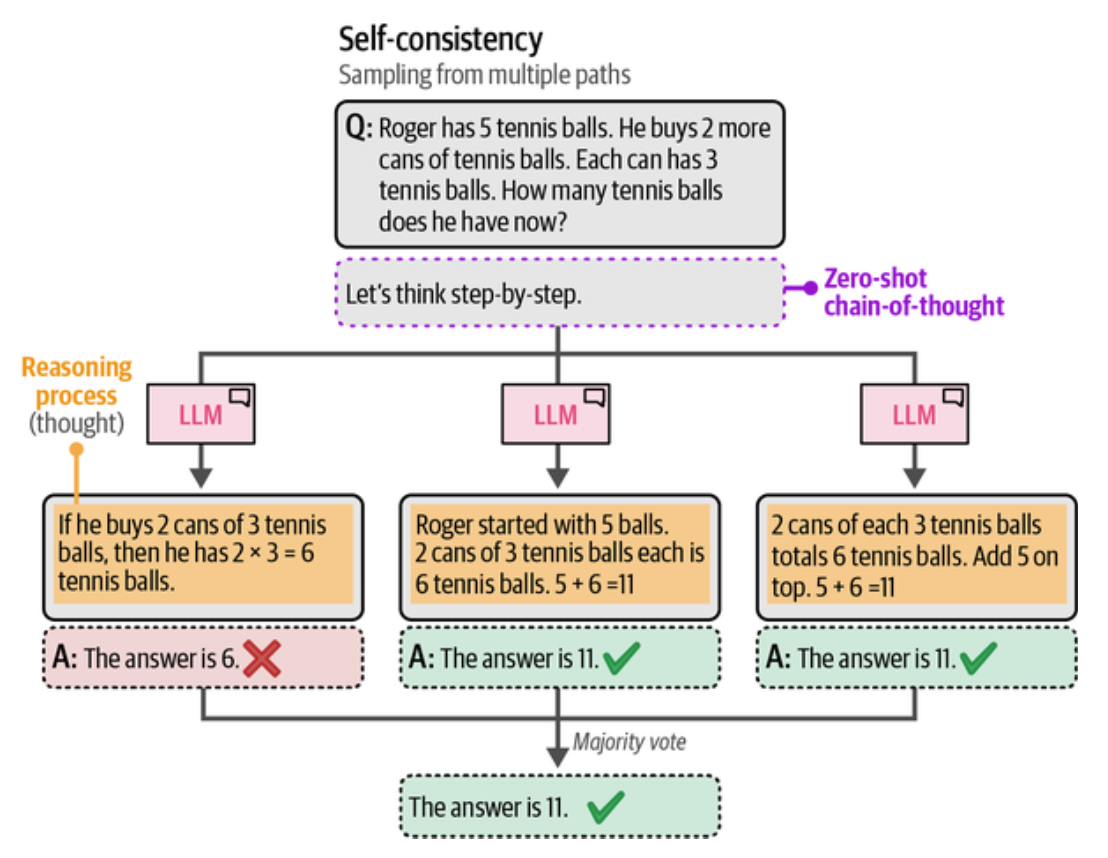
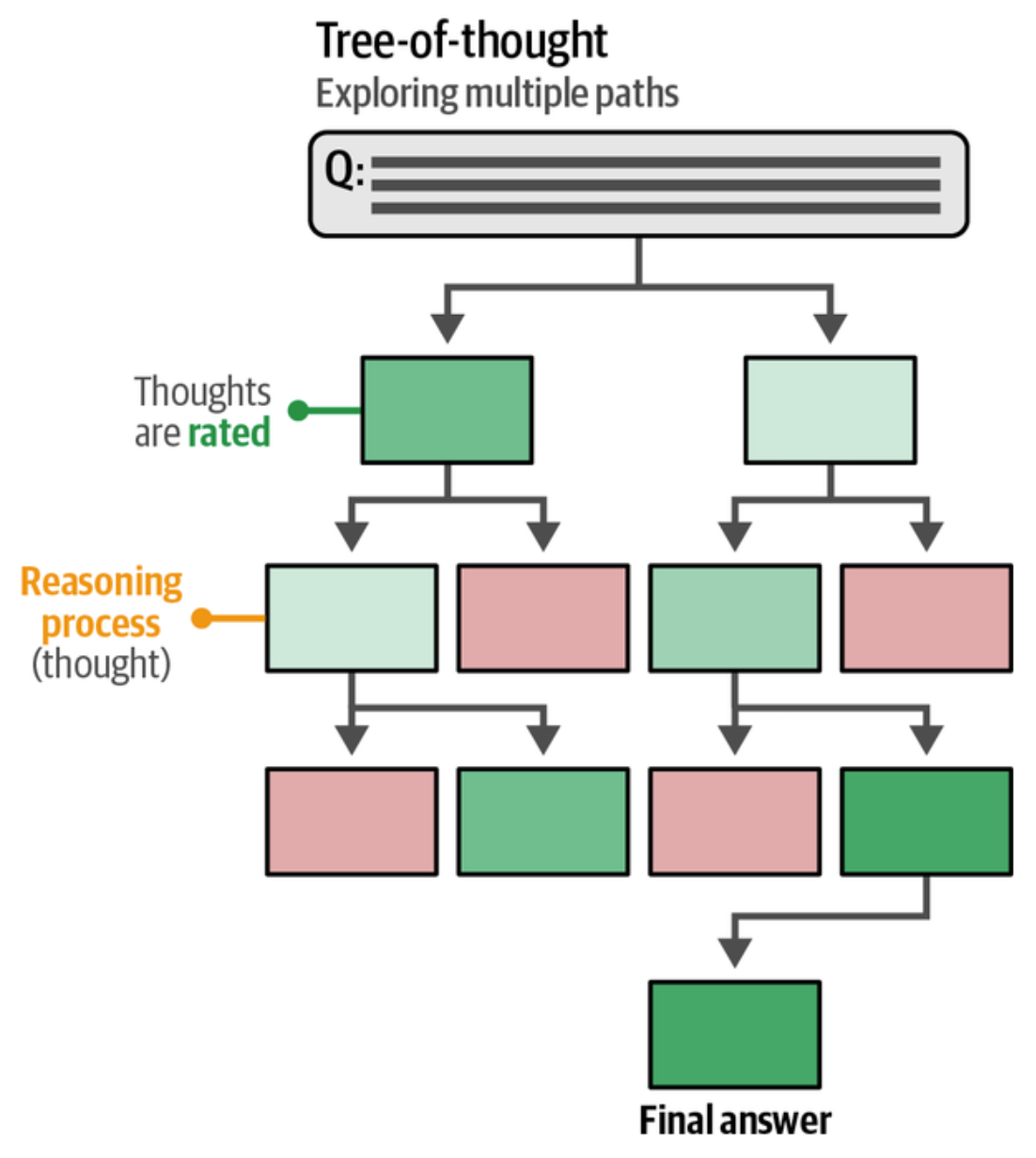
可以把提示词写好让 LLM 以思维树来思考
Imagine three different experts are answering, this question. All experts will write down 1 step of their thinking, then share it with the group. Then all experts will go on to the next step, etc. If any expert realizes they're wrong at any point then they leave. The question is 'The cafeteria had 23 apples. If they used 20 to make lunch and bought 6 more, how many apples do they have?' Make sure to discuss the results."}, {'role': 'assistant', 'content': 'Here's a thinking process that leads to the suggested output:
- Analyze the Request:
- Task: Simulate a collaborative reasoning process involving three different experts.
- Format: Step-by-step interaction. Each expert writes down one step of thinking, shares it, then moves to the next step.
- Constraint: If an expert realizes they are wrong, they leave.
- Question: "The cafeteria had 23 apples. If they used 20 to make lunch and bought 6 more, how many apples do they have?"
- Requirement: Discuss the results at the end.
- Analyze the Math Problem:
- Initial amount: 23 apples.
- Action 1: Used 20 (Subtraction: $23 - 20$).
- Action 2: Bought 6 more (Addition: $+6$).
- Calculation: $23 - 20 = 3$. Then $3 + 6 = 9$.
- Correct Answer: 9 apples.
- Design the Experts:
- To make the simulation interesting, I should give them slightly different approaches or potential pitfalls, but ensure they eventually converge on the correct answer (or one leaves if they make a mistake).
- Expert 1 (The Calculator): Focuses strictly on arithmetic. Likely correct.
- Expert 2 (The Logician): Focuses on the narrative flow. Might get confused by the "used" vs. "bought" phrasing.
- Expert 3 (The Skeptic): Might question the feasibility or context, but ultimately needs to solve the math. Let's make them all start strong but perhaps have a moment of doubt.
- Actually, to make it more dramatic: Let's have one expert make a mistake early on.
- Revised Plan: * Expert 1: Math-focused. * Expert 2: Word-problem focused. * Expert 3: Context-focused.
- Wait, the prompt says "If any expert realizes they're wrong at any point then they leave." This implies I need to'
输出验证
可以指示模型以结构化输出,比如 JSON, XML 等格式输出,还要为输出建立护栏,审查,用 temperature 和 top_p 调整幻觉。通常有三种方式控制模型输出
- 示例: 给输出提供示例也是叫做 X Shot, 比如 "make sure to only use this output format: {"id": "AN ORDER ID"}"
- 语法约束: 提供示例还不够,还可以用约束和验证生成模型输出的软件包,如 Guidance, Guardrails 和 LMQL, 它们利用生成模型来验证自己的输出。 就是用 LLM 对模型输出进行评估
- 微调: 在包含预期输出的数据上对模型进行微调
最后是一个使用 llama-cpp-python 指定 response_format={"type": "json_object"} 的例子。 很早以前有学过使用 C++ 的 llama-cpp,
用 llama.cpp 体验 Meta 的 Llama AI 模型, 这是第一次接触 LLM 模型时写的一篇日志。
接下来用 llama-cpp-python 的例子, 安装的依赖是 uv add llama-cpp-python, 安装时会有一个相应平台的编译过程, 它用的是单文件的 GGUF
格式权重文件。
 1from llama_cpp import Llama
 2
 3llm = Llama.from_pretrained(
 4    repo_id="microsoft/Phi-3-mini-4k-instruct-gguf",
 5    filename="*fp16.gguf",
 6    num_gpus=-1,
 7    n_ctx=2048,
 8    verbose=False
 9)
10
11question = "Create a warrior with fields 'name', 'class', and 'level' for an RPG in JSON format."
12
13output = llm.create_chat_completion(
14    messages=[{"role": "user", "content": question}],
15    response_format={"type": "json_object"},
16    temperature=0
17)['choices'][0]['message']['content']
18
19print(output)
20
21llm.close()
输出
1{
2  "warrior": {
3    "name": "Aldric the Brave",
4    "class": "Warrior",
5    "level": 5
6  }
7}
小结
本章学习了与模型的 Token 交互,提示词的一些基本组件,推理,思维链,思维树,控制模型输出,Zero Shot, One Shot, Few Shot 应用在推理和模型输出,
以及如何使用 llama-cpp-python 与模型交互并指定 response_format={"type": "json_object"}。客观的讲,这一章的实用性不高。
[版权声明]
 本文采用 署名-非商业性使用-相同方式共享 4.0 国际 (CC BY-NC-SA 4.0) 进行许可。