LangChain 1.2 入门学习
AI 界日新月异,新名词层出不穷,像 Prompt Engineering, Context Engineering, 到出现又来了 Harness Engineering. 现在最怕两个人出来搞事情, Dario Amodei 和 Andrej Karpathy, 前者要用 AI 替代一切,后者专造名词。在大语言模型时代,搞机器学习了,专注模型的不用多少人,多数人还能在 AI 上蹭热点的话就剩下 AI Agent 的这个赛道了,其余就是应用了,例如 Vibe Coding,或更贴近具体业务的应用。
像各大 AI 编程工具,如 Codex, Claude Code, OpenCode, GitHub Copilot, Gemini, Cursor, Antigravity, Trae 本质上都是在比拼各家 AI Agent 的能力。最近火的那个 OpenClaw 也是一个学习 AI Agent 的好范例。
而 AI Agent 方面的框架首当其冲就是 LangChain, 它提供了 Python 和 TypeScript 两种语言的支持,网上有人做了个 langchain4j, 这种跟随项目恐怕也坚持不了多久。其他 AI Agent 框架有 [Pydantic AI], 微软的 AutoGen, Crew AI, AWS Strands Agents. 各大语言模型 OpenAI, Anthropic, Gemini 都有自己的 SDK, 但要开发一个 Multi Agent 的系统更需要一个第三方的 AI Agent 框架来整合各家模型的能力,提供统一的接口和工具,这个框架就是 LangChain.
当前 LangChain 的版本在 PyPI 上是 1.2.15, 在关注 LangChain 的同时我们也会看到 LangGraph 和 DeepAgents, 那么这三者有何关系呢?按不同 层次来看,它们分别代表着
- LangChain: Agent 框架, 用于基础构建模型, 万物皆链
- LangGraph: Agent 运行时,工作流程安排, 状态 + 有向图
- DeepAgents: Agent Harness,自主推理引擎,自治编排
下面我们只用 LangChain 来体验如何连接本地模型(将用 Ollama) 和远程模型(将用 Gemini)。
LangChain 支持 Python 和 TypeScript, 这里选择 Python。Python 项目依赖和构建工具经历过 venv, Poetry, PDM 之后,基本确立了 uv 的领导 地位。所以自然也就选择用 uv 来创建 Python 项目
1uv init --lib langchain-study
2cd langchain-study
3uv add langchain
增加 langchain 后,会添加共 32 个依赖,它们主要有
- langchain == 1.2.15
- langchain-core==1.2.27
- langgraph==1.1.6
- langgraph-sdk==0.3.13
- langchain-sdk==0.3.13
- pydantic==2.12.5
LangChain 使用本地 Ollama 模型
LangChain 要使用各语言模型的话需要使用相应的集成,见 LangChain Python integrations.
例如,我们这里要使用 Ollama 的话需安装 langchain-ollam 依赖
1uv add langchain-ollama
它会安装 langchain-ollama 和 ollama 两个依赖。
首先要准备好 Ollama, 本文不介绍它的安装,Ollama 启动后会在 http://127.0.0.1:11434 上监听,如果要远程访问该 Ollama 服务,需要修改配置并重启。
本人又不得不找来 4090 来体验,Ollama 安装在 Ubuntu Linux 上, 修改监听接口的方法如下
1vi /etc/systemd/system/ollama.service
然后在 [Service] 下加上
1Environment="OLLAMA_HOST=0.0.0.0:11434"
或者选定的网络设备,如 OLLAMA_HOST=192.168.1.100:11434
再重载并重启服务
1sudo systemctl daemon-reload
2sudo systemctl restart ollama
这时候 Ollama 就可以从远程进行连接了。
本文打算用 Google 几天前发布的开源模型 gemma4:26b,在 Ollama 主机上先下载该模型
1ollama pull gemma4:26b
第一个例子 - 使用 ChatOllama
 1from langchain_ollama import ChatOllama
 2
 3model = ChatOllama(
 4    model='gemma4:26b',
 5    base_url='http://192.168.86.60:11434',
 6    temperature=0.1,
 7)
 8
 9for chunk in model.stream("what's this model, and what can you do?"):
10    print(chunk.content, end="", flush=True)
python test1.py 可以看到在控制台像是一个个单词蹦出来的
 1python start.py
 2I am Gemma 4, a large language model developed by Google DeepMind. I am an open weights model designed to process and generate information across different formats.
 3
 4### What I can do:
 5* **Text Processing:** I can engage in conversation, answer questions, summarize long documents, write code, translate languages, and assist with creative writing or brainstorming.
 6* **Image Understanding:** I can analyze and process images that you provide to me, describing their content or answering questions about them.
 7* **Audio Processing:** If you are interacting with the 2B or 4B versions of the Gemma 4 family, I am also capable of processing audio input.
 8* **Reasoning and Problem Solving:** I can help with logical reasoning, mathematical problems, and complex instructional tasks.
 9
10### What I cannot do:
11* **Generate Images:** While I can understand images, I can only generate text as an output.
12* **Access the Internet:** I do not have access to Google Search or the live web unless specific tools and endpoints are provided to me in this conversation.
13* **Provide Real-time Information:** My knowledge is grounded in data up to January 2025. I do not have information on events that have occurred after that date unless they are provided in our current context.
上面的 chunk 基本上是对应每一个 Token, 不要想像成与 HTTP 的一个个缓冲大小的块。
第二个例子 -- init_chat_model
 1from langchain.chat_models import init_chat_model
 2
 3model = init_chat_model(
 4    model='ollama:gemma4:26b',
 5    base_url='http://192.168.86.60:11434',
 6    temperature=0.1,
 7)
 8
 9for chunk in model.stream("what's this model, and what can you do?"):
10    print(chunk.content, end="", flush=True)
执行效果与前面是一样的,init_chat_model 会根据 model 中的 ollama:gemma4:2bb 前缀 ollama 使用相应的 ChatOllama 类型。
或者也可以另一种写法来指定 model_provider
1model = init_chat_model(
2    model='gemma4:26b',
3    model_provider='ollama',
4    base_url='http://192.168.86.60:11434',
5    temperature=0.1,
6)
使用远程 Gemini 模型
先安装相应的 Integration 依赖,命令如下
1uv add langchain-google-gemini
使用 ChatGoogleGenerativeAI
1from langchain_google_genai import ChatGoogleGenerativeAI
2
3model = ChatGoogleGenerativeAI(
4    model="gemini-2.5-flash",
5    google_api_key="<YOUR_API_KEY>",
6)
7
8for chunk in model.stream("what's this model, and what can you do?"):
9    print(chunk.content, end="", flush=True)
实际应用中使用 dotenv 来加载 GOOGLE API KEY.
用统一的 init_chat_model 方式
 1from langchain.chat_models import init_chat_model
 2
 3model = init_chat_model(
 4    model='gemini-2.5-flash',
 5    model_provider='google_genai',
 6    google_api_key='<YOUR_API_KEY>',
 7)
 8
 9for chunk in model.stream("what's this model, and what can you do?"):
10    print(chunk.content, end="", flush=True)
不用 model_provider 的话,在 model 中指定 google_genai:gemini-2.5-flash.
理解 LangChain 与 LLM 的交互
我们回到最初的与 LLM 交互的两行代码行来
1for chunk in model.stream("what's this model, and what can you do?"):
2    print(chunk.content, end="", flush=True)
我们调试一下,这里的 chunk 基本上对应于 LLM 的 token, 在 print 行上打个条件为 len(chunk.content) > 0 的断点,输出到 language
时,查看
chunk.model_dum_json() 的内容为
 1{
 2  "content" : " language",
 3  "additional_kwargs" : { },
 4  "response_metadata" : { },
 5  "type" : "AIMessageChunk",
 6  "name" : null,
 7  "id" : "lc_run--019d6a8d-4273-7560-a583-e45faa379dad",
 8  "tool_calls" : [ ],
 9  "invalid_tool_calls" : [ ],
10  "usage_metadata" : null,
11  "tool_call_chunks" : [ ],
12  "chunk_position" : null
13}
从这里看出 chunk 的类型是 AIMessageChunk, 它有以上那些属性,从中发现可用来调用工具。
除了 stream() 流式交互,还可以进行 invoke 操作
1response = model.invoke("what's this model, and what can you do?")
2print(response.content)
即等待从 LLM 拿来所有 token 之后,一次性输出,这会让客户端有一段时间没有任何输出。
类似查看 response.model_dump_json() 输出内容如下(content 部分截断了)
 1{
 2  "content" : "I am Gemma 4, a large language model developed by Google DeepMind. I am an open weights model ...",
 3  "additional_kwargs" : { },
 4  "response_metadata" : {
 5    "model" : "gemma4:26b",
 6    "created_at" : "2026-04-08T00:56:00.702767023Z",
 7    "done" : true,
 8    "done_reason" : "stop",
 9    "total_duration" : 6067217225,
10    "load_duration" : 162074961,
11    "prompt_eval_count" : 27,
12    "prompt_eval_duration" : 18294703,
13    "eval_count" : 883,
14    "eval_duration" : 5556447640,
15    "logprobs" : null,
16    "model_name" : "gemma4:26b",
17    "model_provider" : "ollama"
18  },
19  "type" : "ai",
20  "name" : null,
21  "id" : "lc_run--019d6a96-b3c6-7683-a5e7-ce428edc57ea-0",
22  "tool_calls" : [ ],
23  "invalid_tool_calls" : [ ],
24  "usage_metadata" : {
25    "input_tokens" : 27,
26    "output_tokens" : 883,
27    "total_tokens" : 910
28  }
29}
这里还能看到 response_metadata 的字段信息。invoke() 调用得到的是一个 AIMessage 对象。
更高级的与 LLM 交互
前面都只是进行简单的对话,现在要加入系统提示词, 比如在系统提示词中要求 LLM 只用中文来回复
 1from langchain.chat_models import init_chat_model
 2from langchain.messages import HumanMessage, SystemMessage
 3
 4model = init_chat_model(
 5    model='gemma4:26b',
 6    model_provider='ollama',
 7    base_url='http://192.168.86.60:11434',
 8    temperature=0.1,
 9)
10
11system_msg = SystemMessage(content="You are a helpful assistant, and only reply in Chinese")
12human_msg = HumanMessage("what's this model, and what can you do?")
13
14for chunk in model.stream([system_msg, human_msg]):
15    print(chunk.content, end="", flush=True)
执行后,虽然问题是英文,但是回复确实用了中文
 1我是一个由 Google 训练的大型语言模型。
 2
 3我可以为你提供多种功能和帮助,具体包括:
 4
 51.  **回答问题**:无论是科学、历史、地理、文化还是日常生活中的各种百科知识,你都可以向我提问。
 62.  **文字创作**:我可以帮你写邮件、博客文章、故事、诗歌、论文、工作总结,甚至是剧本。
 73.  **语言翻译**:我可以在多种语言之间进行流畅的翻译,帮助你理解外语内容或进行跨语言交流。
 84.  **编程辅助**:我可以编写代码、解释复杂的编程概念、查找代码中的错误(Debug)以及提供算法建议。
 95.  **内容总结**:如果你有一篇很长的文章或文档,我可以帮你提取核心观点,快速生成摘要。
106.  **逻辑推理与数学**:我可以协助你解决数学难题,进行逻辑分析,或者处理复杂的逻辑推理任务。
117.  **创意构思**:如果你需要寻找灵感(例如起名字、策划活动、寻找礼物建议或进行头脑风暴),我也可以参与讨论。
128.  **数据处理**:我可以帮你整理信息、提取结构化数据或将乱序的文本转换成表格格式。
13
14简单来说,你可以把我当作一个知识渊博、多才多艺且随时待命的智能助手。请问今天有什么我可以帮你的吗?
以下方式与使用 SystemMessage 和 HumanMessage 是等效的
1messages = [
2    ("system", "You are a helpful assistant, and only reply in Chinese"),
3    ("human", "what's this model, and what can you do?"),
4]
5for chunk in model.stream(messages):
6    print(chunk.content, end="", flush=True)
写一个能交互的 Agent
有了上一节的 SystemMessage 和 HumanMessage 的基础,并且把 LLM 每次回复添加到 message 中,再加入新的问话,这样就实现了一个有短期
记忆的对话。
先实现一个简单的收集两个数相加的 Agent
 1from typing import Any
 2
 3from langchain.chat_models import init_chat_model
 4from langchain.messages import HumanMessage, SystemMessage
 5
 6model = init_chat_model(
 7    model='gemma4:26b',
 8    model_provider='ollama',
 9    base_url='http://192.168.86.60:11434',
10    temperature=0.1,
11)
12
13messages: list[Any] = [
14    SystemMessage(content="You are a helpful assistant. Ask the user for two numbers, then add them and output flag 'DONE'"),
15]
16
17while True:
18    response = model.invoke(messages)
19    messages.append(response)
20
21    if 'DONE' in response.content:  # 这里是看到标志 `DONE` 结束对话
22        print(response.content.removesuffix("DONE"))
23        break
24    else:
25        print(response.content)
26        user_input = input("\nYou: ")
27        messages.append(HumanMessage(user_input))
执行效果
1$ python agent1.py
2Please provide two numbers.
3
4You: 1235.222
5I have received 1235.222. Please provide the second number.
6
7You: 35232.888
836468.11
9$
加法操作也是由 LLM 完成的。
加入 tools 调用
 1from typing import Any
 2
 3from langchain.chat_models import init_chat_model
 4from langchain.messages import HumanMessage, SystemMessage, ToolMessage
 5from langchain.tools import tool
 6
 7model = init_chat_model(
 8    model='gemma4:26b',
 9    model_provider='ollama',
10    base_url='http://192.168.86.60:11434',
11    temperature=0.1,
12)
13
14@tool
15def add_numbers(a: float, b: float) -> float:
16    """Add two numbers together and return the result."""
17    return a + b
18
19model_with_tools = model.bind_tools([add_numbers])
20
21messages: list[Any] = [
22    SystemMessage(content="You are a helpful assistant. Ask the user for two numbers, then add them."),
23]
24
25while True:
26    response = model_with_tools.invoke(messages)
27    messages.append(response)
28
29    if response.tool_calls:
30        for tool_call in response.tool_calls:
31            tool_fn = globals()[tool_call["name"]]
32            result = tool_fn.invoke(tool_call["args"])
33            messages.append(ToolMessage(content=str(result), tool_call_id=tool_call["id"]))
34
35        final = model_with_tools.invoke(messages)
36        print(final.content)
37        break
38    else:
39        print(response.content)
40        user_input = input("\nYou: ")
41        messages.append(HumanMessage(user_input))
执行效果
 1$ python agent2.py
 2I'd be happy to help you with that! Please tell me the two numbers you would like me to add.
 3
 4You: abc
 5I'm sorry, but "abc" isn't a number. Please provide two numbers that you would like me to add together.
 6
 7You: 234.435
 8I have the first number: 234.435. What is the second number you would like me to add to it?
 9
10You: 2366
11The sum of 234.435 and 2366 is 2600.435.
12$
@tool 方法的注释部分 """Add two numbers together and return the result.""" 是必须的,否则会出错,因为 LLM 需要 @tool
方法的描述来判断何时调用该工具。
如果我们用 WireShark 那样的网络抓包工具,可以看到 model_with_tools.invoke(messages) 交互时发送给 LLM 的消息如下
 1{
 2   "model":"gemma4:26b",
 3   "stream":true,
 4   "options":{
 5      "temperature":0.1
 6   },
 7   "messages":[
 8      {
 9         "role":"system",
10         "content":"You are a helpful assistant. Ask the user for two numbers, then add them."
11      }
12   ],
13   "tools":[
14      {
15         "type":"function",
16         "function":{
17            "name":"add_numbers",
18            "description":"Add two numbers together and return the result.",
19            "parameters":{
20               "type":"object",
21               "required":[
22                  "a",
23                  "b"
24               ],
25               "properties":{
26                  "a":{
27                     "type":"number"
28                  },
29                  "b":{
30                     "type":"number"
31                  }
32               }
33            }
34         }
35      }
36   ]
37}
这里是一个捕获的 LangChain Agent 与 LLM 完整的交互过程,点击 langchain-ll-interact.txt 查看内容。
从该本件中又发现了新的关于 thinking 推理的内容,比如第一个响应中
 1{"model":"gemma4:26b","created_at":"2026-04-08T01:45:30.252247901Z","message":{"role":"assistant","content":"","thinking":"The"},"done":false}
 2{"model":"gemma4:26b","created_at":"2026-04-08T01:45:30.258806725Z","message":{"role":"assistant","content":"","thinking":" user"},"done":false}
 3{"model":"gemma4:26b","created_at":"2026-04-08T01:45:30.265426972Z","message":{"role":"assistant","content":"","thinking":" wants"},"done":false}
 4{"model":"gemma4:26b","created_at":"2026-04-08T01:45:30.271957077Z","message":{"role":"assistant","content":"","thinking":" me"},"done":false}
 5{"model":"gemma4:26b","created_at":"2026-04-08T01:45:30.278387845Z","message":{"role":"assistant","content":"","thinking":" to"},"done":false}
 6{"model":"gemma4:26b","created_at":"2026-04-08T01:45:30.284987335Z","message":{"role":"assistant","content":"","thinking":" ask"},"done":false}
 7{"model":"gemma4:26b","created_at":"2026-04-08T01:45:30.291512131Z","message":{"role":"assistant","content":"","thinking":" for"},"done":false}
 8{"model":"gemma4:26b","created_at":"2026-04-08T01:45:30.298095059Z","message":{"role":"assistant","content":"","thinking":" two"},"done":false}
 9{"model":"gemma4:26b","created_at":"2026-04-08T01:45:30.304594988Z","message":{"role":"assistant","content":"","thinking":" numbers"},"done":false}
10{"model":"gemma4:26b","created_at":"2026-04-08T01:45:30.311656028Z","message":{"role":"assistant","content":"","thinking":" and"},"done":false}
11{"model":"gemma4:26b","created_at":"2026-04-08T01:45:30.318633198Z","message":{"role":"assistant","content":"","thinking":" then"},"done":false}
12{"model":"gemma4:26b","created_at":"2026-04-08T01:45:30.325672891Z","message":{"role":"assistant","content":"","thinking":" add"},"done":false}
13{"model":"gemma4:26b","created_at":"2026-04-08T01:45:30.332701596Z","message":{"role":"assistant","content":"","thinking":" them"},"done":false}
14{"model":"gemma4:26b","created_at":"2026-04-08T01:45:30.339854282Z","message":{"role":"assistant","content":"","thinking":"."},"done":false}
15{"model":"gemma4:26b","created_at":"2026-04-08T01:45:30.353821264Z","message":{"role":"assistant","content":"","thinking":"\nI"},"done":false}
16{"model":"gemma4:26b","created_at":"2026-04-08T01:45:30.360968841Z","message":{"role":"assistant","content":"","thinking":" should"},"done":false}
17{"model":"gemma4:26b","created_at":"2026-04-08T01:45:30.368507877Z","message":{"role":"assistant","content":"","thinking":" start"},"done":false}
18{"model":"gemma4:26b","created_at":"2026-04-08T01:45:30.375167262Z","message":{"role":"assistant","content":"","thinking":" by"},"done":false}
19{"model":"gemma4:26b","created_at":"2026-04-08T01:45:30.381718679Z","message":{"role":"assistant","content":"","thinking":" asking"},"done":false}
20{"model":"gemma4:26b","created_at":"2026-04-08T01:45:30.388331903Z","message":{"role":"assistant","content":"","thinking":" the"},"done":false}
21{"model":"gemma4:26b","created_at":"2026-04-08T01:45:30.394845723Z","message":{"role":"assistant","content":"","thinking":" user"},"done":false}
22{"model":"gemma4:26b","created_at":"2026-04-08T01:45:30.401266018Z","message":{"role":"assistant","content":"","thinking":" for"},"done":false}
23{"model":"gemma4:26b","created_at":"2026-04-08T01:45:30.40765756Z","message":{"role":"assistant","content":"","thinking":" the"},"done":false}
24{"model":"gemma4:26b","created_at":"2026-04-08T01:45:30.4140507Z","message":{"role":"assistant","content":"","thinking":" first"},"done":false}
25{"model":"gemma4:26b","created_at":"2026-04-08T01:45:30.42039688Z","message":{"role":"assistant","content":"","thinking":" number"},"done":false}
26{"model":"gemma4:26b","created_at":"2026-04-08T01:45:30.426744735Z","message":{"role":"assistant","content":"","thinking":"."},"done":false}
27{"model":"gemma4:26b","created_at":"2026-04-08T01:45:30.439521087Z","message":{"role":"assistant","content":"Please"},"done":false}
28{"model":"gemma4:26b","created_at":"2026-04-08T01:45:30.445929201Z","message":{"role":"assistant","content":" provide"},"done":false}
29{"model":"gemma4:26b","created_at":"2026-04-08T01:45:30.452233804Z","message":{"role":"assistant","content":" the"},"done":false}
30{"model":"gemma4:26b","created_at":"2026-04-08T01:45:30.458677447Z","message":{"role":"assistant","content":" first"},"done":false}
31{"model":"gemma4:26b","created_at":"2026-04-08T01:45:30.465064535Z","message":{"role":"assistant","content":" number"},"done":false}
32{"model":"gemma4:26b","created_at":"2026-04-08T01:45:30.471438575Z","message":{"role":"assistant","content":"."},"done":false}
在输出 Please provide the first number. 之前其实进行了 thinking
1The user wants me to ask for two numbers and then add them.
2I should start by asking the user for the first number.
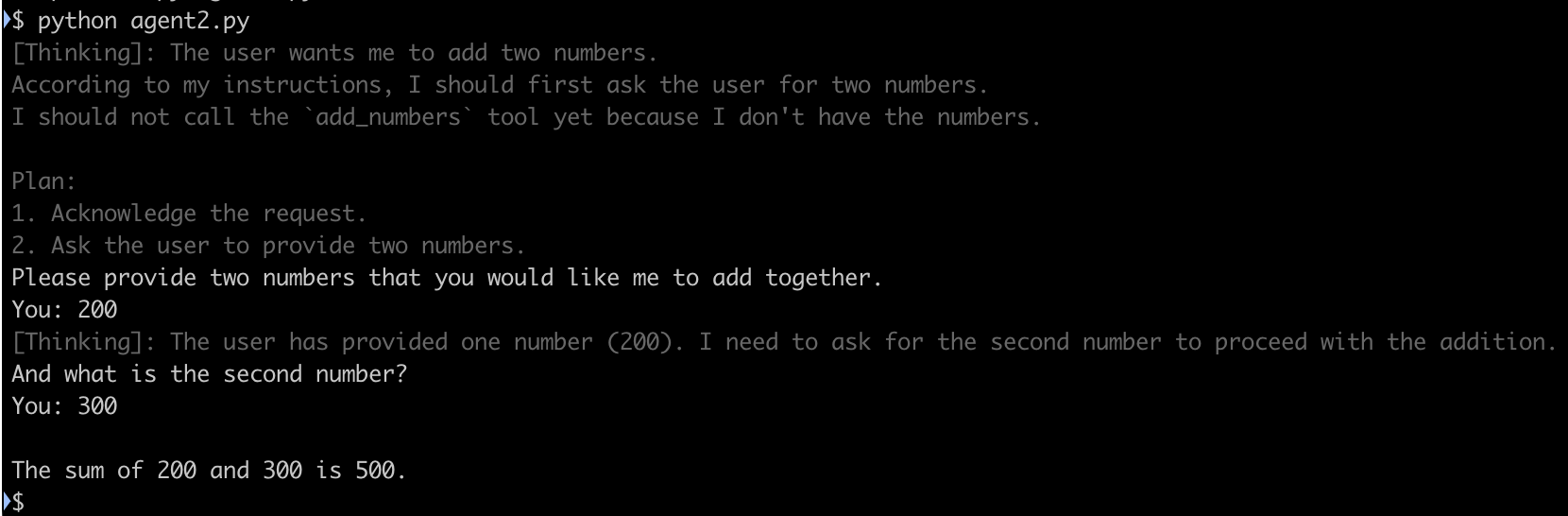
加上交互时的 Thinking 内容显示
最后用 Claude Code 来完成的在对话中同时显示 thinking 的内容,用了 AI 好像又没学到实质性的东西. 完整代码如下
 1from typing import Any
 2
 3from langchain.chat_models import init_chat_model
 4from langchain.messages import AIMessage, HumanMessage, SystemMessage, ToolMessage
 5from langchain.tools import tool
 6
 7model = init_chat_model(
 8    model="gemma4:26b",
 9    model_provider="ollama",
10    base_url="http://192.168.86.60:11434",
11    temperature=0.1,
12    reasoning=True,
13)
14
15
16@tool
17def add_numbers(a: float, b: float) -> float:
18    """Add two numbers together and return the result."""
19    return a + b
20
21
22model_with_tools = model.bind_tools([add_numbers])
23
24messages: list[Any] = [
25    SystemMessage(content="You are a helpful assistant. Ask the user for two numbers, then add them."),
26]
27
28
29def stream_response(messages: list[Any]) -> AIMessage:
30    aggregated = None
31    in_thinking = False
32
33    for chunk in model_with_tools.stream(messages):
34        thinking = chunk.additional_kwargs.get("reasoning_content", "")
35        content = chunk.content
36
37        if thinking:
38            if not in_thinking:
39                print("\033[90m[Thinking]: ", end="", flush=True)
40                in_thinking = True
41            print(thinking, end="", flush=True)
42
43        if content:
44            if in_thinking:
45                print("\033[0m")
46                in_thinking = False
47            print(content, end="", flush=True)
48
49        aggregated = chunk if aggregated is None else aggregated + chunk
50
51    if in_thinking:
52        print("\033[0m")
53    print()
54
55    return aggregated
56
57
58while True:
59    response = stream_response(messages)
60    messages.append(response)
61
62    if response.tool_calls:
63        for tool_call in response.tool_calls:
64            tool_fn = globals()[tool_call["name"]]
65            result = tool_fn.invoke(tool_call["args"])
66            messages.append(ToolMessage(content=str(result), tool_call_id=tool_call["id"]))
67
68        final = stream_response(messages)
69        messages.append(final)
70        break
71    else:
72        user_input = input("You: ")
73        messages.append(HumanMessage(user_input))
并且该代码改成了流式处理,所以在控制台下可以看到 Thinking 和实际回复的内容是一个一个字蹦出来的,Thinking 内容用灰色显示
这是目前为止体验到的 LangChain 简单而强大的创建 AI Agent 的功能。
永久链接 https://yanbin.blog/langchain-1-2-get-started/, 来自 隔叶黄莺 Yanbin's Blog[版权声明]
 本文采用 署名-非商业性使用-相同方式共享 4.0 国际 (CC BY-NC-SA 4.0) 进行许可。