LangChain 高级用法之 MCP
LangChain 1.0 于 2025 年 10 月 22 日发布,这是一个里程碑式的版本,听说在 0.x 要创建一个 agent 很麻烦, 那时候内部是真正的 链,
1.0 后虽然还叫 LangChain, 实际上内部实现是图(LangGraph), 用 create_agent() 创建 agent. 从数据结构来看,图 比 链表
更能直观的表达 Agent 与模型及工具的交互场景。很庆幸在 LangChain 1.0 之后才开始学习这个框架,不用体验 LangChain 0.x 的痛苦。
大概对 LangChain 的 tools 有些许了解之后,现在跳到 Model Context Protocol(MCP) 协议这一章,本人对 MCP 的初步理解是相对于工具,
MCP 是一个远程(跨进程)的工具。为了方便的使用互联网上的各种资源,MCP 在实现一个完备的 Agent 也是一个非常重要的工具。
Model Context Protocol (MCP) 是 Anthropic 推出并开放的协议,用于构建
Agent 与外部资源的交互,下面会与工具对照着学习它. 以前也写过一篇关于 MCP 的文章,今天从不同的角度再次强化对 MCP 的理解。
在 LangChain 中要使用 MCP 需安装 langchain-mcp-adapters 依赖,然后使用它的 MultiServerMCPClient, 它是无状态的。要创建自己的
MCP 服务,使用 FastMCP 库。
1uv add langchain-mcp-adapters
2uv add fastmcp   # develop MCP server
体验 LangChain 和 MCP
先来体验一下 MCP 的能力,创建三个 Python 代码文件,分别是
- math_server.py: 通过
stdio(标准输入输出) 使用的MCP服务 - weather_server.py: 通过
http使用的MCP服务 - mcp_client_agent.py: 使用以上两个
MCP服务的Agent, 它也是一个MCP客户端
math_server.py
 1import sys
 2
 3from fastmcp import FastMCP
 4
 5mcp = FastMCP("Math")
 6
 7@mcp.tool()
 8def add(a: int, b: int) -> int:
 9    """Add two numbers"""
10    print(f"math:add called with {a=} and {b=}", file=sys.stderr)
11    return a + b
12
13@mcp.tool()
14def multiply(a: int, b: int) -> int:
15    """Multiply two numbers"""
16    print(f"math:multiply called with {a=} and {b=}", file=sys.stderr)
17    return a * b
18
19if __name__ == "__main__":
20    mcp.run(transport="stdio", show_banner=False)
weather_server.py
 1from fastmcp import FastMCP
 2
 3mcp = FastMCP("Weather")
 4
 5@mcp.tool()
 6async def get_weather(location: str) -> str:
 7    """Get weather for location."""
 8    print(f"Weather:get_weather called with {location=}")
 9    return "It's always sunny in New York"
10
11if __name__ == "__main__":
12    mcp.run(transport="streamable-http", show_banner=False)
mcp_client_agent.py
 1import asyncio
 2from langchain_mcp_adapters.client import MultiServerMCPClient
 3from langchain.agents import create_agent
 4from pathlib import Path
 5
 6
 7async def main():
 8    math_server_path = str((Path(__file__).resolve().parent / "math_server.py"))
 9
10    client = MultiServerMCPClient(
11        {
12            "math": {
13                "transport": "stdio",  # Local subprocess communication
14                "command": "python",
15                # Absolute path to your math_server.py file
16                "args": [math_server_path],
17            },
18            "weather": {
19                "transport": "http",  # HTTP-based remote server
20                # Ensure you start your weather server on port 8000
21                "url": "http://localhost:8000/mcp",
22            }
23        }
24    )
25
26    tools = await client.get_tools()
27    agent = create_agent(
28        "ollama:gemma4:e4b",
29        tools=tools,
30    )
31    math_response = await agent.ainvoke(
32        {"messages": [{"role": "user", "content": "what's (3 + 5) x 12?"}]}
33    )
34
35    for message in math_response["messages"]:
36        message.pretty_print()
37
38    weather_response = await agent.ainvoke(
39        {"messages": [{"role": "user", "content": "what is the weather in nyc?"}]}
40    )
41
42    for message in weather_response["messages"]:
43        message.pretty_print()
44
45if __name__ == "__main__":
46    asyncio.run(main())
先要启动 http 模式的 weather_server.py
1uv run python src/langchain_study/mcp/weather_server.py
2[04/22/26 16:02:46] INFO     Starting MCP server 'Weather' with transport 'streamable-http' on http://127.0.0.1:8000/mcp                                                                                                            transport.py:301
3INFO:     Started server process [99625]
4INFO:     Waiting for application startup.
5INFO:     Application startup complete.
6INFO:     Uvicorn running on http://127.0.0.1:8000 (Press CTRL+C to quit)
然后执行 mcp_client_agent.py
 1uv run python src/langchain_study/mcp/mcp_client_agent.py
 2[04/22/26 16:06:20] INFO     Starting MCP server 'Math' with transport 'stdio'                                                                                                                                                      transport.py:209
 3[04/22/26 16:06:39] INFO     Starting MCP server 'Math' with transport 'stdio'                                                                                                                                                      transport.py:209
 4[04/22/26 16:06:39] INFO     Starting MCP server 'Math' with transport 'stdio'                                                                                                                                                      transport.py:209
 5math:multiply called with a=8 and b=12
 6math:add called with a=3 and b=5
 7================================ Human Message =================================
 8
 9what's (3 + 5) x 12?
10================================== Ai Message ==================================
11Tool Calls:
12  add (497dc421-b912-4664-82a4-e7ca8cfbc5e2)
13 Call ID: 497dc421-b912-4664-82a4-e7ca8cfbc5e2
14  Args:
15    a: 3
16    b: 5
17================================= Tool Message =================================
18Name: add
19
20[{'type': 'text', 'text': '8', 'id': 'lc_d3ef66f9-d7ba-4aeb-86fb-2548bd43d9bf'}]
21================================== Ai Message ==================================
22Tool Calls:
23  multiply (f242adcd-d1a1-4687-be75-a0a307ca32fe)
24 Call ID: f242adcd-d1a1-4687-be75-a0a307ca32fe
25  Args:
26    a: 8
27    b: 12
28================================= Tool Message =================================
29Name: multiply
30
31[{'type': 'text', 'text': '96', 'id': 'lc_dc22f392-4fb2-45a4-a57a-e00a5de2d960'}]
32================================== Ai Message ==================================
33
3496
35================================ Human Message =================================
36
37what is the weather in nyc?
38================================== Ai Message ==================================
39Tool Calls:
40  get_weather (cc8dd3bd-cb54-4856-808a-1f3979fda25c)
41 Call ID: cc8dd3bd-cb54-4856-808a-1f3979fda25c
42  Args:
43    location: nyc
44================================= Tool Message =================================
45Name: get_weather
46
47[{'type': 'text', 'text': "It's always sunny in New York", 'id': 'lc_aa46f91e-37a9-48bf-8959-558d233a44fe'}]
48================================== Ai Message ==================================
49Tool Calls:
50  get_weather (6d8a8492-22eb-4a72-b8f2-3f82194276e6)
51 Call ID: 6d8a8492-22eb-4a72-b8f2-3f82194276e6
52  Args:
53    location: nyc
54================================= Tool Message =================================
55Name: get_weather
56
57[{'type': 'text', 'text': "It's always sunny in New York", 'id': 'lc_07da67af-1ce3-474e-9199-8b7be3a6769e'}]
58================================== Ai Message ==================================
从这个输出对话,可见它与使用普通工具是完全一样的交互过程, 也是下面几个过程
- HumanMessage: 告诉模型有哪个工具可调用
- AIMessage: 告诉客户端应如何调用工具,工具名及参数列表
- ToolMessage: 客户端调用工具,把结果用 ToolMessage 回送给模型
- AIMessage: 模型根据工具调用的结果继续对话
只不过用 MCP 时,工具调用是跨进程,由启动的子进程通过 stdio 交互,或与远程的 HTTP 交互,背后的交互协议是 JSON-RPC 2.0.
在 math_server 中看到 print() 到标准错误输出的内容,以及 http 时看到 weather_server 中的控制台输出。
math:multiply called with a=8 and b=12
math:add called with a=3 and b=5
Weather:get_weather called with location='nyc'
langchain_mcp_adapter 统一用 MultiServerMCPClient, 而在 mcp 包中有不同形态单独的客户端,如下
1from mcp.client.stdio import stdio_client
2from mcp.client.sse import sse_client
3from mcp.client.websocket import websocket_client
4from mcp.client.streamable_http import streamable_http_client
剖析上面的 MCP
math_server 和 weather_server 中的实现与启动差不多,mcp.run() 时,transport 参数的选择有 http, stdio, streamable-http,
sse(Sever Send Event). 对于 factmcp, http 和 streamable-http 是一样的的。 本例用了 stdio 和 streamable-http 两种方式。
特别要注意的是,对于 stdio 交互方式是通过标准的输入与输出,如果在 stdio 的 @mcp.tool() 装饰的工具函数中用了往标准输出打印的信息,
如 print("hello") 将把把该输出作为工具调用的返回而造成异常。
stdio 模型的 MCP 要通过 command 和 args 来告诉 MultiServerMCPClient 如何启动该 MCP 子进程,启动在 MCP
客户端与服务端之间通过标准输入与输出交互,所以不支持并发。试想多个线程或进程住同一进程的标准输入发送内容,将会造成混乱。
MulltiServerMCPClient 是异步
由于 MultiServerMCPClient 是异步,因此,启动源头就要用 asyncio.run(main()) 来执行,外层是 async, 可以调用 agent 的相应带 a
前缀的异步方法 await agent.ainvoke().
收集工具函数
什么说本质上 MCP 也是工具调用,在 agent = create_agent() 行打个断点查看 tools = await client.get_tools() 的内容为
1[
2    StructuredTool(name='add', description='Add two numbers', args_schema={'additionalProperties': False, 'properties': {'a': {'type': 'integer'}, 'b': {'type': 'integer'}}, 'required': ['a', 'b'], 'type': 'object'}, metadata={'_meta': {'fastmcp': {'tags': []}}}, response_format='content_and_artifact', coroutine=<function convert_mcp_tool_to_langchain_tool.<locals>.call_tool at 0x10c35b060>),
3    StructuredTool(name='multiply', description='Multiply two numbers', args_schema={'additionalProperties': False, 'properties': {'a': {'type': 'integer'}, 'b': {'type': 'integer'}}, 'required': ['a', 'b'], 'type': 'object'}, metadata={'_meta': {'fastmcp': {'tags': []}}}, response_format='content_and_artifact', coroutine=<function convert_mcp_tool_to_langchain_tool.<locals>.call_tool at 0x10c35a520>),
4    StructuredTool(name='get_weather', description='Get weather for location.', args_schema={'additionalProperties': False, 'properties': {'location': {'type': 'string'}}, 'required': ['location'], 'type': 'object'}, metadata={'_meta': {'fastmcp': {'tags': []}}}, response_format='content_and_artifact', coroutine=<function convert_mcp_tool_to_langchain_tool.<locals>.call_tool at 0x10c2aa3e0>)
5]
tools 和用如下常规用 from langchain.tools import tool 装饰的函数类型是一样的,都是 StructuredTool,
1from langchain.tools import tool
2
3@tool
4def add(a: int, b: int) -> int:
5    """Add two numbers"""
6    return a + b
也就是说 LangChain把 MCP tools 转换为 LangChain 的 tools.
每个工具有相应的 coroutine, 即实际对应的执行函数. 使用 MCP 时的工具函数的描述是由 MultiServerMCPClient 通过 stdio 或 http 获取的。
比如下面的方式可以从 streamable-http 的 MCP 上获取工具函数的描述:
 1# 先获得 mcp-session-id
 2curl -i 'http://localhost:8000/mcp' \
 3-H 'Accept: application/json, text/event-stream' \
 4-H 'Content-Type: application/json' \
 5--data '{"method":"initialize","params":{"protocolVersion":"2025-11-25","capabilities":{},"clientInfo":{"name":"mcp","version":"0.1.0"}},"jsonrpc":"2.0","id":0}'
 6HTTP/1.1 200 OK
 7date: Wed, 22 Apr 2026 21:38:52 GMT
 8server: uvicorn
 9cache-control: no-cache, no-transform
10connection: keep-alive
11content-type: text/event-stream
12mcp-session-id: 9b5fd6e4c7804ca69bf3f970da21cbf7
13x-accel-buffering: no
14Transfer-Encoding: chunked
15
16event: message
17data: {"jsonrpc":"2.0","id":0,"result":{"protocolVersion":"2025-11-25","capabilities":{"experimental":{},"logging":{},"prompts":{"listChanged":true},"resources":{"subscribe":false,"listChanged":true},"tools":{"listChanged":true},"extensions":{"io.modelcontextprotocol/ui":{}}},"serverInfo":{"name":"Weather","version":"3.2.4"}}}
18
19# 再由 mcp-session-id 得到工具列表
20curl 'http://localhost:8000/mcp' \
21-H 'Accept: application/json, text/event-stream' \
22-H 'Content-Type: application/json' \
23-H 'mcp-session-id: 9b5fd6e4c7804ca69bf3f970da21cbf7' \
24--data '{"method":"tools/list","jsonrpc":"2.0","id":1}'
25event: message
26data: {"jsonrpc":"2.0","id":1,"result":{"tools":[{"name":"get_weather","description":"Get weather for location.","inputSchema":{"additionalProperties":false,"properties":{"location":{"type":"string"}},"required":["location"],"type":"object"},"outputSchema":{"properties":{"result":{"type":"string"}},"required":["result"],"type":"object","x-fastmcp-wrap-result":true},"_meta":{"fastmcp":{"tags":[]}}}]}}
stdio 的 MCP Server 也类似,只是交互是通过标准输入输出进行的,使用前面 post body 中的内容作为标准输入,见下
1uv run python src/langchain_study/mcp/math_server.py
2[04/22/26 16:45:00] INFO     Starting MCP server 'Math' with transport 'stdio'                                                                                                                                                                              transport.py:209
3{"method":"initialize","params":{"protocolVersion":"2025-11-25","capabilities":{},"clientInfo":{"name":"mcp","version":"0.1.0"}},"jsonrpc":"2.0","id":0}
4{"jsonrpc":"2.0","id":0,"result":{"protocolVersion":"2025-11-25","capabilities":{"experimental":{},"logging":{},"prompts":{"listChanged":false},"resources":{"subscribe":false,"listChanged":false},"tools":{"listChanged":true},"extensions":{"io.modelcontextprotocol/ui":{}}},"serverInfo":{"name":"Math","version":"3.2.4"}}}
5{"method":"tools/list","jsonrpc":"2.0","id":1}
6{"jsonrpc":"2.0","id":1,"result":{"tools":[{"name":"add","description":"Add two numbers","inputSchema":{"additionalProperties":false,"properties":{"a":{"type":"integer"},"b":{"type":"integer"}},"required":["a","b"],"type":"object"},"outputSchema":{"properties":{"result":{"type":"integer"}},"required":["result"],"type":"object","x-fastmcp-wrap-result":true},"_meta":{"fastmcp":{"tags":[]}}},{"name":"multiply","description":"Multiply two numbers","inputSchema":{"additionalProperties":false,"properties":{"a":{"type":"integer"},"b":{"type":"integer"}},"required":["a","b"],"type":"object"},"outputSchema":{"properties":{"result":{"type":"integer"}},"required":["result"],"type":"object","x-fastmcp-wrap-result":true},"_meta":{"fastmcp":{"tags":[]}}}]}}
高亮是标准输入的内容,然后看到相应输出就是工具函数列表,带详细描述。
调用工具
模型会告诉客户端调用哪个工具,以及相应的参数,MCP 客户能把它们组成 JSON-RPC 请求的消息,如果对于 http 的 MCP 服务,进行如下的请求
1curl 'http://localhost:8000/mcp' \
2-H 'Accept: application/json, text/event-stream' \
3-H 'Content-Type: application/json' \
4-H 'mcp-session-id: 9b5fd6e4c7804ca69bf3f970da21cbf7' \
5--data '{"method":"tools/call","params":{"name":"get_weather","arguments":{"location":"nyc"}},"jsonrpc":"2.0","id":1}'
6event: message
7data: {"jsonrpc":"2.0","id":1,"result":{"_meta":{"fastmcp":{"wrap_result":true}},"content":[{"type":"text","text":"It's always sunny in New York"}],"structuredContent":{"result":"It's always sunny in New York"},"isError":false}}
对于 http 的 MCP 调用就完成了。对于 stdio 的 MCP 服务,也可以猜出来如何调用了
1uv run python src/langchain_study/mcp/math_server.py
2[04/22/26 17:09:39] INFO     Starting MCP server 'Math' with transport 'stdio'                                                                                                                                                                              transport.py:209
3{"method":"initialize","params":{"protocolVersion":"2025-11-25","capabilities":{},"clientInfo":{"name":"mcp","version":"0.1.0"}},"jsonrpc":"2.0","id":0}
4{"jsonrpc":"2.0","id":0,"result":{"protocolVersion":"2025-11-25","capabilities":{"experimental":{},"logging":{},"prompts":{"listChanged":false},"resources":{"subscribe":false,"listChanged":false},"tools":{"listChanged":true},"extensions":{"io.modelcontextprotocol/ui":{}}},"serverInfo":{"name":"Math","version":"3.2.4"}}}
5{"method":"tools/call","params":{"name":"add","arguments":{"a":3,"b":5}},"jsonrpc":"2.0","id":1}
6math:add called with a=3 and b=5
7{"jsonrpc":"2.0","id":1,"result":{"_meta":{"fastmcp":{"wrap_result":true}},"content":[{"type":"text","text":"8"}],"structuredContent":{"result":8},"isError":false}}
同样,高亮为标准输入的内容,紧随其后的是输出的结果。
HTTP MCP 传 HTTP Header
要向 http(也是 streamable-http) 或 sse 的 MCP 服务端发送请求头的方法是
 1client = MultiServerMCPClient(
 2    {
 3        "weather": {
 4            "transport": "http",
 5            "url": "http://localhost:8000/mcp",
 6            "headers": {
 7                "Authorization": "Bearer YOUR_TOKEN",
 8                "X-Custom-Header": "custom-value"
 9            },
10        }
11    }
12)
对于 Authentication 应该也能通过请求头的方式发送,但这里有个特殊的参数 auth
1client = MultiServerMCPClient(
2    {
3        "weather": {
4            "transport": "http",
5            "url": "http://localhost:8000/mcp",
6            "auth": auth,
7        }
8    }
9)
auth 是一个 httpx.Auth 实现。
http 的 MCP 通过回调接口应该可以实现 OAuth 的认证流程,此处不继续深入。参考两个链接:
MultiServerMCPClient 默认无状态
http 的 MCP 每次调用函数时都会初始化得到一个 mcp-session-id,据此调用相应的方法,stdio 也是无状态的,这符合正常使用 MCP 的需求,
记忆应该维护在 Agent 端. 用 ClientSeesion 可以让 MCP session 变成有状态的,但还是想不出作为一个工具为何要维护状态。
MCP 工具调用的内容
结构化内容
从 client.get_tools() 返回的 StructuredTool, 它有一个属性 response_format='content_and_artifact', 这意味着 MCP
的工具除了返回适于机器读的内容,还伴随着适于人阅读的内容。
我们窥探一下第一个算 3 + 5 的 ToolMessage 的内容片断
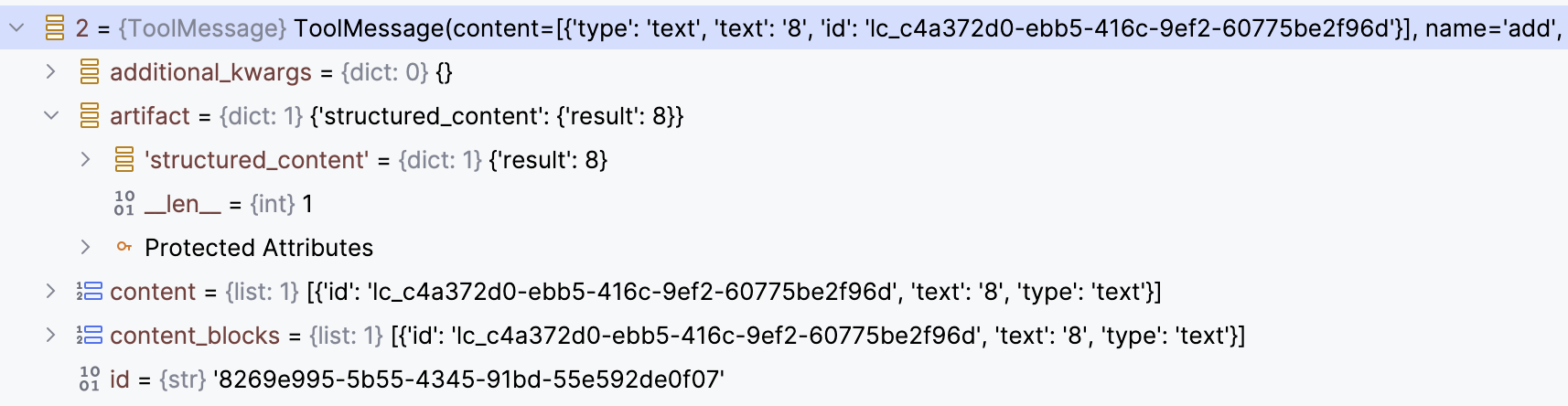
在 LangChain 中消息的 artifact 中的内容是不会加到会话历史中去的,是给人阅读或记日志用的。图中 content, content_blocks 中的内容才会加到会话历史中去。
如果要把 structured_content 加到与 LLM 交互的会话历史中去,则要用 interceptor.
暂时没想到这种需求,跳过相关的演示代码。
多模态内容
除了文本外,MCP 工具也可以返回图片,音视频之类的,还是对比上一个图,此时内容要放在 content_blocks 中, 这时的 type 就要是 image
之类的。这与 MCP 关系不大,就是一个常规的 Tool 也是同样的。
先不管 MCP, 看如果一个 LangChain 的 tool 返回一个图片内容时,工具函数该返回怎么样的格式
 1import base64
 2
 3import httpx
 4from langchain.agents import create_agent
 5from langchain_core.messages import HumanMessage
 6from langchain_core.tools import tool
 7
 8
 9@tool
10def fetch_image(image_url: str) -> list[dict]:
11    """Fetch image from the web"""
12    response = httpx.get(image_url)
13    content_type = response.headers.get("content-type", "image/png")
14    b64_data = base64.b64encode(response.content).decode("utf-8")
15    return [{"type": "image_url", "image_url": {"url": f"data:{content_type};base64,{b64_data}"}}]
16
17
18agent = create_agent(
19    # "ollama:gemma4:e4b",
20    "bedrock:us.anthropic.claude-haiku-4-5-20251001-v1:0",
21    tools=[fetch_image],
22)
23
24result = agent.invoke({"messages": [HumanMessage(content=(
25    "describe the the image at https://yanbin.blog/my-first-langchain-ai-agent/my-first-ai-agent-cats.png"
26    ))]})
27
28print(result["messages"][-1].content)
这段代码还必须切换到 claude 的模型才能正确识别图片的内容,最后显示对图片的描述信息
 1This image shows a Telegram chat interface with a bot called "Seek Cat." Here's what it displays:
 2
 3**Top portion:**
 4- A Telegram conversation header showing "Seek Cat bot" with a blue circular avatar containing an "S"
 5- A high-quality close-up photo of a tabby cat's face with striking yellow/green eyes and prominent whiskers, timestamped 6:29 PM
 6
 7**Bottom portion:**
 8- A message bubble announcing "🐱 New Cat Found!" with details about a cat named **Ribeye**:
 9  - **Sex:** Male/Neutered
10  - **Breed:** Domestic Shorthair/Mix
11  - **Age:** 1 year 9 months
12  - Links to "View Photo" and "View Full Profile"
13  - Below that is another cat photo showing a tabby and white cat lying in a cat hammock/bed, looking at the camera, also timestamped 6:29 PM
14
15**Background:** The chat window has a light green background with cute cat-themed emoji patterns (cats, fish, watermelons, etc.)
16
17This appears to be a demo or example screenshot from a blog post about creating an AI agent using LangChain, showing how the bot can present information about cats in a Telegram interface.
调试看看 fetch_image() 调用后 ToolMessage 的内容是什么
 1{
 2  "artifact": null,
 3  "content": [{"type": "image_url","image_url":  {"url":"data:image/png;base64,iVBORw0KGgoAAAAN......"}}],
 4  "content_blocks": [{"mime_type": "image/png", "type": "image", "base64": "iVBORw0KGgoAAAAN......",
 5    "id": "lc_32058fe8-d4b8-4aad-bdfa-e0b88473becb"}],
 6  "name": "fetch_image",
 7  "text": "",
 8  "tool_call_id": "toolu_bdrk_01VFAFDYiu8jjnEb4Vf6QmkW",
 9  "type": "tool"
10}
LangChain 的 @tool 可指定属性 @tool(response_format="content_and_artifact"), 在方法中返回一个 tuple, 前为 content, 后
为 artifact.
如果一个 MCP 工具方法获取图片数据的话是否也要返回相同的数据格式呢? 尝试写成如下的 MCP tool
 1@mcp.tool()
 2def fetch_image(image_url: str) -> ImageContent:
 3    """Fetch image from the web"""
 4    print(f"Image:fetch_image called with {image_url=}", file=sys.stderr)
 5    response = httpx.get(image_url)
 6    content_type = response.headers.get("content-type", "image/png")
 7    b64_data = base64.b64encode(response.content).decode("utf-8")
 8
 9    return ImageContent(
10            type="image",
11            data=b64_data,
12            mimeType=content_type
13        )
可是失败了,生成的 ToolMessage 中 content_blocks 的内容和上面一样,符合预期,可是 content 也和 content_blocks 一样。
MCP 的资源与提示词
MCP 的 Resources
与 Prompts 很类似,都是 MCP 暴露的资源(比如静态文件)
只是它们的用途不同,它们在改变时可激发事件,客户端可订阅它们的变化事件。 而且获取方式也相近, 通过 MultiServerMCPClient 的方法
- Resources: get_resources(server_name, uris), 通过
uris读取资源的内容 - Prompts: get_prompts(server_name, prompt_name, arguments), 通过
prompt_name读取提示词的内容, 如果是一个模板用arguments字典填充
我们可遵循 MCP 的规范用 JSON-RPC 协议列出 Resources, Resource 模板, Prompts. 创建 @mcp.resource() 和 @mcp.prompt()
很像是在定义 RESTFul API 一样,
Resource 有参数时用占位符,如
1@mcp.resource("resource://users/{user_id}")
2def get_user(user_id: str) -> str:
3    ...
Prompt 有参数时,声明为函数参数即可
1@mcp.prompt()
2def translate(text: str, target_lang: str = "English") -> str:
3    ...
MCP 工具调用拦截器
像 Agent 有中间件一样,MultiServerMCPClient 也有类似的机制,叫做拦截器(Tool Interceptors). 下面是拦截器的配置与相应方法的原型
 1async def mcp_tool_interceptor(request: MCPToolCallRequest, handler):
 2    modified_request = request.override(
 3        args={**(request.args | { "a":100})}
 4    )
 5
 6    return await handler(modified_request)
 7
 8client = MultiServerMCPClient(
 9    {...},
10    tool_interceptors=[mcp_tool_interceptor],
11)
这是一个典型的 filter/interceptor 的模式,在这里有所发挥的事有
- 能从
request: MCPToolCallRequest拿到什么,并进行什么操作 - 对
request.override()可以覆盖什么
首先,request: MCPToolCallRequest 有以下属
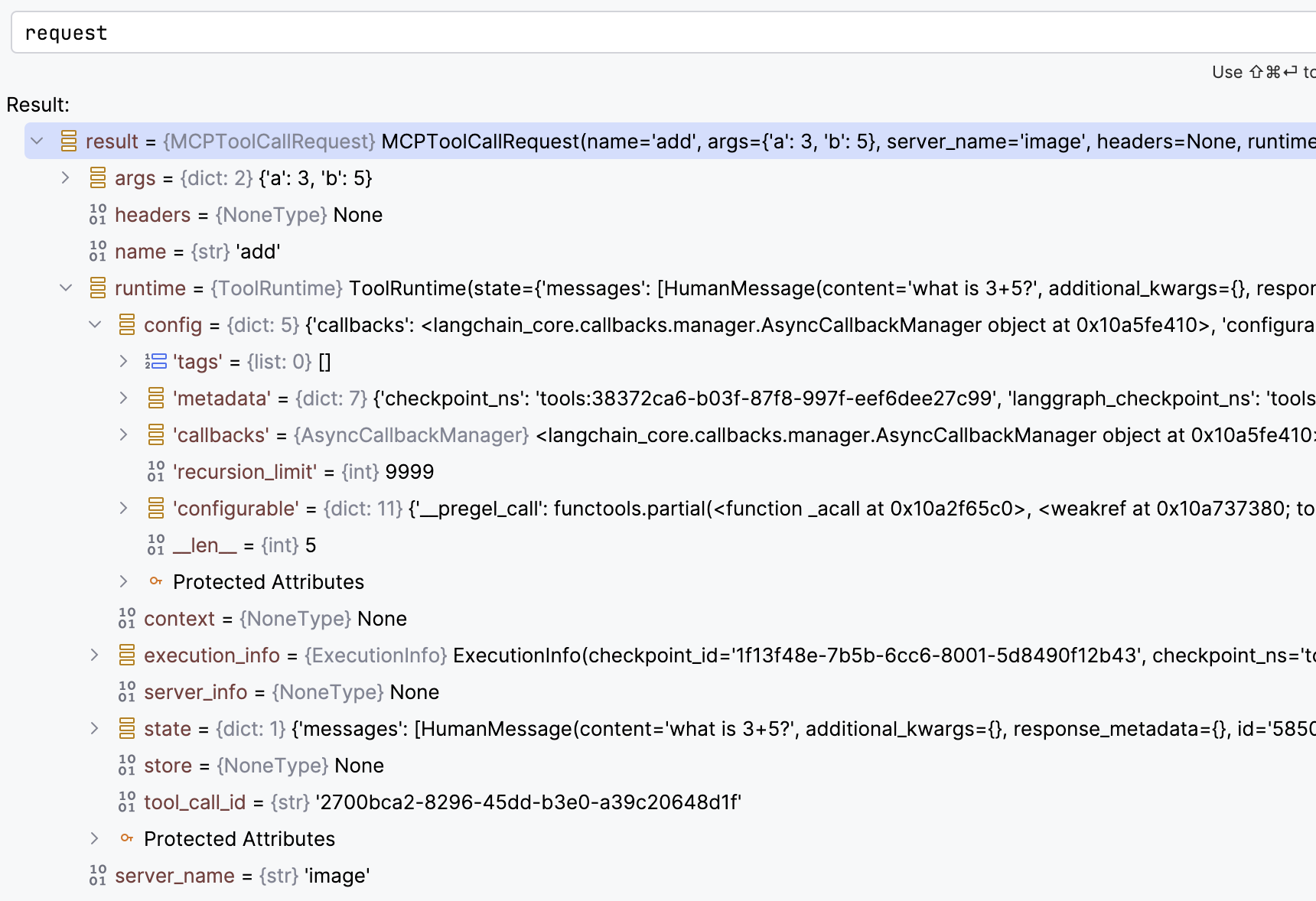
从 MCPToolCallRequest 可以拿到 args(参数),headers(HTTP 的 MCP 的请求头), name(工具名称),ToolRuntime, context,
state(AgentState), 和 Store 等信息.
request.override() 时可以覆盖
name: 工具名称,可以决定调用另一个方法args: 工具参数,比如从context或state中获取一些信息覆盖调用MCP工具时的参数headers: 对http的MCP工具调用时覆盖请求头
这里的例子,在调用 add(a: int, b: lint) 时把 a 参数覆盖为 100, 最后实际调用的是 100 + <b 的值>。
从拦截函数中可以返回 Command 对象来更新 agent 的状态,上篇 LangChain 核心组件之短期记忆
我们在普通的工具可以返回 Command
 1@tool
 2def where_is_bob(runtime:  ToolRuntime) -> str:
 3    """Tell Bob where he is."""
 4    # print(runtime.state["messages"])
 5
 6    if runtime.context.user_id == "123":
 7        return Command(update={
 8            "messages": [
 9                ToolMessage("he is in SF", tool_call_id=runtime.tool_call_id)
10            ]
11        })
12    return "he is in Chicago"
在 mcp_tool_interceptor 中可以做同样的事情
 1async def mcp_tool_interceptor(request: MCPToolCallRequest, handler):
 2    result = await handler(request)
 3
 4    if request.name == "submit_order":
 5        return Command(
 6            update={
 7                "messages": [result] if isinstance(result, ToolMessage) else [],
 8                "task_status": "completed",
 9            },
10            goto="summary_agent",  # goto="__end__" 可提前结束执行
11        )
12
13    return result
拦截器中想要实现的就是拦截对 handler(request) 的调用,所以在调用它的时候可以捕获异常进行重试,或进行其他的异常处理。
MCP 方法调用的进度通知
调用一个耗时的 MCP 工具时,可以使用回调函数来报告进度,但官方的那个例子根本没法直接用,由于 LangChain 1.x 还太新,Google 和各路 AI
都没法做不出一个可用的进度通知的完整例子。
因为 LangChain 的 MCP 的 Adapter 是适配给 FastMCP 的,先看只用 FastMCP 如何实现进度通知,显示。这是一个学习笔记,不是专题,
又要开始大篇幅的展示代码了。
web_fetch.py
 1import asyncio
 2
 3from fastmcp import FastMCP, Context
 4
 5mcp = FastMCP("web_fetch")
 6
 7@mcp.tool()
 8async def fetch(ctx: Context, url: str) -> str:
 9    """fetch web string content by url"""
10    await ctx.report_progress(30, total=100, message=f"loading {url=}")
11    await asyncio.sleep(1)
12    await ctx.report_progress(65, total=100, message=f"loading {url=}")
13    await asyncio.sleep(1)
14    await ctx.report_progress(100, total=100, message=f"loaded {url=}")
15    return "I'm a cat"
16
17if __name__ == "__main__":
18    mcp.run(transport="stdio", show_banner=False)
fetch() 函数必须是 async 的,因为 ctx.report_progress() 是异常函数,至于 ctx: Context 放在前面后面都没关系
mcp_client.py
 1import asyncio
 2
 3from fastmcp import Client
 4
 5
 6async def progress_handler(progress: float, total: float | None, message: str) -> None:
 7    print(f"progress: {progress}/{total} - {message}")
 8
 9async def main():
10    client = Client("web_fetch.py", progress_handler=progress_handler)
11
12    async with client:
13        result = await client.call_tool("fetch", {"url": "https://yanbin.blog"})
14        print(result)
15
16if __name__ == "__main__":
17    asyncio.run(main())
创建 Client 时用 progress_handler 指定进度通知回调函数,Client 会自动在调用 MCP 工具时,收到工具中 ctx.report_progress()
通知调用这个回调函数,传入进度信息。下面将进行多轮测试
第一轮测试 stdio
基于上面的代码,执行 mcp_client.py 的输出如下
1progress: 30.0/100.0 - loading url='https://yanbin.blog'
2progress: 65.0/100.0 - loading url='https://yanbin.blog'
3progress: 100.0/100.0 - loaded url='https://yanbin.blog'
4CallToolResult(content=[TextContent(type='text', text="I'm a cat", annotations=None, meta=None)], structured_content={'result': "I'm a cat"}, meta={'fastmcp': {'wrap_result': True}}, data="I'm a cat", is_error=False)
第二轮测试 http/streamable-http
把 web_fetch.py 改成 http 模型,__main__ 部分改为
1if __name__ == "__main__":
2    mcp.run(transport="http", show_banner=False) # 用 'streamable-http' 也是一样的
启动
1uv run python src/langchain_study/mcp/web_fetch.py
2[04/23/26 21:13:21] INFO     Starting MCP server 'web_fetch' with transport 'http' on http://127.0.0.1:8000/mcp
在 mcp_client.py 中,创建 Client 的行改为
1client = Client("http://localhost:8000/mcp", progress_handler=progress_handler)
执行后,一样的效果,可输出进度。
第三轮测试, sse
把 web_fetch.py 改成 sse 模型,__main__ 部分改为
1if __name__ == "__main__":
2    mcp.run(transport="sse", show_banner=False)
启动
1uv run python src/langchain_study/mcp/web_fetch.py
2[04/23/26 21:16:23] INFO     Starting MCP server 'web_fetch' with transport 'sse' on http://127.0.0.1:8000/sse
在 mcp_client.py 中,创建 Client 的行改为
1client = Client("http://localhost:8000/sse", progress_handler=progress_handler)
测试,能正常输出进度。
LangChain 中的进度报告
现在可以移步回 LangChain, 首先恢复 web_fetch.py 的 __main__ 部分为
1if __name__ == "__main__":
2    mcp.run(transport="stdio", show_banner=False)
创建 langchain_mcp_client.py, 内容为
 1import asyncio
 2
 3from langchain.agents import create_agent
 4from langchain_mcp_adapters.callbacks import CallbackContext, Callbacks
 5from langchain_mcp_adapters.client import MultiServerMCPClient
 6
 7
 8async def on_progress(progress: float, total: float | None, message: str | None, context: CallbackContext):
 9    print(f"{context.server_name}:{context.tool_name} - progress: {progress}/{total} - {message}")
10
11async def main():
12    client = MultiServerMCPClient(
13        {
14            "web_fetch": {
15                "transport": "stdio",
16                "command": "python",
17                "args": ["web_fetch.py"],
18            }
19        },
20        callbacks=Callbacks(on_progress=on_progress),
21    )
22
23    tools = await client.get_tools()
24    agent = create_agent(
25        "ollama:gemma4:e4b",
26        tools=tools,
27    )
28
29    await agent.ainvoke({"messages": [{"role": "user", "content": "read web content from https://yanbin.blog"}]})
30
31
32if __name__ == "__main__":
33    asyncio.run(main())
执行 langchain_mcp_client.py 的输出如下
1uv run python src/langchain_study/mcp/langchain_mcp_client.py
2[04/23/26 21:23:37] INFO     Starting MCP server 'web_fetch'    transport.py:209
3with transport 'stdio'
4[04/23/26 21:23:40] INFO     Starting MCP server 'web_fetch'    transport.py:209
5with transport 'stdio'
6web_fetch:fetch - progress: 30.0/100.0 - loading url='https://yanbin.blog'
7web_fetch:fetch - progress: 65.0/100.0 - loading url='https://yanbin.blog'
8web_fetch:fetch - progress: 100.0/100.0 - loaded url='https://yanbin.blog'
stdio 没问题,on_progress() 方法中必须是按顺序的四个参数 progress: float, total: float | None, message: str | None,
和 context: CallbackContext。
尝试 http 模式,把 web_fetch.py 改成 transport="http", 并启动服务在 http://localhost:8000/mcp. 然后把 langchain_mcp_client.py
中创建 MultiServerMCPClient 的代码改为
1    client = MultiServerMCPClient(
2        {
3            "web_fetch": {
4                "transport": "http",
5                "url": "http://localhost:8000/mcp"
6            }
7        },
8        callbacks=Callbacks(on_progress=on_progress),
9    )
测试 http(或 streamable-http), 可以看到进度输出.
再接再厉,把 web_fetch.py 改成 transport="sse" 模式,启动服务在 http://localhost:8000/sse. langchain_mcp_client.py
中创建 MultiServerMCPClient 的代码改为
1    client = MultiServerMCPClient(
2        {
3            "web_fetch": {
4                "transport": "sse",
5                "url": "http://localhost:8000/sse"
6            }
7        },
8        callbacks=Callbacks(on_progress=on_progress),
9    )
运行 langchain_mcp_client.py, 没问题
1uv run python src/langchain_study/mcp/langchain_mcp_client.py
2web_fetch:fetch - progress: 30.0/100.0 - loading url='https://yanbin.blog'
3web_fetch:fetch - progress: 65.0/100.0 - loading url='https://yanbin.blog'
4web_fetch:fetch - progress: 100.0/100.0 - loaded url='https://yanbin.blog'
使用 http 模式的输出与 sse 模式输出一致。
订阅 MCP 工具中的日志输出
特别是对于 stdio 模式的 MCP 工具,如果用 print() 来调试代码,可能一不小心就把工具函数毁坏了,因为 print() 到控制台的信息会作为工具调用输出的一部分。
所以要特别小心,或者可以输出到标准错误或文件去,print("debug info", file=sys.stderr), 就是千万不要向标准输出打印调试信息。
除了打印到标准错误,或文件外 - 这些都只能在服务端看日志,MCP 还提供服务端输出日志,客户订阅服务端的日志内容,还是用 fastmcp.Context,
把 web_fetch.py 的工具函数改为
 1@mcp.tool()
 2async def fetch(ctx: Context, url: str) -> str:
 3    """fetch web string content by url"""
 4
 5    await ctx.debug(f"fetch debug log for {url=}", extra={"foo": "bar"})
 6    await ctx.info(f"fetch called with {url=}")
 7    await ctx.warning(f"fetch debug log for {url=}")
 8    await ctx.error(f"fetch debug log for {url=}")
 9
10    return "I'm a cat"
用 sse 的方式启动 web_fetch 服务, 然后完整的 langchain_mcp_client.py 改为
 1import asyncio
 2
 3from langchain.agents import create_agent
 4from langchain_mcp_adapters.callbacks import CallbackContext, Callbacks, LoggingMessageNotificationParams
 5from langchain_mcp_adapters.client import MultiServerMCPClient
 6
 7async def on_logging_message(params: LoggingMessageNotificationParams, context: CallbackContext):
 8    print(f"[{context.server_name}] {params.level}: {params.data}")
 9
10async def main():
11    client = MultiServerMCPClient(
12        {
13            "web_fetch": {
14                "transport": "sse",
15                "url": "http://localhost:8000/sse"
16            }
17        },
18        callbacks=Callbacks(on_logging_message=on_logging_message),
19    )
20
21    tools = await client.get_tools()
22    agent = create_agent("ollama:gemma4:e4b", tools=tools)
23
24    await agent.ainvoke({"messages": [{"role": "user", "content": "read web content from https://yanbin.blog"}]})
25
26
27if __name__ == "__main__":
28    asyncio.run(main())
执行 langchain_mcp_client.py 就看到输出
1[web_fetch] debug: {'msg': "fetch debug log for url='https://yanbin.blog'", 'extra': {'foo': 'bar'}}
2[web_fetch] info: {'msg': "fetch called with url='https://yanbin.blog'", 'extra': None}
3[web_fetch] warning: {'msg': "fetch debug log for url='https://yanbin.blog'", 'extra': None}
4[web_fetch] error: {'msg': "fetch debug log for url='https://yanbin.blog'", 'extra': None}
MCP 工具启发式询问 Elicitation
MCP 工具的执行过程中,还能与 MCP 客户端进行交互,例如补充输入等,有点类似 Human-in-the-loop. 官方对这个话题倒是给出了完整的例子,
可是 ctx.elicit() 的第二个参数名不是 schema, 而是 response_type.
新的 web_fetch.py 内容为
 1from fastmcp import FastMCP, Context
 2from pydantic import BaseModel
 3
 4mcp = FastMCP("web_fetch")
 5
 6class QueryParams(BaseModel):
 7    id: int
 8    date: str
 9
10@mcp.tool()
11async def fetch(ctx: Context, url: str) -> str:
12    """fetch web string content by url"""
13
14    result = await ctx.elicit(message=f"Please provide id and date", response_type=QueryParams)
15    if result.action == "accept":
16        print(f"fetch called with {url=} and {result.data=}")
17    if result.action == "decline":
18        print(f"fetch called with {url=} but user declined to provide query params")
19    return f"I'm a cat: {result}"
20
21if __name__ == "__main__":
22    mcp.run(transport="sse", show_banner=False)
改完,启动服务在 http://localhost:8000/sse
新的 langchain_mcp_client.py 内容为
 1import asyncio
 2
 3from langchain.agents import create_agent
 4from langchain_mcp_adapters.callbacks import CallbackContext, Callbacks, LoggingMessageNotificationParams
 5from langchain_mcp_adapters.client import MultiServerMCPClient
 6from mcp.shared.context import RequestContext
 7from mcp.types import ElicitRequestParams, ElicitResult
 8
 9
10async def on_elicitation(mcp_context: RequestContext, params: ElicitRequestParams,
11        context: CallbackContext, ) -> ElicitResult:
12    return ElicitResult(
13        action="accept",
14        content={"id": 12345, "date": "2022-12-23"},
15    )
16
17async def main():
18    client = MultiServerMCPClient(
19        {
20            "web_fetch": {
21                "transport": "sse",
22                "url": "http://localhost:8000/sse"
23            }
24        },
25        callbacks=Callbacks(on_elicitation=on_elicitation),
26    )
27
28    tools = await client.get_tools()
29    agent = create_agent("ollama:gemma4:e4b", tools=tools)
30
31    result = await agent.ainvoke({"messages": [{"role": "user", "content": "read web content from https://yanbin.blog"}]})
32    print(result["messages"][-1].content)
33
34
35if __name__ == "__main__":
36    asyncio.run(main())
ElicitResult 支持的 action 仅限三个, accept, decline, 或 cancel.
上面的程序执行后,输出为
1uv run python src/langchain_study/mcp/langchain_mcp_client.py
2I attempted to read the web content from `https://yanbin.blog`, but the data retrieved appears to be technical or incomplete, and does not contain the readable blog content.
3
4The content I received was:
5`I'm a cat: action='accept' data=QueryParams(id=12345, date='2022-12-23')`
6
7If you were looking for specific information, please let me know, and I can try a different approach.
MCP 工具执行工作询问客户端给出更多的输入,客户提供额外的输入,最后完成工具的调用。在
1async def on_elicitation(mcp_context: RequestContext, params: ElicitRequestParams,
2        context: CallbackContext, ) -> ElicitResult:
我们能从参数中读取到更多的用户或应用信息,在这里也能要求获取用户的一个交互输入。
注意到以上都是设置的 MultiServerMCPClient 的 callbacks 参数,它是一个 Callbacks 实例,函数三个属性 on_logging_message,
on_elicitation, on_progress, 分别对应 MCP 的日志通知,启发式询问,和进度通知, 我们能在一个 callbacks 参数赋予多个回调函数。
这就是 LangChain 关于 MCP 的全部内容了,更多的信息应该参考以下两个链接
[版权声明]
 本文采用 署名-非商业性使用-相同方式共享 4.0 国际 (CC BY-NC-SA 4.0) 进行许可。