LangChain 核心组件之 Messages
经历了一番 LangChain 的学习之后,现在能更好的理解 LangGraph, LangChain 以及 Deep Agents 之间的关系了
LangGraph: 是该家族的底层实现,代表是StateGraphLangChain: 1.0 后不再是Chain,而是Graph, 代表是init_chat_model()和create_agent(), 前者与模型完成单次请求/响应,
后者能与模型进行完整会话,包括工具的自动调用Deep Agents: 是LangChain的高级应用,代表是create_deep_agent(), 在create_agent()之上还能进行自动的规划
学习过一些基本的和高级概念, 如 Agents, Models, Shot-term memory, MCP, Human-in-the-loop, 以及 Long-term memory 之后,
再一次回到 Agent 与模型交互的原点上来,即 Messages. 我们将学习两个层面的消息表示:
Agent与模型交互时Python层面的消息表示,LangChain与模型无关的消息格式Agent与模型交互时HTTP协议交互层面的请求/响应消息
本文依然以本地 Ollama 模型/服务为例,HTTP 响应数据都是一个个 Chunk, 每个 Chunk 是一个 JSON 对象,包含一两个 Token,
我们会直接提取整个响应的 Token 数据,同时会关掉 Reasoning(不希望产生 Thinking 的响应)。
消息通常包含主要三部分内容
role: 常见的是user,assistant,system, 和tools;LangChain还支持human,ai,function, 和developercontent: 携带具体的消息内容,如文本,图片,音视频等metadata: 可选的元数据字段,如消息 ID, Token 使用状态等
LangChain 提供了标准的消息类,如 HumanMessage, AIMessage, SystemMessage,转换成模型相应的 role 或格式由相应的模型提供者库
来完成,如 langchain_ollama/chat_models.py, langchain_openai/base.py 定义了转换规则。
消息的基本用法
测试一下用 init_chat_model() 创建的 model 可以如何向模型发送消息
1from langchain.chat_models import init_chat_model
2
3model = init_chat_model(
4    "gemma4:e4b",
5    reasoning=False,
6    model_provider="ollama",
7)
8
9result = model.invoke("Hello, how are you?")
简单的问题,直接用字符串,它发送给模型的请求是
1{"model":"gemma4:e4b","stream":true,"options":{},"messages":[{"role":"user","content":"Hello, how are you?"}],"tools":[],"think":false}如果有多条消息,比如要保持上下文,或多种类型的消息时,有以下几种形式
 1model.invoke([
 2    SystemMessage("You are a helpful assistant, answer question as short as you can."),
 3    HumanMessage("Hello, how are you?")
 4])
 5
 6model.invoke([
 7    {"role": "system", "content": "You are a helpful assistant, answer question as short as you can."},
 8    {"role": "user", "content": "Hello, how are you?"}
 9])
10
11model.invoke([
12    ("system", "You are a helpful assistant, answer question as short as you can."),
13    ("user", "Hello, how are you?")
14])
如果是 create_agent() 的话,也是采用一样的方式,只需要把上面的 model.invoke() 列表参数作为 agent.invoke({"messages": <...>})
中 message 的字段值即可。如 agent.invoke({"messages": [("system", "lala"), ("user", "lala")]}).
以上三种方式传递给模型的请求数据都是一样的
1{"model":"gemma4:e4b","stream":true,"options":{},"messages":[{"role":"system","content":"You are a helpful assistant, answer question as short as you can."},{"role":"user","content":"Hello, how are you?"}],"tools":[],"think":false}model.invoke() 中的消息转换为模型请求的格式由相应模型 provider 库实现的,上面是 ollama 库的实现。
模型为 ollama 时,相应模型响应的 HTTP 数据是
1{"model":"gemma4:e4b","created_at":"2026-04-29T18:13:51.479055Z","message":{"role":"assistant","content":"I"},"done":false}
2{"model":"gemma4:e4b","created_at":"2026-04-29T18:13:51.512966Z","message":{"role":"assistant","content":"'"},"done":false}
3{"model":"gemma4:e4b","created_at":"2026-04-29T18:13:51.550797Z","message":{"role":"assistant","content":"m"},"done":false}
4{"model":"gemma4:e4b","created_at":"2026-04-29T18:13:51.588897Z","message":{"role":"assistant","content":" good"},"done":false}
5{"model":"gemma4:e4b","created_at":"2026-04-29T18:13:51.630128Z","message":{"role":"assistant","content":","},"done":false}
6{"model":"gemma4:e4b","created_at":"2026-04-29T18:13:51.672524Z","message":{"role":"assistant","content":" thanks"},"done":false}
7{"model":"gemma4:e4b","created_at":"2026-04-29T18:13:51.709789Z","message":{"role":"assistant","content":"!"},"done":false}
8{"model":"gemma4:e4b","created_at":"2026-04-29T18:13:51.747906Z","message":{"role":"assistant","content":""},"done":true,"done_reason":"stop","total_duration":611004334,"load_duration":274585917,"prompt_eval_count":34,"prompt_eval_duration":54066083,"eval_count":8,"eval_duration":250991666}
每个 chunk 是一个 token, 最后一个 json 是模型响应的结束标记,包含模型响应的元数据。反应在 Python 代码中 model.invoke(...)
返回的 result 是
1AIMessage(content="I'm good, thanks!", additional_kwargs={}, response_metadata={'model': 'gemma4:e4b', 'created_at': '2026-04-29T18:13:51.747906Z', 'done': True, 'done_reason': 'stop', 'total_duration': 611004334, 'load_duration': 274585917, 'prompt_eval_count': 34, 'prompt_eval_duration': 54066083, 'eval_count': 8, 'eval_duration': 250991666, 'logprobs': None, 'model_name': 'gemma4:e4b', 'model_provider': 'ollama'}, id='lc_run--019dda72-8391-72b1-b96e-46fabf566e70-0', tool_calls=[], invalid_tool_calls=[], usage_metadata={'input_tokens': 34, 'output_tokens': 8, 'total_tokens': 42})如果换成 OpenAI 兼容的方式,本地仍用 ollama 服务,但创建 model 时指定 model_provider="openai" 和不同的 base_url.
 1from langchain.chat_models import init_chat_model
 2from langchain_core.messages import HumanMessage, SystemMessage
 3
 4model = init_chat_model(
 5    "gemma4:e4b",
 6    model_provider="openai",
 7    base_url="http://localhost:11434/v1",
 8    api_key="any",
 9    reasoning_effort="none",
10)
11
12result = model.invoke([
13    ("system", "You are a helpful assistant, answer question as short as you can."),
14    ("user", "Hello, how are you?")
15])
16
17result.pretty_print()
这时候 Agent 与模型的消息转换由相应的 OpenAI provider(langchain-openai) 来完成. ollama provider 调用的 API 是
http://127.0.0.1:11434/api/chat, 而 OpenAI provider 调用的 API 是 http://localhost:11434/v1/chat/completions.
现在看到相当于是 agent 向 OpenAI 模型发送的请求数据是
1{"messages":[{"content":"You are a helpful assistant, answer question as short as you can.","role":"system"},{"content":"Hello, how are you?","role":"user"}],"model":"gemma4:e4b","reasoning_effort":"none","stream":false}收到的请求也不同
1{"id":"chatcmpl-672","object":"chat.completion","created":1777486983,"model":"gemma4:e4b","system_fingerprint":"fp_ollama","choices":[{"index":0,"message":{"role":"assistant","content":"I'm good, thanks!"},"finish_reason":"stop"}],"usage":{"prompt_tokens":34,"completion_tokens":8,"total_tokens":42}}不是一个 chunk 响应了,好像未能真正模拟到 OpenAI 的流式响应
在 Agent 中 model.invoke() 收到的 result 是
1AIMessage(content="I'm good, thanks!", additional_kwargs={'refusal': None}, response_metadata={'token_usage': {'completion_tokens': 8, 'prompt_tokens': 34, 'total_tokens': 42, 'completion_tokens_details': None, 'prompt_tokens_details': None}, 'model_provider': 'openai', 'model_name': 'gemma4:e4b', 'system_fingerprint': 'fp_ollama', 'id': 'chatcmpl-672', 'finish_reason': 'stop', 'logprobs': None}, id='lc_run--019dda7a-ea79-7c13-bbad-d64a5fb5c48e-0', tool_calls=[], invalid_tool_calls=[], usage_metadata={'input_tokens': 34, 'output_tokens': 8, 'total_tokens': 42, 'input_token_details': {}, 'output_token_details': {}})换成显式的 stream() 调用
1for chunk in model.stream([
2    ("system", "You are a helpful assistant, answer question as short as you can."),
3    ("user", "Hello, how are you?")
4]):
5    print(chunk.content, end="", flush=True)
发送的请求是
1{"messages":[{"content":"You are a helpful assistant, answer question as short as you can.","role":"system"},{"content":"Hello, how are you?","role":"user"}],"model":"gemma4:e4b","reasoning_effort":"none","stream":true}注意到由 "stream":false变成 "stream":true 了
这时候响应为一个个 chunk 数据,流式响应
 1data: {"id":"chatcmpl-85","object":"chat.completion.chunk","created":1777487227,"model":"gemma4:e4b","system_fingerprint":"fp_ollama","choices":[{"index":0,"delta":{"role":"assistant","content":"I"},"finish_reason":null}]}
 2
 3data: {"id":"chatcmpl-85","object":"chat.completion.chunk","created":1777487227,"model":"gemma4:e4b","system_fingerprint":"fp_ollama","choices":[{"index":0,"delta":{"role":"assistant","content":"'"},"finish_reason":null}]}
 4
 5data: {"id":"chatcmpl-85","object":"chat.completion.chunk","created":1777487228,"model":"gemma4:e4b","system_fingerprint":"fp_ollama","choices":[{"index":0,"delta":{"role":"assistant","content":"m"},"finish_reason":null}]}
 6
 7data: {"id":"chatcmpl-85","object":"chat.completion.chunk","created":1777487228,"model":"gemma4:e4b","system_fingerprint":"fp_ollama","choices":[{"index":0,"delta":{"role":"assistant","content":" fine"},"finish_reason":null}]}
 8
 9data: {"id":"chatcmpl-85","object":"chat.completion.chunk","created":1777487228,"model":"gemma4:e4b","system_fingerprint":"fp_ollama","choices":[{"index":0,"delta":{"role":"assistant","content":","},"finish_reason":null}]}
10
11data: {"id":"chatcmpl-85","object":"chat.completion.chunk","created":1777487228,"model":"gemma4:e4b","system_fingerprint":"fp_ollama","choices":[{"index":0,"delta":{"role":"assistant","content":" thank"},"finish_reason":null}]}
12
13data: {"id":"chatcmpl-85","object":"chat.completion.chunk","created":1777487228,"model":"gemma4:e4b","system_fingerprint":"fp_ollama","choices":[{"index":0,"delta":{"role":"assistant","content":" you"},"finish_reason":null}]}
14
15data: {"id":"chatcmpl-85","object":"chat.completion.chunk","created":1777487228,"model":"gemma4:e4b","system_fingerprint":"fp_ollama","choices":[{"index":0,"delta":{"role":"assistant","content":"."},"finish_reason":null}]}
16
17data: {"id":"chatcmpl-85","object":"chat.completion.chunk","created":1777487228,"model":"gemma4:e4b","system_fingerprint":"fp_ollama","choices":[{"index":0,"delta":{"role":"assistant","content":""},"finish_reason":"stop"}]}
18
19data: [DONE]
这是因为默认是否使用流式响应的规则不同
1model = init_chat_model(
2    "gemma4:e4b",
3    #streaming=True,
当使用 ollama provider 时,无论使用 model.invoke() 还是 model.stream() 默认使用流式响应,甚至设置 streaming=False 后,
ollama 都是产生流式响应,只是 model.invoke() 是在 Agent 端把流式响应消化了,感觉不到流式。
而使用 OpenAI provider 时,如果 init_chat_mode() 时指定了 streaming=True 时,model.invoke() 才会使用流式响应,否则非流式响应,
只有显式的调用 model.stream() 才会使用流式响应。
由于 LangChain API对响应数据进行了封装, 不管实际响应是否是流式的(chunk), model.invoke() 直接返回完整结果,model.stream() 才会返回流式结果。
也因为有了 LangChain 的 API 帮我们屏蔽了模型请求/响应数据格式的差异。
消息类型
后面将以 OpenAI provider 为例进行说明,并且设置 streaming=False 来让模型(Ollama)的响应数据更简单化。前面提到过类型 HumanMessage
和 AIMessage 等与 {"role": "user", "content": "..."}, {"role": "assistant", "content": "..."} 相对应的,具体的对应是由相应模型提供者决定的。
下图列出了 LangChain 定义的所有消息类型:
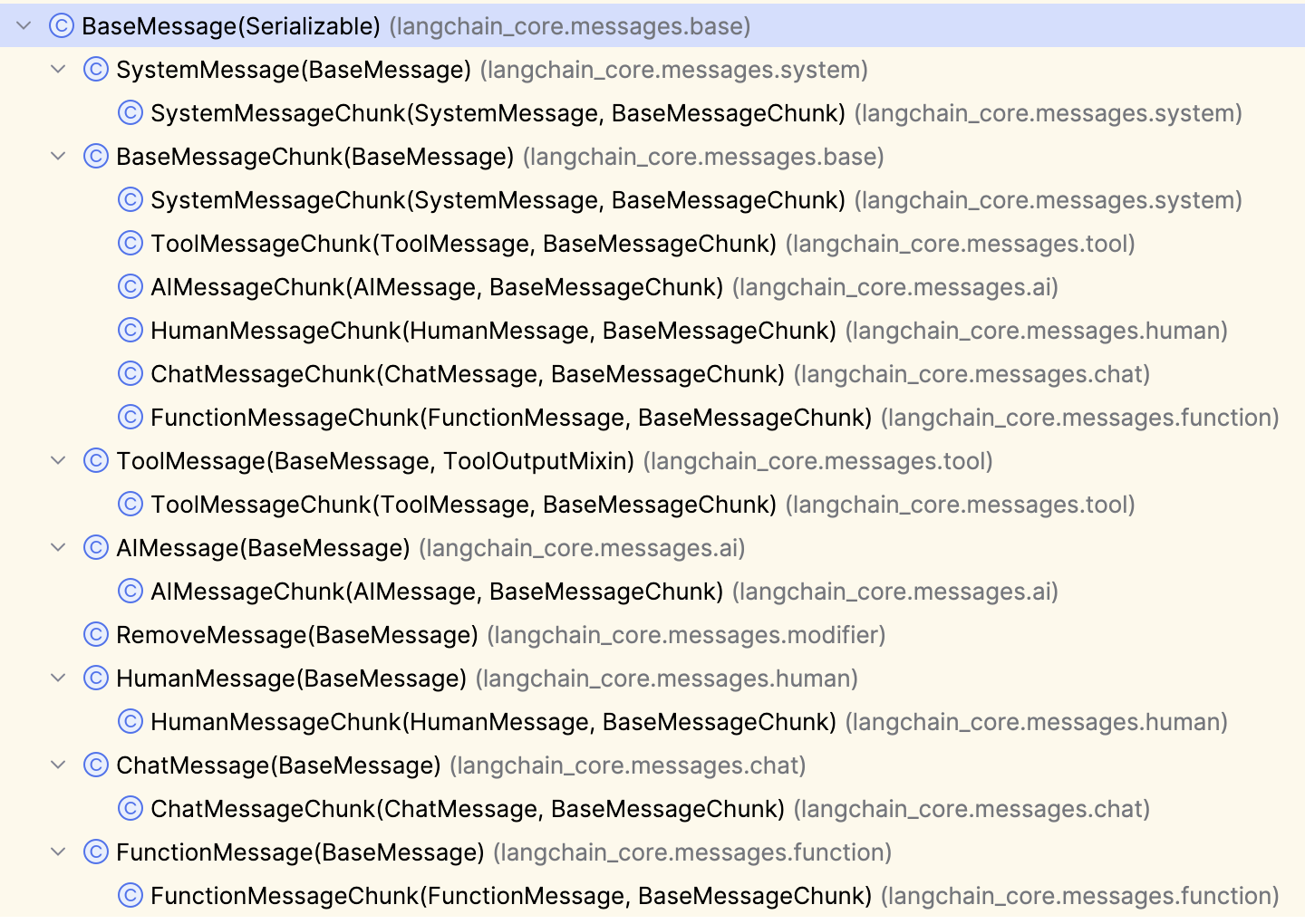
我们来测试一下所有非 XxxChunk 的消息,OpenAI provider 会相应转换成什么 role.
1result = model.invoke([
2    SystemMessage("system"),
3    HumanMessage("human"),
4    AIMessage("ai"),
5    ChatMessage(role="developer", content="chat"),
6    ToolMessage(content="result", tool_call_id="my_function"),
7    FunctionMessage(name="my_function", content="func")
8])
被 OpenAI provider 转换成了
1{"messages":[
2  {"content":"system","role":"system"},
3  {"content":"human","role":"user"},
4  {"content":"ai","role":"assistant"},
5  {"content":"chat","role":"developer"},
6  {"content":"result","role":"tool","tool_call_id":"my_function"},
7  {"content":"func","name":"my_function","role":"function"}
8],"model":"gemma4:e4b","reasoning_effort":"none","stream":false}
如果是用 Ollama provider 呢,Ollama 不支持 FunctionMessage, FunctionMessage 也是不再推荐使用的消息类型。所以必须把它从
model.invoke() 中拿掉,剩下的消息转换成了
1{"model":"gemma4:e4b","stream":true,"options":{},"messages":[
2  {"role":"system","content":"system"},
3  {"role":"user","content":"human"},
4  {"role":"assistant","content":"ai"},
5  {"role":"developer","content":"chat"},
6  {"role":"tool","content":"result"}
7],"tools":[]}
Ollama 与 OpenAI 转换后的 role 都是一样的,即使我们写成以下两种消息格式
1{"role": "ai", "content": "..."}
2("ai", "...")
最终都会转换成 {"role": "assistant", "content": "..."}
SystemMessage: 系统消息,俗称系统提示词HumanMessage: 用户消息,俗称用户输入, 可以通过多模态的content携带除文本外的图片,音视频等数据AIMessage: 模型回过来的消息,content_blocks和tool_calls可能包含工具的调用. 其中还有响应及 Token 使用的元数据ToolMessage: 当一个AIMessage请求调用工具时,Agent回一个ToolMessage给模型,content中包含工具的调用结果,tool_call_id对应AIMessage中的tool_call_id.content也可包含多模态数据。可用artifact记录调试或日志所需的数据, 不会发送给模型, 工具方法标为@tool(response_format="content_and_artifact")便能同时返回content和artifact.
消息中包含多模态数据
关于 HumanMessage 中携带图片官方的例子只使用 image_url 或 url
 1# Provider-native format (e.g., OpenAI)
 2human_message = HumanMessage(content=[
 3    {"type": "text", "text": "Hello, how are you?"},
 4    {"type": "image_url", "image_url": {"url": "https://example.com/image.jpg"}}
 5])
 6
 7# List of standard content blocks
 8human_message = HumanMessage(content_blocks=[
 9    {"type": "text", "text": "Hello, how are you?"},
10    {"type": "image", "url": "https://example.com/image.jpg"},
11])
那么问题是谁能根据 image_url 或 url 获取相应的图片呢?模型(那堆权重数字)肯定没这个能力。试着用 Ollama 来执行下面的代码
 1model = init_chat_model(
 2    "ollama:gemma4:e4b",
 3)
 4
 5
 6result = model.invoke([
 7   HumanMessage(content=[
 8       {"type": "text", "text": "What do you see from this picture?"},
 9       {"type": "image_url", "image_url": {"url": "http://localhost:8000/my-first-ai-agent-cats.png"}}
10   ])
11])
提示错误
 1    return self.__pydantic_serializer__.to_python(
 2           ~~~~~~~~~~~~~~~~~~~~~~~~~~~~~~~~~~~~~~^
 3        self,
 4        ^^^^^
 5    ...<12 lines>...
 6        serialize_as_any=serialize_as_any,
 7        ^^^^^^^^^^^^^^^^^^^^^^^^^^^^^^^^^^
 8    )
 9    ^
10pydantic_core._pydantic_core.PydanticSerializationError: Error calling function `serialize_model`: ValueError: File http://localhost:8000/my-first-ai-agent-cats.png does not exist
说本地不能调用 serialize_mode 函数进行序列化, 提示文件 http://localhost:8000/my-first-ai-agent-cats.png 不存在。那就把图片放在本地,
修改消息为
1 result = model.invoke([
2    HumanMessage(content=[
3        {"type": "text", "text": "What do you see from this picture?"},
4        {"type": "image_url", "image_url": {"url": "my-first-ai-agent-cats.png"}}
5    ])
6])
就没问题了,说明 LangChain 有读取本地图片文件的能力,最后在 Ollama 端收到的请求是
1{"model":"gemma4:e4b","stream":true,"options":{},"messages":[
2  {"role":"user","content":"\nWhat do you see from this picture?",
3    "images":["iVBORw0KGgoAAAANSUhEUgAAAPsAAAGr......Jggg=="]}],"tools":[]}
要是换成 OpenAI provider
 1from langchain.chat_models import init_chat_model
 2
 3
 4model = init_chat_model(
 5    "openai:gemma4:e4b",
 6    streaming=False,
 7    base_url="http://localhost:11434/v1",
 8    api_key="any",
 9    reasoning_effort="none",
10)
11
12
13result = model.invoke([
14   HumanMessage(content=[
15       {"type": "text", "text": "What do you see from this picture?"},
16       {"type": "image_url", "image_url": {"url": "my-first-ai-agent-cats.png"}}
17   ])
18])
会直接向模型发送请求
1{"messages":[{"content":[{"type":"text","text":"What do you see from this picture?"},{"type":"image_url","image_url":{"url":"my-first-ai-agent-cats.png"}}],"role":"user"}],"model":"gemma4:e4b","reasoning_effort":"none","stream":false}收到的响应是
1400 Bad Request
2Content-Type: application/json; charset=utf-8
3Date: Wed, 29 Apr 2026 20:31:23 GMT
4Content-Length: 99
5
6{"error":{"message":"invalid image input","type":"invalid_request_error","param":null,"code":null}}
OpenAI 不支持这种方式. 而且对于 OpenAI 使用 {"type": "image", "url": "..."} 也是行不通的,一样的错误。
切回 ollama 模型,用 {"type": "image", "url": "..."} 的方式
 1model = init_chat_model(
 2    "ollama:gemma4:e4b",
 3)
 4
 5result = model.invoke([
 6   HumanMessage(content=[
 7       {"type": "text", "text": "What do you see from this picture?"},
 8       {"type": "image", "url": "my-first-ai-agent-cats.png"}
 9   ])
10])
错误为
ValueError: Image data only supported through in-line base64 format.
这就比较清楚了,只要用一个函数把文件内容转换为 base64, 而且还必须写成 {"type": "image_url", "image_url": {"url": "..."}} 的格式,
才能被 Ollama 模型正确识别。
 1model = init_chat_model(
 2    "ollama:gemma4:e4b"
 3)
 4
 5image_path = Path(__file__).parent / "my-first-ai-agent-cats.png"
 6b64 = base64.standard_b64encode(image_path.read_bytes()).decode("utf-8")
 7
 8result = model.invoke([
 9    HumanMessage(content=[
10        {"type": "text", "text": "What do you see from this picture?"},
11        {"type": "image_url", "image_url": {"url": f"data:image/png;base64,{b64}"}}
12        # {"type": "image", "url": f"data:image/png;base64,{b64}"} # 不能用这种方式
13    ])
14])
传送多模态的数据时的格式可参考 LangChain/Core components/Messages/Multimodal, 实际应中需找到正确的方式,这会因模型而异。
模型推理信息
模型在深度思考,或因上下文不明时的推理思维链虽然不是最终的回答,但对于用户寻根究底有时还是很有意义的. 对于 ollama:gemma4:e4b 模型
reasoning 或 thinking 的内容会放在 content_blocks 中,只有在创建 model 时指定了 reasoning=True 且调用 model.stream()
时, 才能在 Python 代码中才能看到推理的内容。
1from langchain.chat_models import init_chat_model
2
3model = init_chat_model(
4    "ollama:gemma4:e4b",
5    reasoning=True,
6)
7
8for chunk in model.stream("tell me another one"):
9    print(json.dumps(chunk, default=str, indent=2))
不指定 reasoning 参数,模型也会推理,但是 model.stream() 中拿不到推理的内容,reasoning=False 会完全禁止模型推理,当然就不会
Thinking 了。
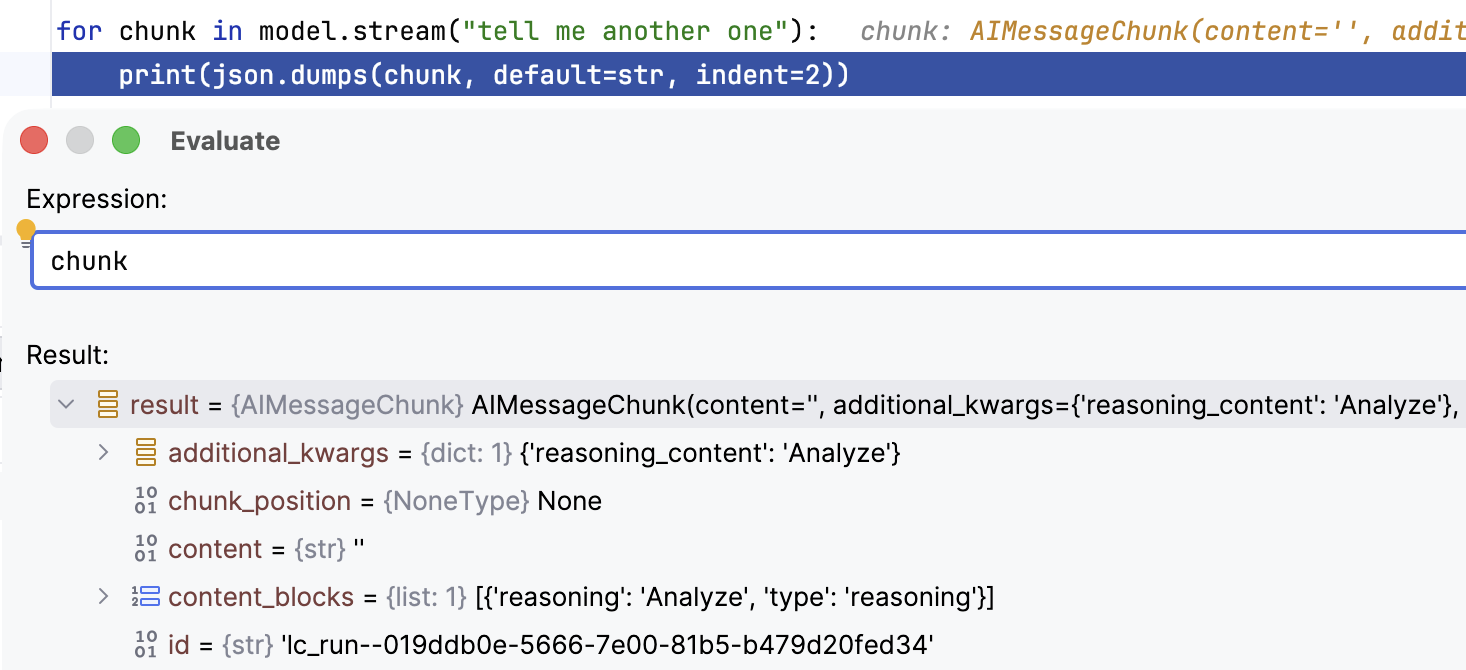
而后端模型的响应只是一个个 content 为空,thinking 有 Token chunk
1{"model":"gemma4:e4b","created_at":"2026-04-29T21:04:03.732473Z","message":{"role":"assistant","content":"","thinking":"Analyze"},"done":false}
2{"model":"gemma4:e4b","created_at":"2026-04-29T21:04:03.763824Z","message":{"role":"assistant","content":"","thinking":" the"},"done":false}
3......
4{"model":"gemma4:e4b","created_at":"2026-04-29T21:04:21.367517Z","message":{"role":"assistant","content":" 😊"},"done":false}
5{"model":"gemma4:e4b","created_at":"2026-04-29T21:04:21.40751Z","message":{"role":"assistant","content":""},"done":true,"done_reason":"stop","total_duration":18228218292,"load_duration":173293250,"prompt_eval_count":20,"prompt_eval_duration":38600833,"eval_count":557,"eval_duration":17781080116}
"done": false ... "done": true 时,推理结束。
AIMessage 中需要调用 tool 时的消息格式,不在本文研究范围内,LangChain 有专门一章讲 Tools 的,到时再详述。
[版权声明]
 本文采用 署名-非商业性使用-相同方式共享 4.0 国际 (CC BY-NC-SA 4.0) 进行许可。