LangChain 核心组件之 Models
在上一篇 LangChain 核心组件之 Agent 有介绍到模型。模型其实是一个很粗泛的概念,放到任何领域都有立身之地, 比如各种建模,经济增长模型,Covid 感染模型等。但来到 AI 时代,会不会只要有人一开口说模型便默认为大语言模型(LLM)呢?而如今的 LLM 模型又基本就是 Transformer 模型,所谓的模型开源只是开放了一堆的 Token 的权重值,不同源软件开源,拿过来能随意定制使用。
大语言模型更像是人类知识的压缩包,可用它生成多种形式的内容,比如文本、图像、音频等。模型在生成内容的过程中,还支持下面几种形式的交互
- 工具调用:可以引导模型通知 Agent 调用工具,如计算,互联网搜索,API 调用等
- 结构化输出:模型本身就支持按照约定的规则格式化输出内容
- 多模态:不仅能生成文本,还能生成图像、音视频等
- 推理:模型可以进行推理,如数学计算、逻辑推理等,就是经常看到的 Thinking 的过程
最初在 Llama3 刚发布的年代,在使用 MCP 时还要查哪个模型支不支持工具使用,现在基本上以上特性是模型的标配了。现在几大商业模型就是 OpenAI 的 GPT, Anthropic 的 Claude,Google 的 Gemini, Musk 的 Grok 在下一梯队。国外的模型选择很清晰,反而中国的大语言模型众多, 仿佛不出个自己的大语言模型就像个互联网公司。
模型的创建
LangChain 标准模型接口来适配各种特定的模型,通过前面的学习,使用模型的方式可分三种
- 特定模型实现:
model = ChatOpenAI(model="gpt-5.2") - LangChain 统一接口:
model = init_chat_model(model="ollama:gemma4:e4b") - 通过 agent 间接使用模型:
agent = create_agent(model="ollama:gemma4:e4b")
LangChain 通过 Provider 的方式支持几乎市面上主流的大语言模型,比如在 init_chat_model 或 create_agent 时有两种方式表明 Provider
- 模型前缀:
init_chat_model(model="anthropic:claude-opus-4-6")以anthropic作为前缀表明使用Anthropic的模型 - 显示指定 provider:
init_chat_model(model="gemma4:e4b", provider="ollama")以provider参数表明使用Ollama的模型
LangChain 支持的 Providers and models, 源代码中找
内置支持的 Provider chat_models/base.py.
初始化模型时的参数支持有:api_key(一般用特定模型的环境变量来指定 API Key), temperature(准确性),max_tokens, timeout, max_retries.
模型的调用
调用又有 model.invoke() 和 model.stream() 两种方式,它们与模型的交互只表示一次请求与响应,不像使用 agent.invoke() 和 agent.stream()
能进行多次请求与响应(包括工具的调用)。model.invoke() 与 model.stream() 请求模型的方式是一样的,只处理输出结果不同, 它们都是向模型发送
一个 JSON 格式的请求,收到的是一段一段的 JSON 响应。
1from langchain.chat_models import init_chat_model
2
3model = init_chat_model(model='ollama:gemma4:e4b')
4
5response = model.invoke("Tell me a joke.")
6print(response)
response 是一个 AIMessage 对象,包含模型生成的文本和一些元数据。比如上面的输出为
content='Why did the scarecrow win an award?\n\n...Because he was outstanding in his field!' additional_kwargs={} response_metadata={'model': 'gemma4:e4b', 'created_at': '2026-04-15T02:12:13.644736Z', 'done': True, 'done_reason': 'stop', 'total_duration': 806794583, 'load_duration': 165737750, 'prompt_eval_count': 21, 'prompt_eval_duration': 89637708, 'eval_count': 20, 'eval_duration': 544281749, 'logprobs': None, 'model_name': 'gemma4:e4b', 'model_provider': 'ollama'} id='lc_run--019d8ee9-139b-7902-922b-e2781147e4f1-0' tool_calls=[] invalid_tool_calls=[] usage_metadata={'input_tokens': 21, 'output_tokens': 20, 'total_tokens': 41}
实际上与 Ollama 的交互是
请求:
 1POST http://127.0.0.1:11434/api/chat
 2Host: 127.0.0.1:11434
 3Accept-Encoding: gzip, deflate, zstd
 4Connection: keep-alive
 5Content-Type: application/json
 6Accept: application/json
 7User-Agent: ollama-python/0.6.1 (arm64 darwin) Python/3.13.5
 8Content-Length: 117
 9
10{"model":"gemma4:e4b","stream":true,"options":{},"messages":[{"role":"user","content":"Tell me a joke."}],"tools":[]}
响应:
 1200 OK
 2Content-Type: application/x-ndjson
 3Date: Wed, 15 Apr 2026 02:12:13 GMT
 4Transfer-Encoding: chunked
 5
 6{"model":"gemma4:e4b","created_at":"2026-04-15T02:12:13.094598Z","message":{"role":"assistant","content":"Why"},"done":false}
 7{"model":"gemma4:e4b","created_at":"2026-04-15T02:12:13.1242Z","message":{"role":"assistant","content":" did"},"done":false}
 8{"model":"gemma4:e4b","created_at":"2026-04-15T02:12:13.153612Z","message":{"role":"assistant","content":" the"},"done":false}
 9{"model":"gemma4:e4b","created_at":"2026-04-15T02:12:13.184216Z","message":{"role":"assistant","content":" scare"},"done":false}
10......
11{"model":"gemma4:e4b","created_at":"2026-04-15T02:12:13.644736Z","message":{"role":"assistant","content":""},"done":true,"done_reason":"stop","total_duration":806794583,"load_duration":165737750,"prompt_eval_count":21,"prompt_eval_duration":89637708,"eval_count":20,"eval_duration":544281749}
为节约篇幅,省略了部分 Token chunk。它的返回类型是 Content-Type: application/x-ndjson, Transfer-Encoding: chunked,
但 model.invoke() 会把每个 chunk 汇总后返回。 下面又会重提到 model.stream() 的输出处理。
我们传一段文字 model.invoke("Tell me a joke.") 相当于是
1response = model.invoke([HumanMessage(content="Tell me a joke.")])
模型是没有记忆的,如果想让模型知道上下文,那必须把每次与模型的交互历史告诉模型,我曾经问过什么,你曾经回复过什么,现在新的问题是什么要按时序堆叠 起来形成一个列表发送给模型。
1conversation = [{"role": "user", "content": "Tell me a joke."}]
2response = model.invoke(conversation)
3
4conversation.append({"role": "assistant", "content": response.content})
5
6conversation.append({"role": "user", "content": "another none"})
7response = model.invoke(conversation)
8print(response.content)
有了这个上下文字后,模型才知道第二次问话 another none 是什么意思。第二次 model.invoke() 相当于是
1model.invoke([
2    {"role": "user", "content": "Tell me a joke."},
3    {"role": "assistant", "content": "Why did the scarecrow win an award?\n\nBecause he was outstanding in his field! 😂"},
4    {"role": "user", "content": "another none"}
5])
role 为 user, assistant, 还有 system 对应于具体的实例类型,以上调用加上 SystemMessage 的话相当于
1model.invoke([
2    SystemMessage(content="You are a joke maker."),
3    HumanMessage(content="Tell me a joke."),
4    AIMessage(content="Why did the scarecrow win an award?\n\nBecause he was outstanding in his field! 😂"),
5    HumanMessage(content="another none")
6])
model 除了用 [{"role": "xxx", "content": "yyy"}] 和 [XxxMessage(content="xxx")] 的形式传递会话历史外,还可以用
list[Tuple] 的形式,代码如下
1response = model.invoke([
2    ("user", "Tell me a joke."),
3    ("assistant", "Why did the scarecrow win an award?\n\nBecause he was outstanding in his field! 😂"),
4    ("user", "another none")
5])
这就是模型的上下文。
模型的流式输出
model.stream() 其实就是把模型返回的 Content-Type: application/x-ndjson 格式的一个个 chunked 渐进的输出。 ndjson 为
Newline Delimited JSON, 就是一大段文本里有多个按行分隔的 JSON。从前面的模型响应看就是一个 chunk 一个 JSON, 其中对应一个 Token.
流式输出
 1from io import StringIO
 2from langchain.chat_models import init_chat_model
 3
 4model = init_chat_model(
 5    model='ollama:gemma4:e4b',
 6)
 7
 8last_message = StringIO()
 9for chunk in model.stream("tell me a joke"):
10    print(chunk.text, end="", flush=True) # AIMessageChunk
11    print(chunk.text, file=last_message, end="", flush=True)
12
13print("\n---\n")
14
15for chunk in model.stream([
16    {"role": "user", "content": "Tell me a joke."},
17    {"role": "assistant", "content": last_message.getvalue()},
18    {"role": "user", "content": "another none"}
19]):
20    print(chunk.text, end="", flush=True)
上面的代码会逐个 Token 蹦出的输出以下内容,像 ChatGPT 和 ollama run ollama:gemma4:e4b 那样的聊天效果,
1Why did the scarecrow win an award?
2
3...Because he was outstanding in his field! 🏆🌽😄
4---
5
6Why don't scientists trust atoms?
7
8...Because they make up *everything*! ⚛️😉
但是遍历了所有的 chunk 都没看到 thinking 的内容输出,从抓取的响应数据包看到在第二次带有 another one 时,模型 ollama:gemma4:e4b
进行了推理,有以下内容的输出
 1{"model":"gemma4:e4b","created_at":"2026-04-15T02:27:07.044361Z","message":{"role":"assistant","content":"","thinking":"Thinking"},"done":false}
 2{"model":"gemma4:e4b","created_at":"2026-04-15T02:27:07.072249Z","message":{"role":"assistant","content":"","thinking":" Process"},"done":false}
 3{"model":"gemma4:e4b","created_at":"2026-04-15T02:27:07.10088Z","message":{"role":"assistant","content":"","thinking":":"},"done":false}
 4{"model":"gemma4:e4b","created_at":"2026-04-15T02:27:07.1567Z","message":{"role":"assistant","content":"","thinking":"\n\n1"},"done":false}
 5{"model":"gemma4:e4b","created_at":"2026-04-15T02:27:07.185115Z","message":{"role":"assistant","content":"","thinking":"."},"done":false}
 6{"model":"gemma4:e4b","created_at":"2026-04-15T02:27:07.239727Z","message":{"role":"assistant","content":"","thinking":"  **"},"done":false}
 7{"model":"gemma4:e4b","created_at":"2026-04-15T02:27:07.26744Z","message":{"role":"assistant","content":"","thinking":"Analyze"},"done":false}
 8{"model":"gemma4:e4b","created_at":"2026-04-15T02:27:07.302577Z","message":{"role":"assistant","content":"","thinking":" the"},"done":false}
 9{"model":"gemma4:e4b","created_at":"2026-04-15T02:27:07.335515Z","message":{"role":"assistant","content":"","thinking":" Request"},"done":false}
10{"model":"gemma4:e4b","created_at":"2026-04-15T02:27:07.367018Z","message":{"role":"assistant","content":"","thinking":":**"},"done":false}
11{"model":"gemma4:e4b","created_at":"2026-04-15T02:27:07.401783Z","message":{"role":"assistant","content":"","thinking":" The"},"done":false}
遍历 model.stream() 时不含 thinking 的 chunk 是因为创建模型时没有带 reasoning=True 参数,代码改造为
 1from io import StringIO
 2from langchain.chat_models import init_chat_model
 3
 4model = init_chat_model(
 5    model='ollama:gemma4:e4b',
 6    reasoning=True
 7)
 8
 9last_message = StringIO()
10for chunk in model.stream("tell me a joke"):
11    print(chunk.text, end="", flush=True) # AIMessageChunk
12    print(chunk.text, file=last_message, end="", flush=True)
13
14print("\n---\n")
15stopped_thinking = False
16
17for chunk in model.stream([
18    {"role": "user", "content": "Tell me a joke."},
19    {"role": "assistant", "content": last_message.getvalue()},
20    {"role": "user", "content": "another none"}
21]):
22    thinking = chunk.additional_kwargs.get("reasoning_content", "")
23
24    if thinking:
25        print(f"\033[32m{thinking}", end="", flush=True)
26    else:
27        if stopped_thinking == False and len(chunk.text) > 0:
28            print("\n---\n")
29            stopped_thinking = True
30
31        print(f"\033[0m{chunk.text}", end="", flush=True)
当 init_chat_model() 不指定 reasoning 参数时,模型会自行决定是否进行推理(reasoning/thinking). 指定 reasoning=False
的话模型则不进行推理。
比如对于 model.invoke("hello") 时,init_chat_model() 的 reasoning 参数值会影响到向模型发送的数据的 think 属性。没有
reasoning 参数,reasoning=True 与 reasoning=False 时发给模型的请求数据分别如下:
1{"model":"gemma4:e4b","stream":true,"options":{},"messages":[{"role":"user","content":"Hello"}],"tools":[]}
2{"model":"gemma4:e4b","stream":true,"options":{},"messages":[{"role":"user","content":"Hello"}],"tools":[],"think":true}
3{"model":"gemma4:e4b","stream":true,"options":{},"messages":[{"role":"user","content":"Hello"}],"tools":[],"think":false}
上面代码的输出为
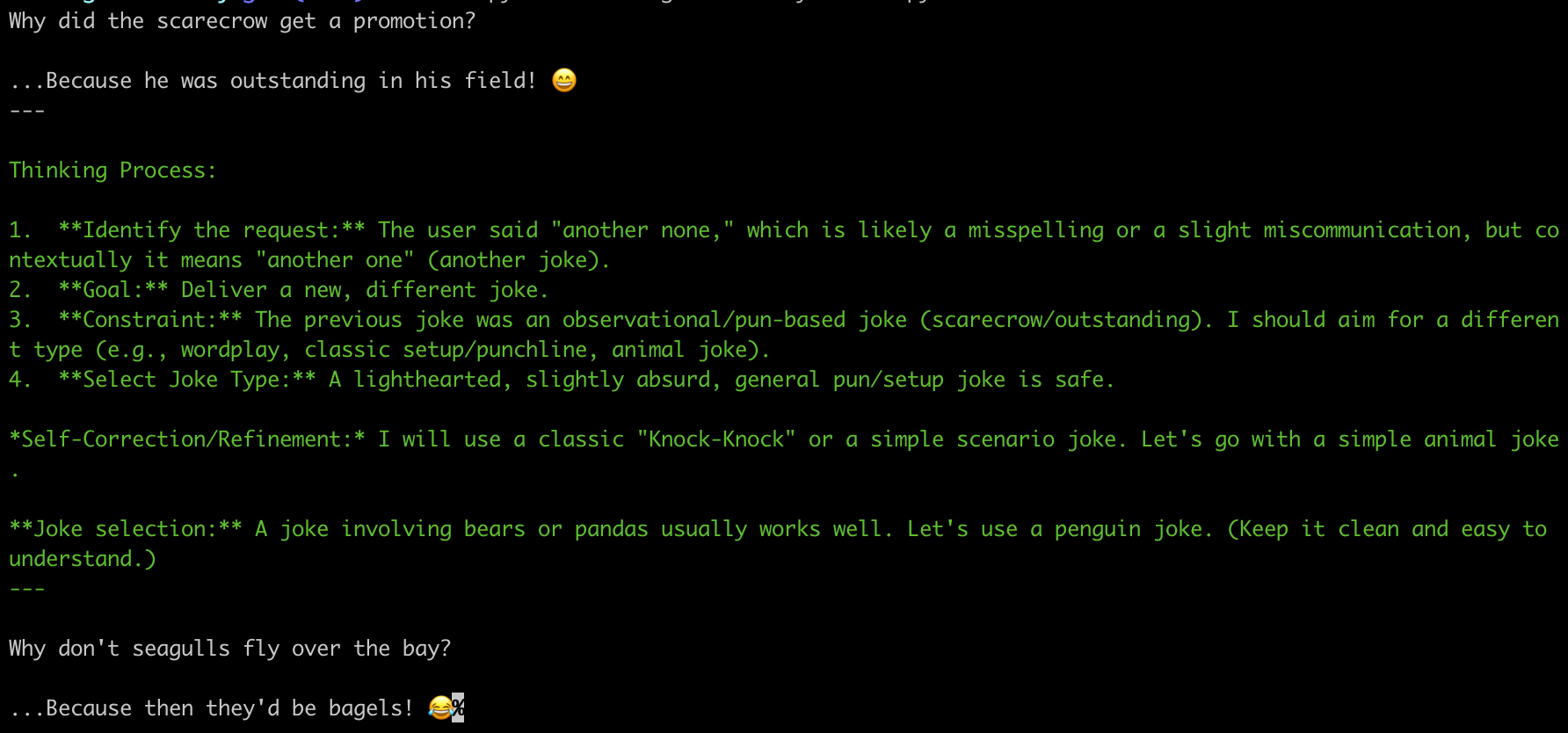
也能通过 chunk.content_block 中的内容,如
[{'reasoning': 'Thinking', 'type': 'reasoning'}]: thinking 的输出[{'text': 'What', 'type': 'text'}]: 实际回复的输出- 更多的
type有tool_call_chunk
Streaming 还能用于事件,如 model.astream_events(),
批处理 model.invoke()
LangChain 提供了自动批处理调用模型,像是启动多个线程来执行 model.invoke() 一般。model.batch() 的使用方式为
1responses = model.batch([
2    "Why do parrots have colorful feathers?",
3    "How do airplanes fly?",
4    "What is quantum computing?"
5])
6for response in responses:
7    print(response)
这会有三个独立的模型请求, 完成整个 Batch 后收到对应的三个 AIMessage. Batch 也可以 Streaming, 并发请求,只要收到任何一个响应即可输出,
相应的函数是 model.batch_as_completed()
1for response in model.batch_as_completed([
2    "Why do parrots have colorful feathers?",
3    "How do airplanes fly?",
4    "What is quantum computing?"
5]):
6    print(response)
如果输入项太多,比如说 100 个输入,你可能不想 100 个请求同时发出去,那么可以配置它的并发数,如
1model.batch(
2    list_of_inputs,
3    config={'max_concurrency': 5}
4)
工具调用(Tool calling)
LangChain 的文档太过于冗余,在 Agents 一章上讲过工具调用,本章 Models 也讲,下面还有单独的 Tools,
就当时反复学习巩固吧,但侧重点还是有所不同的。
最早是叫 function calling, 现在多称为 tool calling,这两个是一样的,到后来发展到 MCP(Model Context Protocol), 到现在流行的
Agent Skills, 它们都有内在的关联。自从 Model 有了工具之后它才开始能实际干活了,否则还只是一个很聪明的知识问答库。tool calling 指
Agent 调用进程内的函数,MCP 是由 MCP Client 调用外部工具(RPC 操作),Agent Skills 让工具调用更动态化了。
Agent 加上工具与模型的交互语义上是这样的
- Agent 告诉模型,我这里有一些工具,它们有各自的用途描述,接收什么样的参数,如果你需要的话告诉我可调用哪个函数,并且提供相应的参数
- 模型如果判断需要调用哪个工具,则返回要调用的工具名称和参数
- Agent 完成工具调用,并把工具调用结果再次发给模型,同时也会把工具列表发给模型
- 模型如果还需要调用某个工具的话,再次进入 #2, #3 循环
- 如果模型判断不再需要调用工具的话,就可结束会话,返回最终结果
这是 LangChain 用 create_agent() 会自动完成的循环,而 init_chat_model() 的 invoke() 只进作一次请求/响应,是否要进行工具调用,
如何调用工具,并且把工具调用结果再次发送给模型的这一系列操作得自己动手。
测试代码
 1from langchain.chat_models import init_chat_model
 2from langchain.tools import tool
 3
 4@tool
 5def get_weather(location: str) -> str:
 6    """Get the weather at a location."""
 7    return f"It's sunny in {location}."
 8
 9model = init_chat_model(model="ollama:gemma4:e4b")
10
11model_with_tools = model.bind_tools([get_weather])
12
13response = model_with_tools.invoke("What's the weather like in Boston?")
14print(response.tool_calls)
15print(response.content_blocks)
最后看到 repsonse 中有 tool_calls 和 content_blocks 含有通知工具调用的指令
[{'name': 'get_weather', 'args': {'location': 'Boston'}, 'id': '36527d9b-4a7d-48be-ab15-fb72add8f9a6', 'type': 'tool_call'}]
[{'type': 'tool_call', 'id': '36527d9b-4a7d-48be-ab15-fb72add8f9a6', 'name': 'get_weather', 'args': {'location': 'Boston'}}]
继续模拟出与模型完整的交互过程
 1conversation = [{"role": "user", "content": "What's the weather like in Boston?"}]
 2response = model_with_tools.invoke(conversation)
 3conversation.append(response)
 4
 5for tool_call in response.tool_calls:
 6    tool_result = globals()[tool_call["name"]].invoke(tool_call["args"])
 7    conversation.append({"role": "tool", "content": tool_result, "tool_call_id": tool_call["id"]})
 8
 9response = model_with_tools.invoke(conversation)
10print(response.content)
最后输出的结果是
The weather in Boston is sunny.
如果使用 create_agent(), 会自动完成这一系列的交互过程, 这里只是用 model 再来做一次练习。
上面假定了只有一个工具调用就结整,如果调用工具把结果发送给模型,模型又返回说要进行另一个工具调用,那么就需要在循环中继续调用工具,发送结果给模型,
直到模型不再需要工具调用为止。工具调用时,返回的 AIMessage 中的 tool_call_id 要与返回工具调用结果给模型时 ToolMessage 的
tool_call_id 相对应。
强制使用工具
model.bind_tools() 时可以强制当前对话是否使用工具, 有时候会很怪异,明明用不着工具时一强制,模型的回复就有点胡来了。方法是
1model_with_tools = model.bind_tools([tool_1, tool_2], tool_choice="any")
model.bind_tools() 是使用 tool_choice 参数,它的取值有 any, <tool_name>, 分别让模型选择任意一个工具和指定的工具。下面测试一下
 1from langchain.tools import tool
 2from langchain.chat_models import init_chat_model
 3
 4@tool
 5def tool_1(filepath: str) -> str:
 6    """read file content by filepath"""
 7    return "I'm a cat"
 8
 9@tool
10def tool_2(filepath: str, content: str) -> str:
11    """write file content by filepath and content"""
12    return "updated file " + filepath
13
14
15model = init_chat_model(
16    model='ollama:llama3.2:1b',
17)
18model_with_tools = model.bind_tools([tool_1, tool_2], tool_choice="any")
19
20response = model_with_tools.invoke("hello")
21print("content: ", response.content)
22print("tool_calls: ", response.tool_calls)
23print("content_blocks: ", response.content_blocks)
当 tool_choice="any" 时看模型的决定
content:
tool_calls: [{'name': 'tool_1', 'args': {'filepath': 'hello.txt'}, 'id': 'd60d136d-f908-4f30-a523-55518ed270d6', 'type': 'tool_call'}]
content_blocks: [{'type': 'tool_call', 'id': 'd60d136d-f908-4f30-a523-55518ed270d6', 'name': 'tool_1', 'args': {'filepath': 'hello.txt'}}]
问句 hello, 模型说请调用 tool_1('hello.txt'), 好像还有点相关性. 可是再跑一次相同的代码又会是下面的结果
1content:  {
2  "name": "{function read_file_content_by_filepath}",
3  "parameters": {
4    "filepath": "hello"
5  }
6}
7tool_calls:  []
8content_blocks: [{'type': 'text', 'text': '{\n "name": "{function read_file_content_by_filepath}",\n "parameters": {\n "filepath": "hello"\n }\n}'}]不是要强制使用工具吗?那好,hello 是吧,给我任意调 read_file_content_by_filepath("hello") 方法,这就乱套了。
换成
1model_with_tools = model.bind_tools([tool_1, tool_2], tool_choice="tool_2")
使用 ollma:llama3.2:1b 模型,多运行几次什么结果都有,有说调用 tool_2, 或说调用 tool_1 的,甚至是任何无名的工具函数。
所以在使用 tool_choice 时一定要描述清楚要模型干什么活,比如有两个类似的工具函数,问题和 tool_choice 双重约定,换成下面的代码
1model_with_tools = model.bind_tools([tool_1, tool_2], tool_choice="any")
2response = model_with_tools.invoke("use tool_1 to load file 'hello.txt', and explain content")
就清晰了,在问题不明确的情况下强制 tool_choice 使用工具时,是否有意外的结果很大程度上还由所选择的模型. 如果选择了一个更聪明的模型,即使用
tool_choice="tool_1", 但问题不明不白时,模型也会拒绝请求工具, 例如下面的代码
1model = init_chat_model(
2    model='ollama:gemma4:e4b',
3)
4model_with_tools = model.bind_tools([tool_1, tool_2], tool_choice="tool_1")
5
6response = model_with_tools.invoke("hello")
7print("content: ", response.content)
8print("tool_calls: ", response.tool_calls)
9print("content_blocks: ", response.content_blocks)
执行多次的结果总是
content: Hello! How can I help you today?
tool_calls: []
content_blocks: [{'type': 'text', 'text': 'Hello! How can I help you today?'}]
工具的并发调用
当一次询问模型会返回多个工具调用,例如问
1model_with_tools = model.bind_tools([tool_1, tool_2])
2response = model_with_tools.invoke("read file 1.txt and 2.txt, merge and summarize")
它返回的 tool_calls 就会包含多项
tool_calls: [{'name': 'tool_1', 'args': {'filepath': '1.txt'}, 'id': '8c327fe1-de8b-4570-b2f8-b921a813f2ed', 'type': 'tool_call'}, {'name': 'tool_1', 'args': {'filepath': '2.txt'}, 'id': 'f4f66d8d-9782-4afc-91e2-c107b51e4cca', 'type': 'tool_call'}]
在 Agent 端也可并发安排这两个工具函数的调用,有些模型 Provider 可用 model.bind_tools(tools, parallel_tool_calls=False) 禁用该特性。
Streaming 工具调用
当 Streaming 时, for chunk in model_with_tools.stream(), 工具调用对应的 chunk 是 ToolCallChunk.
结构化输出
模型可被要求按某个预设的格式输出内容,而不只是一段非结构化的文本. 格式化输出的 Schema 可以通过 Pydantic, TypedDict, 或者 JSON Schema
告诉模型。
下面分别演示
Pydantic Schema
 1from langchain.chat_models import init_chat_model
 2
 3from pydantic import BaseModel
 4
 5class Winner(BaseModel):
 6    first_name: str
 7    last_name: str
 8    birth_year: int
 9
10model = init_chat_model(
11    model='ollama:gemma4:e4b',
12)
13
14model_with_structure = model.with_structured_output(Winner)
15response = model_with_structure.invoke("Get one who won the Nobel Prize in Chemistry in 2020?")
16print("type: ", type(response), "\n", response)
返回的 response 就是一个 Winner 实例,没有额外信息
1type:  <class 'dict'>
2 {'first_name': 'Peter', 'last_name': 'Wouter', 'birth_year': 1953}
模型还是很聪明的,看看上面向模型发送的什么请求
1{"model":"gemma4:e4b","stream":true,"options":{},"format":{"properties":{"first_name":{"title":"First Name","type":"string"},"last_name":{"title":"Last Name","type":"string"},"birth_year":{"title":"Birth Year","type":"integer"}},"required":["first_name","last_name","birth_year"],"title":"Winner","type":"object"},"messages":[{"role":"user","content":"Get one who won the Nobel Prize in Chemistry in 2020?"}],"tools":[]}TypedDict Schema
换成 TypedDict 的形式, 定义有所不同
1from typing_extensions import TypedDict, Annotated
2
3class Winner(TypedDict):
4    first_name: Annotated[str, ...]
5    last_name: Annotated[str, ...]
6    birth_year: Annotated[int, ...]
执行结果是一样的,但发送给模型的提示词是不一样的
1{"model":"gemma4:e4b","stream":true,"options":{},"format":{"title":"Winner","description":"dict() -> new empty dictionary\ndict(mapping) -> new dictionary initialized from a mapping object's\n (key, value) pairs\ndict(iterable) -> new dictionary initialized as if via:\n d = {}\n for k, v in iterable:\n d[k] = v\ndict(**kwargs) -> new dictionary initialized with the name=value pairs\n in the keyword argument list. For example: dict(one=1, two=2)","type":"object","properties":{"first_name":{"type":"string"},"last_name":{"type":"string"},"birth_year":{"type":"integer"}},"required":["first_name","last_name","birth_year"]},"messages":[{"role":"user","content":"Get one who won the Nobel Prize in Chemistry in 2020?"}],"tools":[]}JSON Schema Schema
只要把 Pydantic 定义方式生成的 Schema 赋给 model.with_structured_output(json_schema, method="json_schema") 即可,
从 Pydantic 方式发送给模型的请求中拷贝出 format 中的 Schema 定义
1{"properties":{"first_name":{"title":"First Name","type":"string"},"last_name":{"title":"Last Name","type":"string"},
2"birth_year":{"title":"Birth Year","type":"integer"}},"required":["first_name","last_name","birth_year"],"title":"Winner","type":"object"}
3''')
4
5model_with_structure = model.with_structured_output(json_schema, method="json_schema")
6response = model_with_structure.invoke("Get one who won the Nobel Prize in Chemistry in 2020?")
7print("type: ", type(response), "\n", response)
一样的输出。
model.with_structured_output() 的参数说明
include_raw=true,model.with_structured_output(Winner, include_raw=True),它invoke()之后返回的是结构是 {'raw':, 'parsed': , 'parsing_error': } method="function_calling",model.with_structured_output(Winner, method="function_calling"), 它会把Schema当作tools传给模型,相应的请求这个1 {"model":"gemma4:e4b","stream":true,"options":{},"messages":[{"role":"user","content":"Get one who won the Nobel Prize in Chemistry in 2020?"}],"tools":[{"type":"function","function":{"name":"Winner","description":"dict() -> new empty dictionary\ndict(mapping) -> new dictionary initialized from a mapping object's\n (key, value) pairs\ndict(iterable) -> new dictionary initialized as if via:\n d = {}\n for k, v in iterable:\n d[k] = v\ndict(**kwargs) -> new dictionary initialized with the name=value pairs\n in the keyword argument list. For example: dict(one=1, two=2)","parameters":{"type":"object","required":["first_name","last_name","birth_year"],"properties":{"first_name":{"type":"string"},"last_name":{"type":"string"},"birth_year":{"type":"integer"}}}}}]} 2tools定义与使用TypedDict方式的 Schema 很相似. 既然是工具调用,就要求客户端来进行调用,并返回ToolMessage, 除非用agent自动化处理。method="json_mode", ``model.with_structured_output(None, method="json_mode")`1 model_with_structure = model.with_structured_output(None, method="json_mode") 2 response = model_with_structure.invoke("""Get one who won the Nobel Prize in Chemistry in 2020?, \n 3 extract first_name, last_name, and birth_year and return as json""") 4 print("type: ", type(response), "\n", response)
这段代码返回的是一个 AIMessage, 其中 response.content 内容是
1type:  <class 'dict'>
2 {'first_name': 'Peter', 'last_name': 'Wouter', 'birth_year': '1959'}
method=json_mode 时返回的数据构靠问题提示词中的描述,它底层是 response_format: json_object 实现的。
嵌套的结构
带嵌套的结构化数据,例如获得 2020 年诺贝尔化学奖获得者的信息,返回格式为 JSON 数组,每个元素包含 first_name, last_name, 和 birth_year 字段。
 1class Winner(BaseModel):
 2    first_name: str
 3    last_name: str
 4    birth_year: int
 5
 6class Winners(BaseModel):
 7    winners: list[Winner]
 8
 9model = init_chat_model(
10    model='ollama:gemma4:e4b',
11)
12
13model_with_structure = model.with_structured_output(Winners)
14response = model_with_structure.invoke("Get who won the Nobel Prize in Chemistry in 2020?")
15print("type: ", type(response), "\n", response)
得到的结果是
1type:  <class '__main__.Winners'>
2winners=[Winner(first_name='Omar', last_name='Atwater', birth_year=1944), Winner(first_name='Lewis', last_name='Brust', birth_year=1932), Winner(first_name='Joseph', last_name='Chrichton', birth_year=1932)]
其他更高级的话题
LangChain 1.1 之后,据官方文档介绍 model.profile 可看到关于模型的特性,但对于本地 Ollama 模型, model.profile 返回 None.
看下 Gemini 的模型
1model = init_chat_model(
2    model='gemini-2.5-flash',
3    model_provider='google_genai'
4)
5
6print(json.dumps(model.profile, indent=2))
看到了模型相关数据
 1{
 2  "max_input_tokens": 1048576,
 3  "max_output_tokens": 65536,
 4  "text_inputs": true,
 5  "image_inputs": true,
 6  "audio_inputs": true,
 7  "pdf_inputs": true,
 8  "video_inputs": true,
 9  "text_outputs": true,
10  "image_outputs": false,
11  "audio_outputs": false,
12  "video_outputs": false,
13  "reasoning_output": true,
14  "tool_calling": true,
15  "structured_output": true,
16  "image_url_inputs": true,
17  "image_tool_message": true,
18  "tool_choice": true
19}
有些模型 profile 数据可以覆盖的,其中一种做法是
1custom_profile = {
2    "max_input_tokens": 100_000,
3    "tool_calling": True,
4    "structured_output": True,
5    # ...
6}
7model = init_chat_model("...", profile=custom_profile)
Ollama 可用 /api/show 查看模型的详细信息
1curl -s http://localhost:11434/api/show -d '{"model":"gemma4:e4b"}' | jq .
多模态(Multimodal)
很多模型不仅仅是处理文本数据,还能处理如图片,音频,视频等数据,非文本数据可以通过 content blocks 传递给模型。从前面 Gemini 模型的
profile 看到它支持 input 的其他格式有 image, pdf, audio, video, 但没有 image, audio, 和 video 的输出。
本地 Ollama 模型没有一个能支持 LangChain 来生成图片的模型
推理(Reasoning)
现代模型越来越强,工具与推理都快成标配了,可以 reponse.content_blocks 或 chunk.additional_kwargs 中找到 Reasoning 的步骤与内容,
本文前方有介绍在控制台下如何用不同的颜色显示 Reasoning 的内容。另外,我们在创建 model 实例时可以选择是否启用推理,推理的级别 高 与 低.
提示词缓存(Prompt Cache)
许多模型提供者具有隐式或显式的提示词缓存功能,用以应对重复 Token 时降低延迟。OpenAI 和 Gemini 提供了隐式的提示词缓存,自动帮助节约成本。
ChatOpenAI(通过 prompt_cache_key), Anthropic(AnthropicPromptCachingMiddleware), Gemini, 和 AWS Bedrock允许用户 手工指定缓存点。提示词缓存就像是给模型装了一个短期记忆`.
服务端工具使用(Server-side tool use)
从以往的经验工具调用都是模型的客户端完成的,模型只是告诉客户端该调用哪个工具,并且参数是什么,客户端调用工具后,发送一个相关联的 ToolMessage
给模型。但读到这里有的模型自身就能调用工具,不依赖于提示词中的 tools, 也没有 ToolMessage, 这就做服务端工具调用。比如问 "今天天气如何",
模型自己就能调用天气的 API 确定今天的天气状态,难怪中国的模型本身就有这么强大的敏感词过滤功能(应该是另一回事),不知道服务端工具调用是如何实现的。
运行在 Anthropic 基础设施上的模型就支持服务端的 web_search, code_execution, web_fetch, tool_search 这些方法。
服务端工具使用还是很有意思,有这个功能的话,某些操作都不用依赖于 MCP, 期待发现更多支持 Server-side tool use 的模型,反正 Ollama
本地模型是不行的。
服务端工具使用依赖的部署模型的基础设置实现的,就模型本身那一堆权重值是不会调用工具的,也就云上模型的 API 与模型之间加入了工具调用能力, 当有工具调用要求时不需要询问客户端,让服务端 API 去执行,然后结果送给模型,最后的结果才发送到客户端去。
限流(Rate Limiting)
主要是针对云上的模型,应该大部分都有限流设置,防止硬件资源过载或者是被人蒸馏,对使用端也能避免花钱过度。init_chat_model() 时可以用 rate_limiter
参数指定一个限流器,限流器的基类是 BaseRateLimiter, 在 LangChain 标准库中只有一个实现类 InMemoryRateLimiter, 下面是限流器的使用示例:
 1from langchain_core.rate_limiters import InMemoryRateLimiter
 2
 3rate_limiter = InMemoryRateLimiter(
 4    requests_per_second=0.1,  # 1 request every 10s
 5    check_every_n_seconds=0.1,  # Check every 100ms whether allowed to make a request
 6    max_bucket_size=1,  # Controls the maximum burst size.
 7)
 8
 9model = init_chat_model(
10    model="ollama:llama3.2:1b",
11    rate_limiter=rate_limiter
12)
13
14question = "1+1? answer it as simple as you can"
15print(datetime.now(), model.invoke(question).content)
16print(datetime.now(), model.invoke(question).content)
17print(datetime.now(), model.invoke(question).content)
18print(datetime.now(), model.invoke(question).content)
上面的代码控制 10s 最多的一个请求,执行效果是
12026-04-16 13:31:01.987762 2.
22026-04-16 13:31:12.222312 2.
32026-04-16 13:31:22.233443 2
42026-04-16 13:31:32.247292 2.
发快了不会报异常,而是在 10 秒后才发送下一个请求。如果改为 requests_per_second=0.5,即每两秒可以发一个请求
12026-04-16 13:33:33.147593 2.
22026-04-16 13:33:35.451476 2.
32026-04-16 13:33:37.492235 2.
42026-04-16 13:33:39.538332 2.
Base URL 和代理设置
Base URL 常用到,比较要访问不在本机运行的 Ollama,就需要设定 base_url 来覆盖默认的 http://127.0.0.1:11434
1model = init_chat_model(
2    model="ollama:llama3.2:1b",
3    base_url="http://192.168.86.55:11434"
4)
或者仿真了某个 Provider 的 API, 或者通过 base_url 进行代理
1model = init_chat_model(
2    model="MODEL_NAME",
3    model_provider="openai",
4    base_url="BASE_URL",
5    api_key="YOUR_API_KEY",
6)
前面提到代理,有些模型提供都支持 proxy 设置,例如 ChatOpenAI
1from langchain_openai import ChatOpenAI
2
3model = ChatOpenAI(
4    model="gpt-4.1",
5    openai_proxy="http://proxy.example.com:8080"
6)
而 Ollama 没有 Proxy 相关参数,所以只有针对 Python 代码设置环境变量 http_proxy=http://127.0.0.1:9090 来代理,有代理的挟持就能
观察客户端与模型之间的通信数据。本人对 LangChain 的学习就非常依赖代理与反向代理来理解与模型的通信过程。
对数概率(Log probabilities)
有些模型可以输出每个 Token 预测的概率,像 Ollama 的 Gemma4 模型就支持
1model = init_chat_model(
2    model="ollama:gemma4:e4b",
3    reasoning = False,
4).bind(logprobs=True)
5
6response = model.invoke("what's your model name")
7print(response.content)
8print(response.response_metadata)
观察它的输出
1I am Gemma 4.
2{'logprobs': [Logprob(token='I', logprob=-0.08577388525009155, top_logprobs=None), Logprob(token=' am', logprob=-0.0008207597420550883, top_logprobs=None), Logprob(token=' Gemma', logprob=-0.012466958723962307, top_logprobs=None), Logprob(token=' ', logprob=-3.5138086218466924e-07, top_logprobs=None), Logprob(token='4', logprob=-9.579081705624048e-08, top_logprobs=None), Logprob(token='.', logprob=-0.0023099889513105154, top_logprobs=None)], 'model': 'gemma4:e4b', 'created_at': '2026-04-16T18:50:19.834211Z', 'done': True, 'done_reason': 'stop', 'total_duration': 484960458, 'load_duration': 150261667, 'prompt_eval_count': 15, 'prompt_eval_duration': 116573333, 'eval_count': 7, 'eval_duration': 201391248, 'model_name': 'gemma4:e4b', 'model_provider': 'ollama'}
Token 使用状况
有些模型支持输出当前模型调用,或多次调用上下文的 Token 使用情况,Ollama 的本地模型 Gemma4 已支持. 代码演示
 1from langchain.chat_models import init_chat_model
 2from langchain_core.callbacks import UsageMetadataCallbackHandler, get_usage_metadata_callback
 3
 4callback = UsageMetadataCallbackHandler()
 5
 6model = init_chat_model(
 7    model="ollama:gemma4:e4b",
 8    base_url='http://192.168.86.54:11434',
 9)
10
11result_1 = model.invoke("hello", config={"callbacks": [callback]})
12print(callback.usage_metadata)
13
14with get_usage_metadata_callback() as cb:
15    model.invoke("Hello")
16    model.invoke("Hello")
17    print(cb.usage_metadata)
输出来的信息是
1{'gemma4:e4b': {'input_tokens': 17, 'output_tokens': 210, 'total_tokens': 227}}
2{'gemma4:e4b': {'total_tokens': 319, 'input_tokens': 34, 'output_tokens': 285}}
使用 Ollama 时不用 Callback 也能从 response.response_metadata 中看到 token 的统计
1response = model.invoke("hello")
2print(response.response_metadata)
response.response_metadata 为
1{'model': 'gemma4:e4b', 'created_at': '2026-04-16T20:28:01.183718Z', 'done': True, 'done_reason': 'stop', 'total_duration': 612028791, 'load_duration': 144160541, 'prompt_eval_count': 17, 'prompt_eval_duration': 131673834, 'eval_count': 210, 'eval_duration': 328611165, 'logprobs': None, 'model_name': 'gemma4:e4b', 'model_provider': 'ollama'}其中的 'prompt_eval_count': 17, 'eval_count': 210
输入输出大概是下面那样算出来的, 包括换行等特殊字符
1<start_of_turn>user
2hello<end_of_turn>
3<start_of_turn>model
模型调用参数
model.invoke() 时用 config:RunnableConfig 字典指定调用模型时的参数,其中一些关键属性是 run_name, tags, metadata,
max_concurrency(batch 调用时用到), callbacks, recursion_limit(有许多工具时).
 1response = model.invoke(
 2    "Tell me a joke",
 3    config={
 4        "run_name": "joke_generation",      # Custom name for this run
 5        "tags": ["humor", "demo"],          # Tags for categorization
 6        "metadata": {"user_id": "123"},     # Custom metadata
 7        "callbacks": [my_callback_handler], # Callback handlers
 8        "model": "gpt-5-nano"               # Configure model
 9    }
10)
配置模型的默认值
 1first_model = init_chat_model(
 2        model="gpt-4.1-mini",
 3        temperature=0,
 4        configurable_fields=("model", "temperature", "max_tokens"),
 5        config_prefix="first",  # Useful when you have a chain with multiple models
 6)
 7
 8first_model.invoke(
 9    "what's your name",
10    config={
11        "configurable": {
12            "first_temperature": 0.5,
13            "first_max_tokens": 100,
14        }
15    },
16)
这就是 LangChain 核心组件 - Models 的内容,每章的内容真的挺多的,写在同一篇博客中,信息密度有些高。相对于 create_agent() 来说这是低级别的组件,
因为使用 init_chat_model() 基本所有操作都必须手工处理,如工具调用,短期记忆,甚至是结构化输出更更笨拙,但是了解它有助于我们理解与模型交互的实际过程。
学习到现在,该考虑用 create_agent() 来创建一个能帮自动化处理一些事情的 Agent。
[版权声明]
 本文采用 署名-非商业性使用-相同方式共享 4.0 国际 (CC BY-NC-SA 4.0) 进行许可。