设置 UILabel 和 UITextField 的 Padding 或 Insets
iOS 的控件,只看到 UIButton 可以设置 Padding/Insets,即按钮上文字或图片与按钮边界的间隙,对与 CSS 来说叫做 Padding,在 iOS 中叫做 Insets,UIButton 设置 Insets 相应的属性如下:
Configuring Edge Insets
contentEdgeInsets property
titleEdgeInsets property
imageEdgeInsets property
它们接受的属性类型是:UIEdgeInsets,由函数 UIEdgeInsetsMake ( CGFloat top, CGFloat left, CGFloat bottom, CGFloat right ); 构造出,分别表示其中的内容/标题/图片离各边的距离。
在 xib 中也有界面来对按钮的这三个 EdgeInsets 属性的设置,分别是按钮的 Edge 和 Inset 属性。
印像中,Swing 的许多组件都可设置 Insets 属性,可对于 iOS 的控件就没那么幸运了,比如我想设置 UILable 或 UITextField 中的文本离边界的间隙,无伦是在 xib 里还是直接代码的方式都无能为力,因为它们根据未开放相应的属性让你去控制。
办法当然还是有的,自定义相应自己的控件了,比如 InsetsLabel 或是 InsetsTextField,接着就是覆盖某些个方法来达成。
首先来看 UILabel 的子类 InsetsLabel 的实现代码:
关键就是覆盖了 -(void) drawTextInRect: (CGRect) rect; 方法,在画 Label 的文本时分别设置文本与 Label 四个边的间隙,即画在 Label 内的一个小矩形内,这个例子提供了便利的构造函数,提供自己的 UIEdgeInsets 属性。另外,函数 UIEdgeInsetsInsetRect(CGRect, UIEdgeInsets) 应该是好理解的。
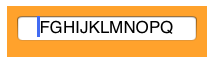
再看如何设置 UITextField 中文本到四边的间距,这里也可以定义自己的 InsetsTextField:
效果如下:
上面更像是借鉴的 InsetsLabel 的实现,其实对于 UITextField 还有更好的实现办法,而且更简单,因为 UITextFiled 原来就支持的做法。比如它可以让你做出在文本框最前方固定一个 $ 符号,表示这个文本框是输入钱的,第一个$ 是不能被删除的。确实,你可以在 TextField 上贴个 Label,然后文本框的光标后移,稍显麻烦了。
而 UITextField 可以直接设置 leftView 或 rightView, 然后文本输入区域就在 leftView 和 rightView 之间了,看例子:
rightView 也是一样的设置方式,其中的 Mode 有四种,看到名字应该不难理解:
UITextFieldViewModeNever,
UITextFieldViewModeWhileEditing,
UITextFieldViewModeUnlessEditing,
UITextFieldViewModeAlways
它的效果呢就更酷了:
实际应用中,对于 UITextField 如果有类似的需求,我会毫不犹豫的使用 leftView/rightView 属性来设置。
参考:1. http://stackoverflow.com/questions/2694411/text-inset-for-uitextfield
2. http://stackoverflow.com/questions/5674655/uitextfield-align-left-margin 永久链接 https://yanbin.blog/uilable-uitextfield-padding-insets/, 来自 隔叶黄莺 Yanbin's Blog
[版权声明] 本文采用 署名-非商业性使用-相同方式共享 4.0 国际 (CC BY-NC-SA 4.0) 进行许可。
Configuring Edge Insets
contentEdgeInsets property
titleEdgeInsets property
imageEdgeInsets property
它们接受的属性类型是:UIEdgeInsets,由函数 UIEdgeInsetsMake ( CGFloat top, CGFloat left, CGFloat bottom, CGFloat right ); 构造出,分别表示其中的内容/标题/图片离各边的距离。
在 xib 中也有界面来对按钮的这三个 EdgeInsets 属性的设置,分别是按钮的 Edge 和 Inset 属性。
印像中,Swing 的许多组件都可设置 Insets 属性,可对于 iOS 的控件就没那么幸运了,比如我想设置 UILable 或 UITextField 中的文本离边界的间隙,无伦是在 xib 里还是直接代码的方式都无能为力,因为它们根据未开放相应的属性让你去控制。
办法当然还是有的,自定义相应自己的控件了,比如 InsetsLabel 或是 InsetsTextField,接着就是覆盖某些个方法来达成。
首先来看 UILabel 的子类 InsetsLabel 的实现代码:
 1//1.header file
 2#import <UIKit/UIKit.h>
 3
 4@interface InsetsLabel : UILabel
 5@property(nonatomic) UIEdgeInsets insets;
 6-(id) initWithFrame:(CGRect)frame andInsets: (UIEdgeInsets) insets;
 7-(id) initWithInsets: (UIEdgeInsets) insets;
 8@end
 9
10//2. implementation file
11#import "InsetsLabel.h"
12
13@implementation InsetsLabel
14@synthesize insets=_insets;
15-(id) initWithFrame:(CGRect)frame andInsets:(UIEdgeInsets)insets {
16    self = [super initWithFrame:frame];
17    if(self){
18        self.insets = insets;
19    }
20    return self;
21}
22
23-(id) initWithInsets:(UIEdgeInsets)insets {
24    self = [super init];
25    if(self){
26        self.insets = insets;
27    }
28    return self;
29}
30
31-(void) drawTextInRect:(CGRect)rect {
32    return [super drawTextInRect:UIEdgeInsetsInsetRect(rect, self.insets)];
33}
关键就是覆盖了 -(void) drawTextInRect: (CGRect) rect; 方法,在画 Label 的文本时分别设置文本与 Label 四个边的间隙,即画在 Label 内的一个小矩形内,这个例子提供了便利的构造函数,提供自己的 UIEdgeInsets 属性。另外,函数 UIEdgeInsetsInsetRect(CGRect, UIEdgeInsets) 应该是好理解的。
再看如何设置 UITextField 中文本到四边的间距,这里也可以定义自己的 InsetsTextField:
 1//
 2//  Created by Unmi on 11/2/11.
 3//  Copyright (c) 2011 http://unmi.cc. All rights reserved.
 4//
 5
 6#import <UIKit/UIKit.h>
 7
 8@interface InsetsTextField : UITextField
 9@end
10
11@implementation InsetsTextField
12//控制 placeHolder 的位置,左右缩 20
13- (CGRect)textRectForBounds:(CGRect)bounds {
14    return CGRectInset( bounds , 20 , 0 );
15}
16
17// 控制文本的位置,左右缩 20
18- (CGRect)editingRectForBounds:(CGRect)bounds {
19    return CGRectInset( bounds , 20 , 0 );
20}
21@end
22
23//-----------------------------------------------------------------
24//下面是使用 InsetsTextField 的代码,可放在 viewDidLoad 等代理方法中
25InsetsTextField *insetTextField = [[InsetsTextField alloc]
26                                  initWithFrame:CGRectMake(10, 10, 180, 25)];
27
28//须手动设置它的 borderStyle, 不然看不到边框的
29insetsTextField.borderStyle = UITextBorderStyleRoundedRect;
30[self.view addSubview:insetsTextField];
31[insetsTextField release];
效果如下:
上面更像是借鉴的 InsetsLabel 的实现,其实对于 UITextField 还有更好的实现办法,而且更简单,因为 UITextFiled 原来就支持的做法。比如它可以让你做出在文本框最前方固定一个 $ 符号,表示这个文本框是输入钱的,第一个$ 是不能被删除的。确实,你可以在 TextField 上贴个 Label,然后文本框的光标后移,稍显麻烦了。
而 UITextField 可以直接设置 leftView 或 rightView, 然后文本输入区域就在 leftView 和 rightView 之间了,看例子:
1UILabel *paddingView = [[UILabel alloc] initWithFrame:CGRectMake(0, 0, 10, 25)];
2paddingView.text = @"$";
3paddingView.textColor = [UIColor darkGrayColor];
4paddingView.backgroundColor = [UIColor clearColor];
5textfield.leftView = paddingView;
6textfield.leftViewMode = UITextFieldViewModeAlways;
rightView 也是一样的设置方式,其中的 Mode 有四种,看到名字应该不难理解:
UITextFieldViewModeNever,
UITextFieldViewModeWhileEditing,
UITextFieldViewModeUnlessEditing,
UITextFieldViewModeAlways
它的效果呢就更酷了:
 文本框的起始光标是从上图数字 1 位置开始的。
实际应用中,对于 UITextField 如果有类似的需求,我会毫不犹豫的使用 leftView/rightView 属性来设置。
参考:1. http://stackoverflow.com/questions/2694411/text-inset-for-uitextfield
2. http://stackoverflow.com/questions/5674655/uitextfield-align-left-margin 永久链接 https://yanbin.blog/uilable-uitextfield-padding-insets/, 来自 隔叶黄莺 Yanbin's Blog
[版权声明]
本文采用 署名-非商业性使用-相同方式共享 4.0 国际 (CC BY-NC-SA 4.0) 进行许可。