UIView 中的控件事件穿透 Passthrough 的实现
我们在有多个 UIView 层叠时,比如一个按钮被一个 UIView 遮盖时,想要在点击最上层的 UIView 时能触发按钮的相应事件,我们该如何实现呢,初步可以想到几种办法:
1. 把按钮上层的所有 UIView 的 userInteractionEnabled 属性设置为 NO,要是 UIView 有自己的交互事件该如何办呢?而且这个 userInteractionEnabled 不能动态设置,等到点击后决定设置它的 NO 是没用的
2. UIView 接受到点击事件后主动去触发下面按钮的点击,这时的关题有三,按钮没有点击过程中的交换效果、多层 UIView 时不切实际,逐层下传吗、还有就是其他双击、三击或别的手势如何处理
我也一直被前面两种方式纠缠着,同时也让 UIPopoverController 的 NSArray *passthroughViews 属性提醒着,因为对于 UIPopoverController,设置到它的 passthoughViews 属性中的控件事件可以完全从 UIDimmingView 下透出来。但苦于不可能看到 UIPopoverController 的源码,还是后面一而再的 Google 终于发现了 UIView 的方法:
- (UIView *)hitTest:(CGPoint)point withEvent:(UIEvent *)event; // recursively calls -pointInside:withEvent:. point is in the receiver's coordinate system
只要实现了最顶层的 UIView 的 hitTest 方法,在某些情况返回下层的某个按钮实例,即相当于把那个按钮的事件透出来了,比如在点击落在该按钮上时,不管这个按钮在 UIView 下多少层都可以把它挖出来。
先看效果图:
三个图分别是:
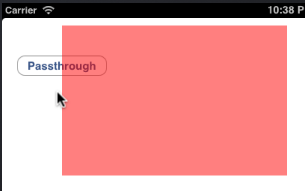
1. 所见到的,按钮被半透明红色 View 遮住了一部分
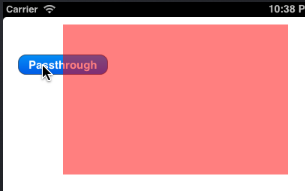
2. 可点击未遮住的按钮部分,可看到按钮被点下未抬起的效果
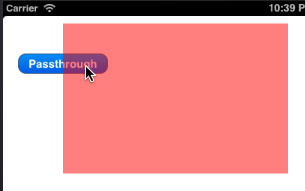
3. 在红色的 View 中点击按钮被遮住部分,同样触发了按钮的相应事件,且有中间效果,也就是说按钮穿透出来了
再看代码实现,有两部分代码,分别是 ViewController 和 CustomController
ViewController.h
ViewController.h
CustomView.h
CustomView.m
关键要理解 hitTest 方法的作用,可参考:
1. http://blog.sina.com.cn/s/blog_677089db01012wpg.html
2. https://github.com/werner77/WEPopover 永久链接 https://yanbin.blog/uiview-event-passthrough/, 来自 隔叶黄莺 Yanbin's Blog
[版权声明] 本文采用 署名-非商业性使用-相同方式共享 4.0 国际 (CC BY-NC-SA 4.0) 进行许可。
1. 把按钮上层的所有 UIView 的 userInteractionEnabled 属性设置为 NO,要是 UIView 有自己的交互事件该如何办呢?而且这个 userInteractionEnabled 不能动态设置,等到点击后决定设置它的 NO 是没用的
2. UIView 接受到点击事件后主动去触发下面按钮的点击,这时的关题有三,按钮没有点击过程中的交换效果、多层 UIView 时不切实际,逐层下传吗、还有就是其他双击、三击或别的手势如何处理
我也一直被前面两种方式纠缠着,同时也让 UIPopoverController 的 NSArray *passthroughViews 属性提醒着,因为对于 UIPopoverController,设置到它的 passthoughViews 属性中的控件事件可以完全从 UIDimmingView 下透出来。但苦于不可能看到 UIPopoverController 的源码,还是后面一而再的 Google 终于发现了 UIView 的方法:
- (UIView *)hitTest:(CGPoint)point withEvent:(UIEvent *)event; // recursively calls -pointInside:withEvent:. point is in the receiver's coordinate system
只要实现了最顶层的 UIView 的 hitTest 方法,在某些情况返回下层的某个按钮实例,即相当于把那个按钮的事件透出来了,比如在点击落在该按钮上时,不管这个按钮在 UIView 下多少层都可以把它挖出来。
先看效果图:
 |  |
三个图分别是:
1. 所见到的,按钮被半透明红色 View 遮住了一部分
2. 可点击未遮住的按钮部分,可看到按钮被点下未抬起的效果
3. 在红色的 View 中点击按钮被遮住部分,同样触发了按钮的相应事件,且有中间效果,也就是说按钮穿透出来了
再看代码实现,有两部分代码,分别是 ViewController 和 CustomController
ViewController.h
 1//
 2//  ViewController.h
 3
 4//
 5//  Created by Unmi on 11/15/11.
 6//  Copyright (c) 2011 http://unmi.cc. All rights reserved.
 7//
 8
 9#import <UIKit/UIKit.h>
10
11@interface ViewController : UIViewController{
12}
13
14@end
ViewController.h
 1//
 2//  ViewController.m
 3//
 4//  Created by Unmi on 11/15/11.
 5//  Copyright (c) 2011 http://unmi.cc. All rights reserved.
 6//
 7
 8#import "ViewController.h"
 9#import "CustomView.h"
10
11@implementation ViewController{
12    UIButton *passthroughButton;
13}
14
15#pragma mark - View lifecycle
16
17- (void)viewDidLoad
18{
19    [super viewDidLoad];
20
21    passthroughButton = [UIButton buttonWithType:UIButtonTypeRoundedRect];
22    [passthroughButton setTitle:@"Passthrough" forState:UIControlStateNormal];
23    [self.view addSubview:passthroughButton];
24    passthroughButton.frame = CGRectMake(20, 50, 120, 28);
25    [passthroughButton release];
26
27    CustomView *customView = [[CustomView alloc] initWithFrame:CGRectMake(80, 10, 300, 200)];
28    customView.backgroundColor = [UIColor colorWithRed:1 green:0 blue:0 alpha:.5];
29    customView.passthroughViews = [NSArray arrayWithObject:passthroughButton];
30    [self.view addSubview:customView];
31    [customView release];
32}
33
34- (void)dealloc {
35    [super dealloc];
36}
37@end
CustomView.h
 1//
 2//  CustomView.h
 3//  TestPopover
 4//
 5//  Created by Unmi on 2/19/12.
 6//  Copyright (c) 2012 http://unmi.cc. All rights reserved.
 7//
 8
 9#import <UIKit/UIKit.h>
10
11@interface CustomView : UIView
12@property (nonatomic, copy) NSArray *passthroughViews;
13@end
CustomView.m
 1//
 2//  CustomView.m
 3//
 4//  Created by Unmi on 2/19/12.
 5//  Copyright (c) 2012 http://unmi.cc. All rights reserved.
 6//
 7
 8#import "CustomView.h"
 9
10@interface CustomView()
11-(BOOL) isPassthroughView: (UIView*) view;
12@end
13
14@implementation CustomView{
15    BOOL testHits;
16}
17
18@synthesize passthroughViews=_passthroughViews;
19
20-(UIView*) hitTest:(CGPoint)point withEvent:(UIEvent *)event{
21    if(testHits){
22        return nil;
23    }
24
25    if(!self.passthroughViews
26        || (self.passthroughViews && self.passthroughViews.count == 0)){
27        return self;
28    } else {
29
30        UIView *hitView = [super hitTest:point withEvent:event];
31
32        if (hitView == self) {
33            //Test whether any of the passthrough views would handle this touch
34            testHits = YES;
35            CGPoint superPoint = [self.superview convertPoint:point fromView:self];
36            UIView *superHitView = [self.superview hitTest:superPoint withEvent:event];
37            testHits = NO;
38
39            if ([self isPassthroughView:superHitView]) {
40                hitView = superHitView;
41            }
42        }
43
44        return hitView;
45    }
46}
47
48- (BOOL)isPassthroughView:(UIView *)view {
49
50    if (view == nil) {
51        return NO;
52    }
53
54    if ([self.passthroughViews containsObject:view]) {
55        return YES;
56    }
57
58    return [self isPassthroughView:view.superview];
59}
60
61-(void) dealloc{
62    self.passthroughViews = nil;
63}
64
65@end
关键要理解 hitTest 方法的作用,可参考:
1. http://blog.sina.com.cn/s/blog_677089db01012wpg.html
2. https://github.com/werner77/WEPopover 永久链接 https://yanbin.blog/uiview-event-passthrough/, 来自 隔叶黄莺 Yanbin's Blog
[版权声明]
本文采用 署名-非商业性使用-相同方式共享 4.0 国际 (CC BY-NC-SA 4.0) 进行许可。