JVM 上的 Lisp 方言 Clojure 1.9
还是从 OSChina 网站上得知 Clojure 1.9 在 2017 年 12 月发布的,时值这么久才开始真正去了解一下这个新版本。距离上一个版本 1.8 的发布时间(2016 年 1 月), 大概两年才出一个版本,而且总的说来 Clojure 1.9 并没有带来多大惊喜。
唯一能带来点喜气的也就是 Clolure 有了自己的命令行工具了,再也无需寄身于 Leiningen(一个 Clojure 构建工具,相当于 sbt 之于 Scala) 的篱笆之下了。以 Mac OS 平台为例,以前试图用 brew 来直接安装
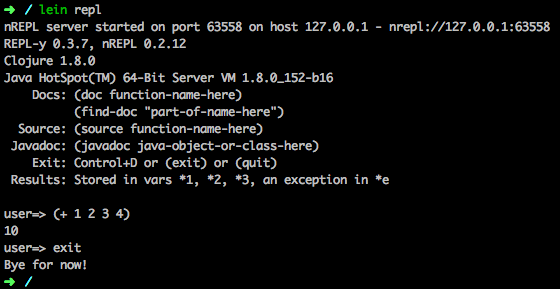 现在的 Leiningen 的 repl 还只能支持 Clojure 1.8,但作为项目构建工具应该能和 Clojure 1.9 一同使用。
Clojure 1.9 出来后,我们可以用 brew 安装 Clojure 了
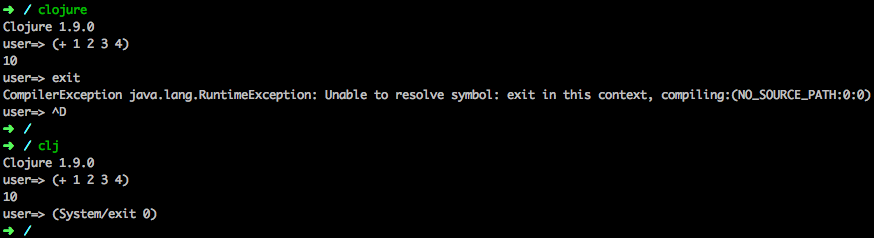 进到 Clojure 的控制台(repl - Read-Eval-Print-Loop) 是那么的干脆。不过不能简单的用
Clojure 官方的推荐的构建工具仍然是
其实 Clojure 也内置有类库依赖管理的功能的,通过
在项目目录(如 hello-world) 中运行
更多关于
估计实际要开创一个 Clojure 项目,目前来说首选的构建工具应该还是
最后,在 Clojure 1.9 的 ChangeLog 中提到的其他新的或增强的特性看是否能在实际中用上, 它们包括:
[版权声明] 本文采用 署名-非商业性使用-相同方式共享 4.0 国际 (CC BY-NC-SA 4.0) 进行许可。
唯一能带来点喜气的也就是 Clolure 有了自己的命令行工具了,再也无需寄身于 Leiningen(一个 Clojure 构建工具,相当于 sbt 之于 Scala) 的篱笆之下了。以 Mac OS 平台为例,以前试图用 brew 来直接安装
clojure 的时候会提示找不到 clojure, 建议安装 leiningen.$ brew install clojure在 Clojure 1.9 出来之前,上面的命令会得到如下提示信息
Error: No available formula with the name "clojure"所以那时候不得不用
Clojure isn't really a program but a library managed as part of a
project and Leiningen is the user interface to that library. To install Clojure you should install Leiningen:
brew install leiningen
and then follow the tutorial:
https://github.com/technomancy/leiningen/blob/stable/doc/TUTORIAL.md
brew install leiningen安装
leiningen 后,再通过它进入到 Clojure 控制台
现在的 Leiningen 的 repl 还只能支持 Clojure 1.8,但作为项目构建工具应该能和 Clojure 1.9 一同使用。lein repl 可以用 exit, ctrl + d 退出。当然用 (System/exit 0) 或 (. System exit 0) 代码退出也行。Clojure 1.9 出来后,我们可以用 brew 安装 Clojure 了
brew install clojure安装好 Clojure 就能直接运行
clojure 或 clj 命令了
进到 Clojure 的控制台(repl - Read-Eval-Print-Loop) 是那么的干脆。不过不能简单的用 exit 命令退出,退出需要用 ctrl + d, 或者 (System/exit 0), 或者 (. System exit 0) 来退出 clojure 的 repl。关于 Clojure 项目的构建工具
< 其实最想要的是 clojure 能与 Maven 相结合,官方并未出品这样的插件,有一款民间的 clojure-maven-plugin, 能用 Maven 管理 Clojure 项目,不知可靠性如何。Clojure 官方的推荐的构建工具仍然是
Leiningen 和 Boot, Leiningen 有小试过,不怎么趁手,可能是 Maven 用习惯了。至于 Boot 就完全不同于传统的思维了。其实 Clojure 也内置有类库依赖管理的功能的,通过
deps.edn 文件来配置,允许用本地库,或从 github, Maven 仓库中下载依赖。详情请见 Clojure 官方文档 Deps and CLI Guide。clojure/clj 并不能称之为一个完备的构建工具,它也只定义最基本的项目布局hello-world如果要加上
├── deps.edn
└── src
└── hello.clj
test 目录,resources 目录必须在 deps.edn 中额外指定。在项目目录(如 hello-world) 中运行
clj 命令会依据 deps.edn 中的定义下载依赖,也能用 clj -m hello 来运行项目。但它离一个真正的构建工具还很远,不能执行清晰的编译产品代码,编译测试代码,运行测试,打包,布置等操作,更不便于与 CI 的集成。更多关于
clojure/clj 的命令可运行 clj --help 查看 1clj --help
2Usage: clojure [dep-opt*] [init-opt*] [main-opt] [arg*]
3 clj [dep-opt*] [init-opt*] [main-opt] [arg*]
4
5The clojure script is a runner for Clojure. clj is a wrapper
6for interactive repl use. These scripts ultimately construct and
7invoke a command-line of the form:
8
9java [java-opt*] -cp classpath clojure.main [init-opt*] [main-opt] [arg*]
10
11The dep-opts are used to build the java-opts and classpath:
12 -Jopt Pass opt through in java_opts, ex: -J-Xmx512m
13 -Ralias... Concatenated resolve-deps aliases, ex: -R:bench:1.9
14 -Calias... Concatenated make-classpath aliases, ex: -C:dev
15 -Sdeps EDN Deps data to use as the final deps file
16 -Spath Compute classpath and echo to stdout only
17 -Srepro Use only the local deps.edn (ignore other config files)
18 -Sforce Force recomputation of the classpath (don't use the cache)
19 -Spom Generate (or update existing) pom.xml with deps and paths
20 -Stree Print dependency tree
21 -Sresolve-tags Resolve git coordinate tags to shas and update deps.edn
22 -Sverbose Print important path info to console
23
24init-opt:
25 -i, --init path Load a file or resource
26 -e, --eval string Eval exprs in string; print non-nil values
27
28main-opt:
29 -m, --main ns-name Call the -main function from namespace w/args
30 -r, --repl Run a repl
31 path Run a script from a file or resource
32 - Run a script from standard input
33 -h, -?, --help Print this help message and exit
34
35For more info, see:
36 https://clojure.org/guides/deps_and_cli
37 https://clojure.org/reference/repl_and_main估计实际要开创一个 Clojure 项目,目前来说首选的构建工具应该还是
Leiningen, 其次是 clojure-maven-plugin(1.8.1 最近更新在 2016 年 5 月)。最后,在 Clojure 1.9 的 ChangeLog 中提到的其他新的或增强的特性看是否能在实际中用上, 它们包括:
- spec
- Support for working with maps with qualified keys
- New predicates
- More support for instants
- Other new core functions
- Other reader enhancements
- Spec syntax checking
- Documentation
[版权声明]
本文采用 署名-非商业性使用-相同方式共享 4.0 国际 (CC BY-NC-SA 4.0) 进行许可。