自定义 Spring Web Controller 方法的参数
在 Spring Web Controller 方法中的参数可用 org.springframework.web.bind.annotation 下的各种注解来说明参数值从哪儿获得,比如我们熟知的 @PathVariable, @RequestParam, @RequestHeader, @RequestBody, 还有较少使用的 @ReqeustAttribute, @SessionAttribute, @RequestPart, @MatrixVariable, @ModelAttribute, @AuthenticationPrincipal, @CurrentSecurityContext 等。其实在它们背后工作的是相应的 HandlerMethodArgumentResolver 的子孙们,当然还有 HttpMessageConverter 的各个实现类还默默的对输入数据进入类型转换。
为进一步深入了解 Spring Web 如何获得用户输入,我们先尝试一下不常用的注解,然后实现一个自己的注解参数 @ProductId, 它来从 queryString 或 requestHeader 中获得 productId。写作本文的起因是在上一篇 理解 Spring Boot Security + JWT Token 的简单应用 里, JwtTokenFilter 住 SecurityContextFilter 放一个 Authentication 实例, 在 Controller 方法中便能用 @AuthenticationPrincipal 自动注入 authentication.getPrincipal() 的值。
JwtTokenFilter: SecurityContextHolder.getContext().setAuthentication(new UsernamePasswordAuthenticationToken("foo", "bar"))
Controller 方法: public String hello(@AuthenticationPrincipal String user) ---- 这样就能获得 JwtTokenFilter 设置的 principal "foo"
为节约代码使用了 JDK 16 的 record 类型,现在我们来请求一下 POST http://localhost:8080/hello
不过那些应该交给 @ModelAttribute 处理
@ModelAttribute 注解参数
把上面的 @RequestBody 改为 @ModelAttribute
测试
显然 @ModelAttribute 也支持 GET 请求的 queryString, 把上面的 @PostMapping("/hello") 改成 @GetMapping("/hello"), 再试
为避免 shell 下对
测试
测试
另外,在使用 @MatrixVariable 时如果看到错误
productId 会自动从 queryString 或 header 中获得值,相当于每次调用如下方法
需要自己获得 productId 的 controller 方法很多,所以每次调用 getProductId(request) 就不现实了。这时候我们要实现自己的
 要实现 @ProductId 在 Controller 方法中自动注入值,很简单,实现一个 ProductIdMethodArgumentResolver,同时通过 WebMvcConfigurer 注册 Spring MVC 中去
早先的 Spring 或 Java 版本我们需通过继承 WebMvcConfigurerAdapter 的类来注册 MethodArgumentResolver, 由于 Java 8 支持接口的 default 方法,所以这个 *Adapter 就显得多余,不再被推荐使用。
现在测试
在 HandlerMethodArgumentResolver 中的 resolveArgument 方法中,我们有 MethodParameter, ModelAndViewContainer, NativeWebRequest, 和 WebDataBinderFactory 参数,所以能够实现更复杂的数据绑定,或者使用现有或自定义的 HttpMessageConverter 把请求数据转换成需要的数据对象。 永久链接 https://yanbin.blog/customize-spring-web-controller-method-parameter/, 来自 隔叶黄莺 Yanbin's Blog
[版权声明] 本文采用 署名-非商业性使用-相同方式共享 4.0 国际 (CC BY-NC-SA 4.0) 进行许可。
为进一步深入了解 Spring Web 如何获得用户输入,我们先尝试一下不常用的注解,然后实现一个自己的注解参数 @ProductId, 它来从 queryString 或 requestHeader 中获得 productId。写作本文的起因是在上一篇 理解 Spring Boot Security + JWT Token 的简单应用 里, JwtTokenFilter 住 SecurityContextFilter 放一个 Authentication 实例, 在 Controller 方法中便能用 @AuthenticationPrincipal 自动注入 authentication.getPrincipal() 的值。
JwtTokenFilter: SecurityContextHolder.getContext().setAuthentication(new UsernamePasswordAuthenticationToken("foo", "bar"))
Controller 方法: public String hello(@AuthenticationPrincipal String user) ---- 这样就能获得 JwtTokenFilter 设置的 principal "foo"
@RequestBody 处理输入
我们知道在 Controller 方法中用 hello(@RequestBody String body) 可收到请求的整个 body 字符串,这儿我们尝试用 @RequestBody 直接获取一个 JavaBean1@RestController
2public class HelloController{
3 record User(String username, String password){}
4
5 @PostMapping("/hello")
6 public String hello(@RequestBody User user) {
7 return user.toString();
8 }
9}为节约代码使用了 JDK 16 的 record 类型,现在我们来请求一下 POST http://localhost:8080/hello
$ curl -X POST -H "Content-type: application/json" http://localhost:8080/hello -d '{"username": "yanbin", "password": "123"}'目前 @RequestBody 好像只支持 application/json Content-type, 尝试用其他 Content-Type 得到 415: Unsupported Media Type 错误。如果我们注册自己的 HttpMessageConverter,就能实现解析类似
User[username=yanbin, password=123]
- Content-type: application/xml -> <user><username>yanbin</username><password>123</password></user>
- Content-type: application/x-www-form-urlencoded -> username=yanbin&password=123
- 等等
不过那些应该交给 @ModelAttribute 处理
@ModelAttribute 注解参数
把上面的 @RequestBody 改为 @ModelAttribute
1@PostMapping("/hello")
2public String hello(@ModelAttribute User user) {
3    return user.toString();
4}
测试
$ curl -X POST -H "Content-type: application/x-www-form-urlencoded" http://localhost:8080/hello -d 'username=yanbin&password=123'试图用 Content-type: application/json 也不能获得 username 和 password 的值,不报错,但输出的是 User[username=null,password=null]
User[username=yanbin, password=123]
显然 @ModelAttribute 也支持 GET 请求的 queryString, 把上面的 @PostMapping("/hello") 改成 @GetMapping("/hello"), 再试
$ curl http://localhost:8080/hello\?username\=yanbin\&password\=123注:
User[username=yanbin, password=123]
\ 为 shell 下的转义,实际请求为 http://localhost:8080/hello?username=yanbin&password=123@MatricVariable 处理 Map 输入
@MatricVariable 是用于从 a=1;b=2;c=3 这种分号分隔的字符串中提取值的,作以下几个测试1@GetMapping("/hello/{*}")
2public String hello(@MatrixVariable Map<String, String> user) {
3 return user.toString();
4}为避免 shell 下对
&, =, ; 等字符自动转译而影响阅读,只显示实际请求的 URL 及响应http://localhost:8080/hello/;username=yanbin;password=123不想要前导分号,还要收集到第一个值,这样定义 API
{username=yanbin, password=123} http://localhost:8080/hello/username=yanbin;password=123 -- 没有前导分号将丢失第一个值
{password=123}
1@GetMapping("/hello/{id:.*}")
2public String hello(@PathVariable String id, @MatrixVariable Map<String, String> user) {
3    return id +";" + user.toString();
4}
测试
http://localhost:8080/hello/100;username=yanbin;password=123
100;{username=yanbin, password=123} http://localhost:8080/hello/100;username=yanbin;password=123
username=yanbin;{password=123}
1@GetMapping("/hello/{userId}")
2public String hello(@PathVariable String userId, @MatrixVariable String first, @MatrixVariable String last) {
3    return "userId: %s, first: %s, last: %s".formatted(userId, first, last);
4}
测试
http://localhost:8080/hello/100;first=scott;last=tiger同样需要注意 @MatrixVariable 的值是从第一个分号后开始算起,其实是第一个分号前的整个值赋给了 userId, 所
userId: 100, first: scott, last: tiger
http://localhost:8080/hello/x=y;first=scott;last=tiger@MatrixVariable 只能从 GET 请求的路径上拆解值,不能从 Form 或 Post Body 中拆解 a=1;b=2 中的值。
userId: x=y, first:scott, last:tiger
另外,在使用 @MatrixVariable 时如果看到错误
org.springframework.security.web.firewall.RequestRejectedException: The request was rejected because the URL contained a potentially malicious String ";"那是因为启用了 Spring Security, 它禁上在 URL 中带分号,转义的分号也不行,我们可以通过声明一个 Bean 来重新允许 URL 中带分号
1@Bean
2public HttpFirewall getHttpFirewall() {
3    StrictHttpFirewall strictHttpFirewall = new StrictHttpFirewall();
4    strictHttpFirewall.setAllowSemicolon(true);
5    return strictHttpFirewall;
6}
自定义的 @ProductId 参数
预习完基本的 Spring Controller 参数注解后,我们来实现一个自己的 @ProductId 参数注解,它所要达成的功能是,在 Controller 方法中加上1@GetMapping("/hello")
2public String hello(@ProductId String productId) {
3 return "productId: " + productId;
4}productId 会自动从 queryString 或 header 中获得值,相当于每次调用如下方法
1private String getProductId(HttpServletRequest request) {
2    String productId =  request.getParameter("productId");
3    return productId != null ? productId : request.getHeader("x-product-id");
4}
需要自己获得 productId 的 controller 方法很多,所以每次调用 getProductId(request) 就不现实了。这时候我们要实现自己的
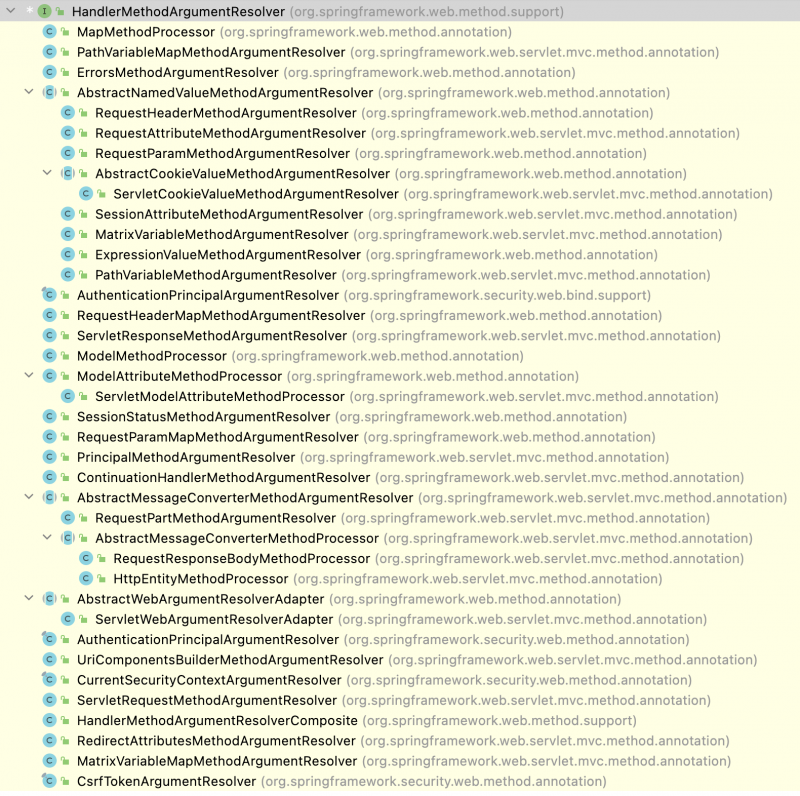
HandlerMethodArgumentResolver,我们不妨看下 Spring Web 已有的实现类有哪些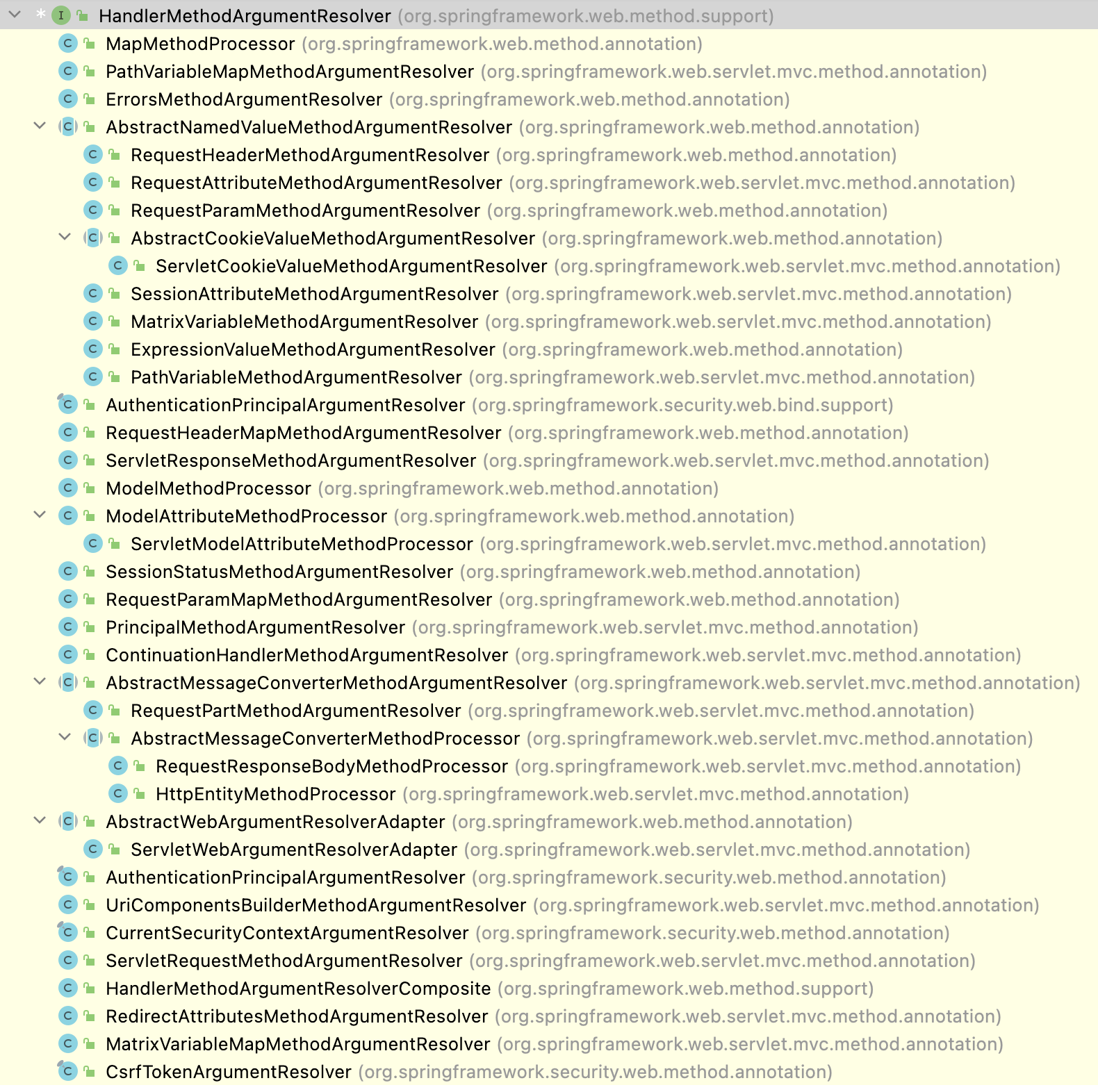 要实现 @ProductId 在 Controller 方法中自动注入值,很简单,实现一个 ProductIdMethodArgumentResolver,同时通过 WebMvcConfigurer 注册 Spring MVC 中去
 1@Configuration
2public class ProductIdMethodArgumentResolver implements HandlerMethodArgumentResolver, WebMvcConfigurer {
3
4 @Override
5 public boolean supportsParameter(MethodParameter parameter) {
6 return parameter.getParameterAnnotation(ProductId.class) != null;
7 }
8
9 @Override
10 public Object resolveArgument(@Nonnull MethodParameter parameter, ModelAndViewContainer mavContainer,
11 NativeWebRequest webRequest, WebDataBinderFactory binderFactory) {
12 return getProductId(Objects.requireNonNull(webRequest.getNativeRequest(HttpServletRequest.class)));
13 }
14
15 private String getProductId(HttpServletRequest request) {
16 String productId = request.getParameter("productId");
17 return productId != null ? productId : request.getHeader("x-product-id");
18 }
19
20 @Override
21 public void addArgumentResolvers(List<HandlerMethodArgumentResolver> resolvers) {
22 resolvers.add(this);
23 }
24}早先的 Spring 或 Java 版本我们需通过继承 WebMvcConfigurerAdapter 的类来注册 MethodArgumentResolver, 由于 Java 8 支持接口的 default 方法,所以这个 *Adapter 就显得多余,不再被推荐使用。
现在测试
$ curl http://localhost:8080/hello?productId=newbie首先从 queryString 中通过
productId: newbie $ curl -H "x-product-id:xyz" http://localhost:8080/hello
productId: xyz $ curl -H "x-product-id:xyz" http://localhost:8080/hello?productId=newbie
productId: newbie
productId 获得,没有话从 header 中取得, key 是 x-product-id。在 HandlerMethodArgumentResolver 中的 resolveArgument 方法中,我们有 MethodParameter, ModelAndViewContainer, NativeWebRequest, 和 WebDataBinderFactory 参数,所以能够实现更复杂的数据绑定,或者使用现有或自定义的 HttpMessageConverter 把请求数据转换成需要的数据对象。 永久链接 https://yanbin.blog/customize-spring-web-controller-method-parameter/, 来自 隔叶黄莺 Yanbin's Blog
[版权声明]
本文采用 署名-非商业性使用-相同方式共享 4.0 国际 (CC BY-NC-SA 4.0) 进行许可。