Python 调用动态库时 Segmentation fault (core dumped) 问题
这几天一直纠缠在如何调用动态库的问题上,先是 Go 语言,而后迁移到 Python 语言。在测试 Python 调用动态库时,出现过 "Segmentation fault (core dumped)" 的问题,本文记录下怎么去寻找线索,找到并解决问题的。
出现 "Segmentation fault (core dumped)" 的原因是多方面的,比如在 C/C++ 语言中
用 Python 来调用动态库很大的可能性会是内存访问越界
下面来回顾并重现 "Segmentation fault (core dumped)" 这个问题,以 Linux 平台为例,首先在准备一个 C 动态库 testsf.c 文件,内容如
用 gcc 编译得到动态库文件
执行
这时再次执行
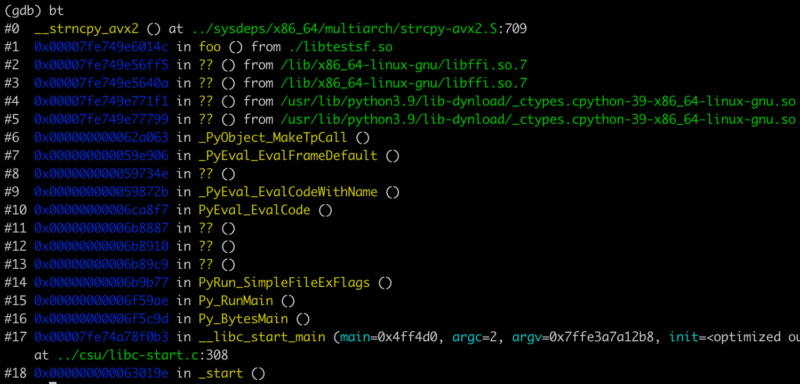 问题就出在对 strcpy 的函数调用上,越界了。原因是
上面的 Python 一执行立即会被非正常终止
再执行
2022-05-31: Ubuntu 会把 crash 的文件记录在 /var/crash 目录中,如
需要用 apport-unpack 工具解开来
[版权声明] 本文采用 署名-非商业性使用-相同方式共享 4.0 国际 (CC BY-NC-SA 4.0) 进行许可。
出现 "Segmentation fault (core dumped)" 的原因是多方面的,比如在 C/C++ 语言中
- 内存访问越界(数组越界,strcpy, strcat, sprintf, strcmp 等字符串函数读写越界)
- 多线程使用了线程不安全的函数
- 多线程读写的数据未加锁保护
- 非法指针(NULL 指针,随意的指针类型转换
- 堆栈溢出(如大的分配在栈上的局部变量)
用 Python 来调用动态库很大的可能性会是内存访问越界
下面来回顾并重现 "Segmentation fault (core dumped)" 这个问题,以 Linux 平台为例,首先在准备一个 C 动态库 testsf.c 文件,内容如
1#include <stdio.h>
2#include <string.h>
3
4void foo (char* output)
5{
6    char* h = "hello";
7    strncpy(output, h, 5);
8}
用 gcc 编译得到动态库文件
libtestsf.so$ gcc -fPIC -shared -o libtestsf.so testsf.c试着写下面的 Python 调用代码 testsf.py
1from ctypes import *
2
3foo = cdll.LoadLibrary("./libtestsf.so").foo
4foo.argtypes = (c_char_p,)
5
6buf = c_char_p(10)
7foo(buf)
8print(buf.value.decode())
执行
python testsf.py$ python testsf.py没有更多的信息了,虽然提示说
Segmentation fault (core dumped)
core dumped, 但当前目录中没有发现 dumped 的 core 文件。原因是 ulimit 设置,默认时 ulimit -a 看到的$ ulimit -acore file size 为 0, 所以上面的
core file size (blocks, -c) 0
......
core dumped 是在撒谎,并没有生成 core 文件,我们可以用 ulimit -c unlimited(或设置一个具体数值) 打开 dump core 的选项$ ulimit -c unlimitedulimit 是会话参数,所以重新连接终端后需要时又得重新执行
$ ulimit -a
core file size (blocks, -c) unlimited
ulimit -c unlimited这时再次执行
python testsf.py, 在当前目录中就会产生一个 core 文件$ python testsf.py接下来要做的就是用
Segmentation fault (core dumped)
$ ls -l core
-rw------- 1 vagrant vagrant 3235840 Aug 24 02:29 core
gdb 定位出问题的地方,没有 gdb 的用 yum 或 apt 自行安装$ gdb python core # gdb 执行程序(python) core文件这时进到 gdb 的控制台,输入 bt, 就能看到哪里出问题了
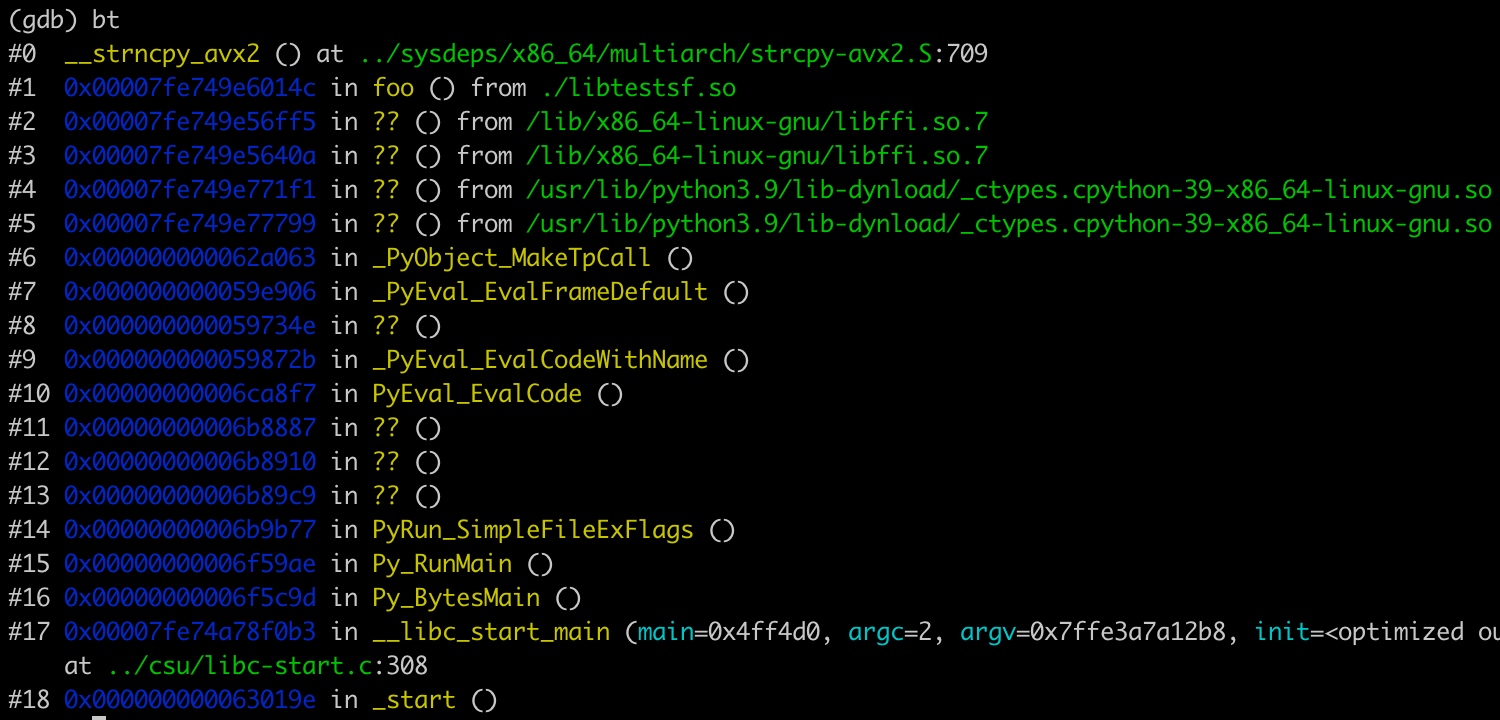 问题就出在对 strcpy 的函数调用上,越界了。原因是
 c_char_p(10) 并非我们想要的 buffer, 它是不可访问的1aa = c_char_p(10)
2print(aa.value)上面的 Python 一执行立即会被非正常终止
Process finished with exit code 139 (interrupted by signal 11: SIGSEGV)我们应该使用 ctypes 的
create_string_buffer(size) 函数来创建一个缓冲,所以正确的 Python 使用前面动态库的代码如下1from ctypes import *
2
3foo = cdll.LoadLibrary("./libtestsf.so").foo
4foo.argtypes = (c_char_p,)
5
6buf = create_string_buffer(10)
7foo(buf)
8print(buf.value.decode())再执行
python testsf.py$ python testsf.py一切正常,以后碰到这种 segment fault 的错误,就可以尝试着用 gdb 来寻求问题的解决办法。
hello
2022-05-31: Ubuntu 会把 crash 的文件记录在 /var/crash 目录中,如
$ ls -l /var/crash/
total 45292
-rw-r----- 1 vagrant vagrant 46378197 May 31 16:23 _usr_bin_python3.9.1000.crash
需要用 apport-unpack 工具解开来
$ apport-unpack /var/crash/_usr_bin_python3.9.1000.crash ./coredump $ ls -l coredump/分析 CoreDump 文件
total 216168
-rw-r--r-- 1 vagrant vagrant 5 May 31 16:36 Architecture
-rw-r--r-- 1 vagrant vagrant 209625088 May 31 16:36 CoreDump
-rw-r--r-- 1 vagrant vagrant 24 May 31 16:36 Date
-rw-r--r-- 1 vagrant vagrant 12 May 31 16:36 DistroRelease
-rw-r--r-- 1 vagrant vagrant 18 May 31 16:36 ExecutablePath
-rw-r--r-- 1 vagrant vagrant 10 May 31 16:36 ExecutableTimestamp
-rw-r--r-- 1 vagrant vagrant 5 May 31 16:36 ProblemType
-rw-r--r-- 1 vagrant vagrant 22 May 31 16:36 ProcCmdline
-rw-r--r-- 1 vagrant vagrant 27 May 31 16:36 ProcCwd
-rw-r--r-- 1 vagrant vagrant 110 May 31 16:36 ProcEnviron
-rw-r--r-- 1 vagrant vagrant 67423 May 31 16:36 ProcMaps
-rw-r--r-- 1 vagrant vagrant 1358 May 31 16:36 ProcStatus
-rw-r--r-- 1 vagrant vagrant 2 May 31 16:36 Signal
-rw-r--r-- 1 vagrant vagrant 30 May 31 16:36 Uname
-rw-r--r-- 1 vagrant vagrant 44 May 31 16:36 UserGroups
$ gdb python coredump/CoreDump链接:
- gdb 查看coredump文件
- Segmentation fault (core dumped) -llinux系统内存错误报错信息
- Linux程序运行出现Segmentation fault (core dumped)的通用解决方法
[版权声明]
本文采用 署名-非商业性使用-相同方式共享 4.0 国际 (CC BY-NC-SA 4.0) 进行许可。